
Disconnect Rust Guide
How Rust External and Internal Cheats Work
External and Internal describe where the cheat runs. They do not tell you which menu is better, which one suits your wipe or whether either one will stay undetected.
External sits outside Rust; Internal is loaded into Rust. That changes the way the software operates, but the buying decision still comes down to the live menu. Neither type makes an account safe from EAC.
External and Internal describe where the cheat runs
External Rust cheats run as separate software outside the Rust game process. An Internal Rust cheat is loaded into that process. That is the technical difference in plain English. It does not mean External is the weak option, and it does not mean Internal automatically contains every External feature.
DisconnectCheats has a separate menu for each product. Both products include Memory Aimbot, Silent Aimbot, Player ESP, World ESP, chams, radar and movement features. The controls around those headings are different. The Rust Cheats page explains both versions, so start there before choosing access.
DisconnectCheats’ Rust External
Rust External aim and World ESP menu
External Rust cheats are not reduced cheats. Its current feature list covers aim config, player information, Rust world objects, weapon values and movement across a normal wipe.
- Memory Aimbot plus a separate silent aim mode
- Player ESP, NPC ESP, chams and radar
- Ore, collectable, deployable, vehicle and crate ESP
- Recoil, spread, movement and Fast Loot features
DisconnectCheats’ Rust Internal
Rust Internal combat choices
Internal is the cheat to inspect when you want features such as Dynamic FOV, Dormant Players, OOF Arrows or its Combat Misc section. Pay for those differences, not the word Internal.
- Dynamic FOV and Aimbot Lock Target
- Dormant Players, Dormant Bullets and OOF Arrows
- Bullet Teleport, Instant Hit, Desync and Rapid Fire
- Silent Walk, Instant Loot and Auto Pickup Collectables
Rust External aim, ESP and object filters
External Rust cheats make sense when you want a wide Rust cheat menu without choosing Internal purely because it sounds stronger.
Its Memory Aimbot includes Head, Chest, Stomach and Pelvis hitboxes, smoothing, hit chance, Aimbot FOV and a target line. Silent Aimbot is a separate aim mode. The smoothing value belongs to Memory Aimbot, not Silent Aimbot.
External Rust cheats show names, boxes, held items, distance, skeletons and Team ID.
Chams and radar cover a different job from ESP, while NPC ESP separates scientists from players. If the fight moves outside your FOV, the OOF Indicator gives directional information instead of drawing another player box through the middle of the screen.
World ESP in external Rust cheats separates supported Rust objects.
Ore ESP separates Sulfur, Metal and Stone. Deployable ESP includes the TC plus Tier 1, Tier 2 and Tier 3 Workbenches.
Vehicle ESP includes the Patrol Helicopter, Minicopter, Scrap Heli and Bradley.
Crate filters cover the Hackable Crate, Bradley Crate, Heli Crate and the usual monument loot.
A farm run, roof defence and AK raid do not need the same config. Keep Sulfur Ore, Metal Ore and the Minicopter visible while farming. Strip World ESP back around a compact base so Player ESP is still readable. Set Memory Aimbot FOV, smoothing, hitbox and hit chance around the weapon instead of forcing the same values across an Eoka fight, bows and rifles.
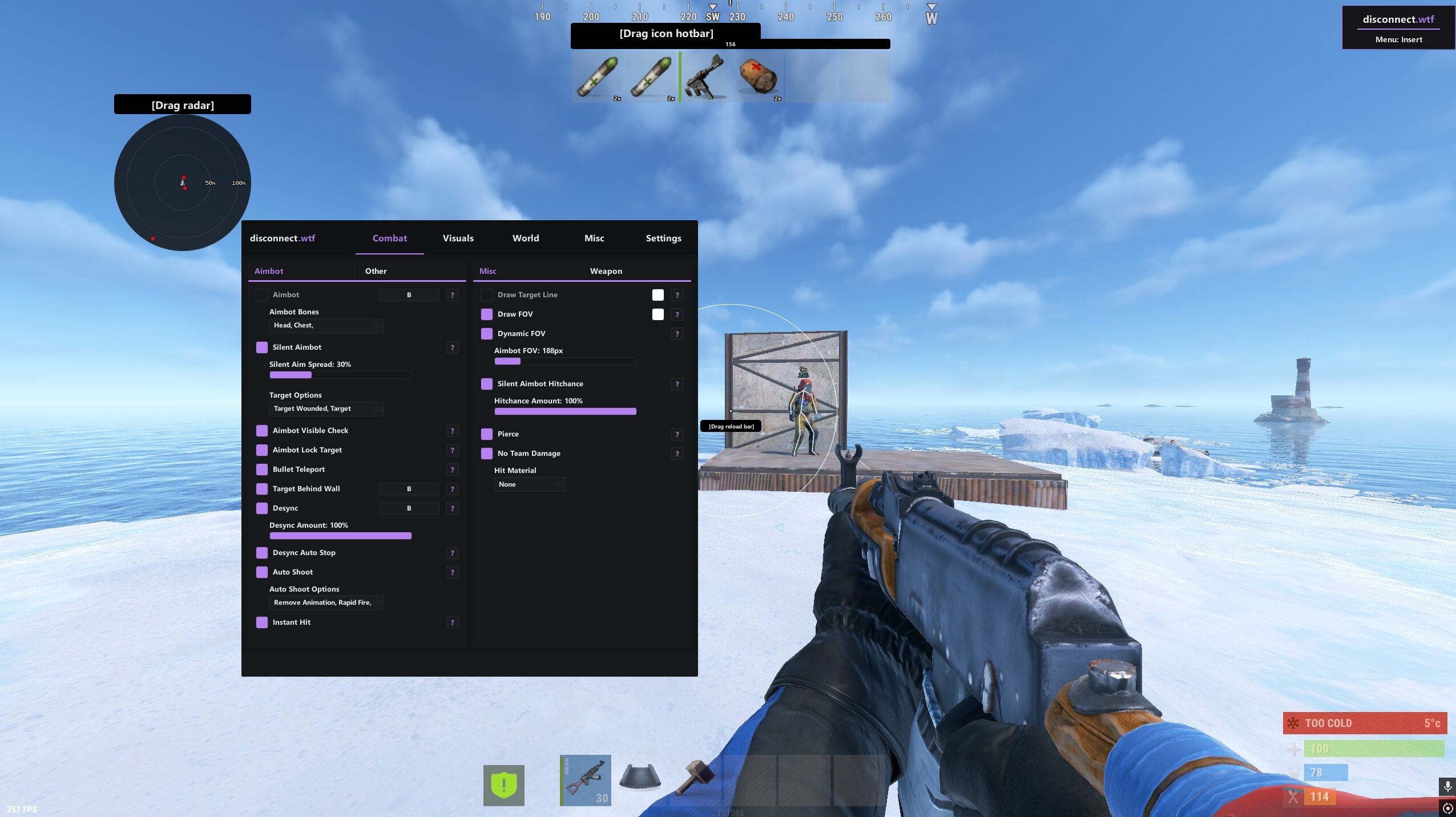
Rust Internal combat and player features
Internal keeps the familiar aim and ESP headings, then changes the detail underneath them.
Its Memory Aimbot adds Dynamic FOV, Visible Check and target options for wounded players, scientists, sleepers, teammates and players in a safe zone.
It also lists Target Behind Wall. Again, Silent Aimbot is separate from a smoothed Memory Aimbot config.
The aggressive difference sits in the weapon and Combat Misc sections: Bullet Teleport, Instant Hit, Pierce, Desync, Rapid Fire, Silent Fire and Aimbot Lock Target. Those are not polite features, and the cheat does not pretend otherwise. If the account matters, do not see a longer menu as an instruction to switch everything on.
Internal also goes deeper on directional and dormant information. Player ESP includes Dormant Players and Dormant Bullets, while the visual menu lists radar, Bullet Tracers and OOF Arrows. Its hotbar indicators can show item names, durability and amount. Around Military Tunnels or a base with three floors, that detail can help. Twenty colours covering a doorway will not.
For the slower parts of a wipe, Internal includes Silent Walk, Omni Sprint, Instant Loot, Auto Pickup Collectables and its own World ESP for ores, backpacks, corpses, crates, vehicles, animals and deployables. That does not make it External plus a few extras. Some External filters and visual choices are more specific. Check both products line by line.
Shared feature names can hide different menus
External Rust cheats and Internal can share an aimbot or ESP name while offering different controls. Compare target selection, bone choice, FOV, smoothing and hit chance in the product you want to use. Memory Aimbot and Silent Aimbot concern different aiming behaviours, with weapon recoil and spread handled separately.
ESP needs the same care. Player boxes, skeletons, held items, chams, radar, OOF Arrows and World ESP answer different questions. Player ESP helps you read the fight. Radar and OOF information help with direction. World filters pull out Ore, a dropped gun, a backpack, an Auto Turret or a SAM Site. Calling the lot a wallhack hides the reason the menus feel different.
Rust changes, EAC changes and menu features can change after an update. Use screenshots to understand the layout, then check the current cheat and status before paying or launching.
Rust cheats remain subject to EAC
External Rust cheats are not invisible. Internal does not mean permanently undetected. Rust uses Easy Anti-Cheat, and either cheat can be affected by a Rust update, an EAC change, player reports or later review. Facepunch states that an EAC ban for cheating is permanent, so the risk is not a bit of fine print.
A less blatant config may change what another player sees. It cannot remove technical detection or guarantee the account survives. Check the current status, stop when compatibility is being tested and use an account only when you accept the chance of losing it. Simple as that.
Choose the Rust cheat for your actual session
Choose the features you actually want to use. Check the parts that change what you will actually do in game, then leave the rest alone.
Choose your useful Rust cheat features
If you want Memory Aimbot, Player ESP and Ore ESP, external Rust cheats may cover those features. Do not choose from the words External or Internal alone.
Read the Rust External and Internal menus
Read external Rust cheats and Internal for their own aim, visual, movement and combat features. An old forum feature list is not enough.
Check the product requirements and current status
Do this before paying and again before launching. If an update is being checked, wait instead of guessing.
Save a Rust cheat config for each purpose
A sulfur run, monument trip and raid are different sessions. Save a readable setup for each instead of moving every value at once.
Choose the cheat by its functions rather than its label
Begin with the job you actually want the menu to do. Someone following player movement needs a different emphasis from someone looking for supported resources. Write down those feature groups before deciding that one implementation must be the better choice. The name external Rust cheats does not tell you every control supplied by the current product.
Read a shared feature name in its own menu. Two products can both name a player visual group while offering different filters or ways of presenting it. Use the individual product's information for those details instead of filling gaps from the other menu. That keeps a useful choice from becoming an invented promise about identical behaviour.
Once you have chosen a product, keep a reference export with the choices you understand. It is easier to recognise what changed later when you have a familiar starting point. The important distinction is the actual menu and its effect on your screen, not an assumption that one software type is always stronger or safer.
Read shared Rust ESP names in their own menus
Rust ESP can locate a supported player without telling you every choice available in the other product. Read the player group, its filters and its presentation where you intend to use it. A shared name does not make two menus identical.
Rust ESP for resources has a different job from aim selection. It helps you pick out the objects relevant to the session. Keep that purpose attached to the individual product rather than assuming that every object filter transfers between External and Internal.
A Rust ESP display can be quiet or detailed according to the available choices. More text is not automatically more useful, especially where several objects overlap. Choose the details that make the scene easier to follow on your own display.
Use a saved Rust ESP reference when comparing two visual arrangements. Keep the labels and colours familiar where possible, so the comparison concerns the information you actually changed. The software type does not choose those preferences for you.
Questions about External and Internal Rust cheats
Is a Rust Internal cheat automatically better than External?
No. Internal and External describe how the software operates, not a quality ranking. Internal has extra combat and dormant player features, while External may already cover everything you want. Check the current products rather than choosing from the name.
Does External mean the Rust cheat is safer?
No. External does not promise safety, and Internal does not promise detection. Rust uses EAC and both cheats carry account risk. Check the current status before every launch and wait whenever compatibility is being tested.
Do both Disconnect Rust cheats include aimbot and ESP?
Yes. Memory Aimbot and Silent Aimbot appear on both current products. Each cheat also has Player ESP and World ESP, but the controls and extra features differ. Read the live product pages for the exact aim, visual, weapon and movement options available now.
Which Rust cheat is better for farming?
When checking Rust Cheats for farming, External has the more itemised feature list: Sulfur, Metal, Stone, crates, vehicles and deployables are named. Internal has its own World ESP filters, including backpacks and corpses. Choose from what you need, not the assumption that the higher price suits every wipe.