
Can an HWID Serial Checker Spot a Banned PC?
An HWID serial checker reads identifiers that the PC exposes. It has no window into a publisher's enforcement records. If a screenshot of a serial number is the only evidence behind a “ban check”, the account question is still unanswered.
A checker can report a value for a particular device. It can't turn that value into a ban history. For a used PC, a seller's promise that the machine is clean needs more than a screenshot full of green ticks.
What an HWID Serial Checker Reads
An HWID serial checker can label several different values on one screen. A hardware ID is a term Windows uses to match a device with a driver. A serial number can identify an individual unit. The two strings can refer to the same piece of hardware and still mean different things.
Microsoft's hardware ID documentation explains that a device can report a list of IDs. Two PCs containing the same device model can therefore share a matching device ID. A repeated model identifier in a screenshot is a poor basis for claiming the machines are identical.
Read the label next to the value in an HWID serial checker. If it says model, device ID or serial, keep that wording when talking about the screenshot. Calling every long string “my HWID” throws away the detail that makes the result interpretable.
A Serial Number Isn't a Game Ban Record
An HWID serial checker can display a disk serial number without knowing whether a game ever ran on that drive. Membership of a publisher's ban list is separate information. A screenshot of the local value doesn't gain access to that information just because it has the game's logo beside it.
Players looking into a Rust HWID ban can read what Facepunch says about sanctions and appeals. The message on an affected account is evidence about that account. A local utility on a used PC can't issue an official finding about its previous owner.
If a seller offers an HWID serial checker report as proof of a clean second-hand PC, ask what question the report actually answered. A photo of the machine running a game shows that specific session. Neither a session nor a serial readout establishes the whole history of the hardware.
What a Green Spoofer Result Means
Disconnect Cheats describes real-time verification and result indicators on its HWID spoofer page. A value reported by the release is evidence about what that software reports. An HWID serial checker showing the same result provides a second view of that value, within the limits of what each app reads.
A status label is another matter again. For a claim about the Windows security chip in particular, see what TPM spoofing claims actually cover. Testing on the Disconnect status page describes the team's work on a release. It says nothing about a reader's account. A green tick on a single PC doesn't override a Testing label for the software.
When somebody posts an HWID serial checker screenshot beside an advertisement for an unban, look for the jump between the claims. One side shows a number. Only the publisher or its enforcement service can say that it overturned an account ban.
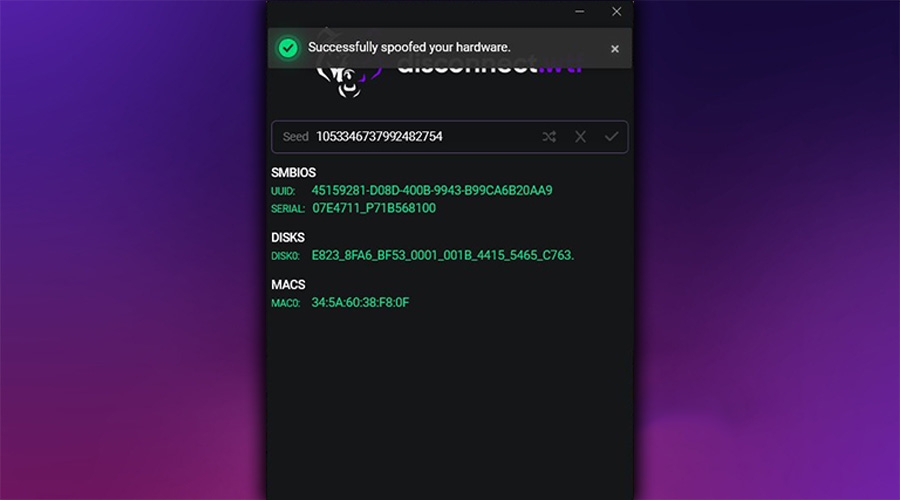
What to Share in a Hardware Support Ticket
There's rarely a reason to put the full output from an HWID serial checker in a public thread. For a question about what a field means, the label alone is often enough. If a seller asks for a screenshot, start with the message and redact the unique values.
For a purchase at Disconnect Cheats, support asks for the order reference. A licence error on a replacement motherboard is a question about paid access. It doesn't require posting a motherboard serial number to strangers or asking them to judge a ban from it.
An HWID serial checker also can't tell you whether a key has expired. The issuer has the subscription record. Read the date in your account and quote the precise error before guessing that the PC is at fault.
Reading HWID Checker Claims on a Product Page
If you're reading Disconnect Cheats' hardware ban explainer, keep the question you started with in view. An HWID serial checker can tell you what label and value a program read. A hardware fingerprint is a broader term, and each service decides which information it uses.
The strongest conclusion you can draw from an HWID serial checker screenshot is narrow. At the time shown, that program displayed that field with that value. A claim about a game account needs an account message, an official response or an appeal outcome to back it up.