Disconnect Wardogs Guide
How to Check Wardogs ESP in OBS Recordings
A Wardogs ESP recording check needs to inspect the saved video, not just the screen you play on. OBS can capture a game, a window or an entire display, and those sources do not necessarily show the same result. Test the exact scene and capture source you intend to use before recording a full session or going live. DisconnectCheats keeps the product’s aiming and visual features separate.
Make a short local recording, open the saved file and inspect the ESP, radar and other on-screen elements. Product wording about recording visibility does not guarantee identical behaviour with every OBS source or scene.
Choose the OBS source for your Wardogs recording
OBS Game Capture captures the game directly on Windows.
OBS Display Capture captures an entire monitor. OBS Window Capture targets a selected window.
These distinctions are described in OBS’s own documentation and matter before you judge what should appear in the recorded output.
A Wardogs game capture check therefore needs to record which source you selected. A Wardogs display capture check needs to identify the monitor as well. Do not change sources halfway through a test and treat the two recordings as the same capture result.
See the Wardogs cheats guide for the full aimbot, ESP and radar feature overview.
Check the gameplay scene and selected window
An OBS scene used for Wardogs ESP recording can contain several capture sources. Check the active scene, the visible sources and the window selection before recording. A second display source can show content you did not expect even when the game source itself looks correct.
If you use multiple scenes, inspect each one you plan to switch to. A recording test for the gameplay scene does not establish the output of a desktop, break or full-screen camera scene. Record the same transitions you intend to use during the session.
Check Player ESP and radar in the recording
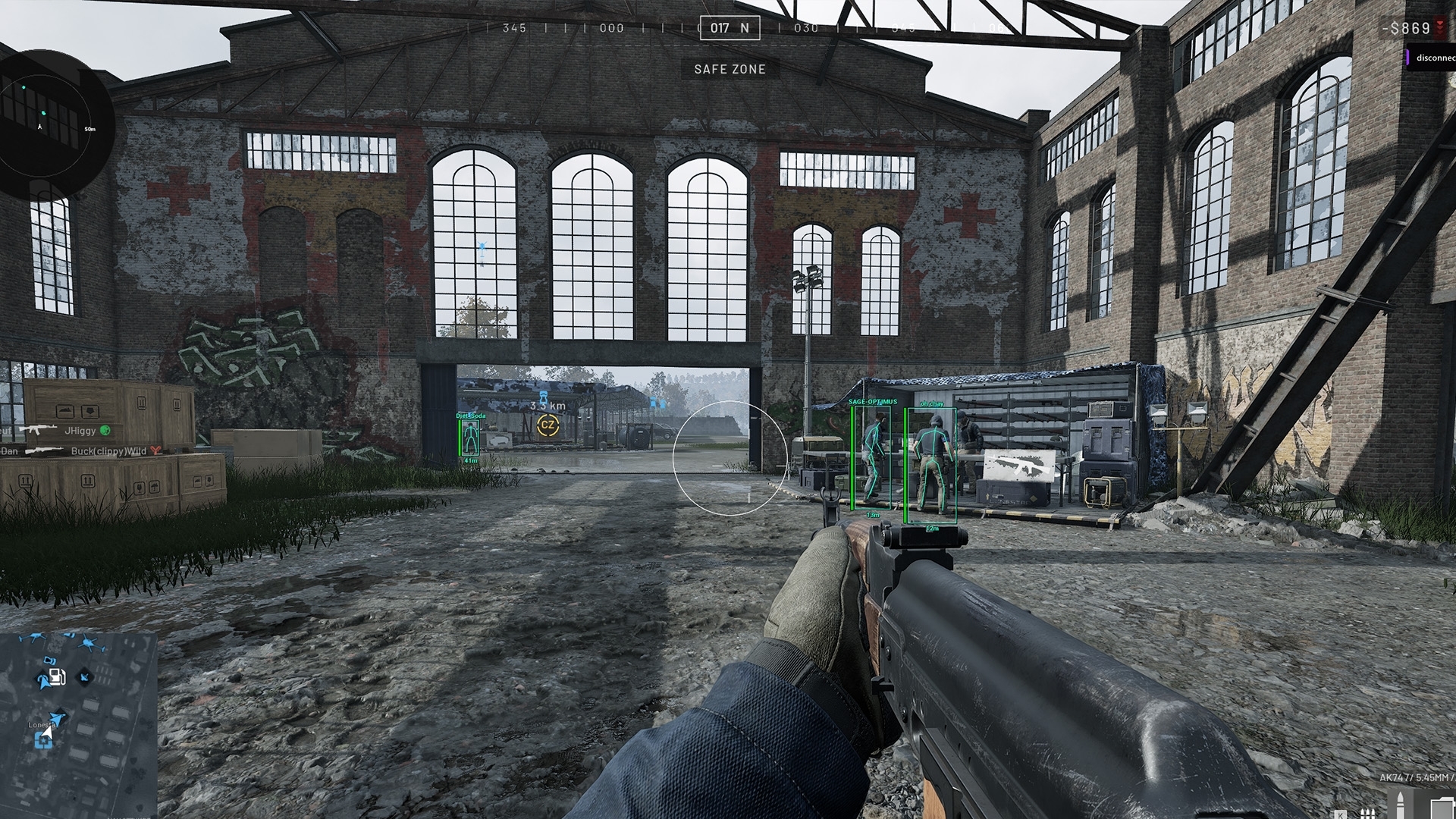
Wardogs ESP and radar occupy different parts of the gameplay view. Include both in your review if you normally use both. Seeing no player boxes in one frame does not establish that the radar is absent elsewhere in the recording.
Use a moment where the relevant feature is actually visible on your play screen. An empty scene with no qualifying players does not test whether a Wardogs ESP overlay would appear when players enter range. Keep the game and cheat configuration consistent during the check.
Look for FOV circles and other cheat drawings
The FOV Circle and Target Line can appear separately from player boxes.
The FPS Counter and Watermark may also be active.
Include each enabled element when reviewing the saved clip instead of checking only the most obvious skeleton or box.
If you alter one of those features after your first test, record another short sample. A result from one configuration does not establish what a different combination of on-screen elements will produce.
Play the saved clip and inspect scene changes
A saved Wardogs ESP clip is the output you will keep or share, so review it separately from the preview. Make a short local recording and open it in a player. Check the beginning, gameplay portion, menu opening and any scene transition you recorded.
If the clip is black, frozen or capturing the wrong window, resolve the capture problem before drawing conclusions about Wardogs ESP visibility. OBS provides a Game Capture troubleshooting guide for source problems. A broken recording is not evidence that the cheat is excluded correctly.
Recording visibility does not establish cheat safety
Check whether Wardogs ESP appears in each OBS source you use. Record the source, scene and cheat configuration alongside the result, so you know exactly which combination produced that output.
Whether an overlay appears in a video does not establish what an anti-cheat can detect. A clear recording does not protect an account from penalties. Use the live product status for availability and keep that check separate from your OBS test. Contact DisconnectCheats if you need help with the particular Wardogs product.
Recheck ESP capture after changing the OBS scene
Repeat the short recording check after changing capture sources, scenes or the way the game is displayed. Also review the result after relevant application updates. Keep a note of the working source and scene so you can identify what changed when a later clip looks different.
Read the main Wardogs cheats page for the product’s aimbot, Wardogs ESP and radar context. For a capture problem, report the source type and observed output to support. Do not send a subscription key or account credentials with a screenshot or clip.
Read the saved Wardogs recording at its actual output size
Play the local recording at the size somebody will actually watch. A small preview can hide a faint line that becomes obvious in a larger player. Pause a frame containing both an opponent and your own normal displays, then inspect the corners as well as the centre. Radar or a menu can occupy a part of the picture you did not notice during the recording.
Check motion as well as a paused frame. A line may become noticeable only as the player moves across a different background. Watch a short stretch with the same elements visible on your own screen so you know what the recording could have captured. A quiet moment with no relevant player cannot settle the question for a crowded encounter.
Keep the recorded frame separate from the live Wardogs ESP gameplay view when comparing them. If you are looking at the game instead of the saved output, you can mistake your own current overlay for something in the recording. Open the saved clip in a player and use its controls to pause or move through the footage.
If the output is scaled, look for faint text rather than assuming that unreadable text is absent. A line can be too small to read while still showing as an obvious overlay. Recording resolution and the size of the final viewing window affect that judgement. Do not use a thumbnail as a substitute for watching the actual file.
Check OBS scene changes and overlapping sources
A Wardogs ESP drawing hidden in one OBS scene may appear in another scene with different sources. Make a short recording of each transition you intend to use, including leaving gameplay and returning to it. The useful question is what appears in the saved output at the transition, not whether the gameplay scene looked right when considered alone.
Look for an extra desktop source beneath or above the game source. A scene can contain several captures of the same application, and hiding one does not establish that the others are hidden. Read the scene's visible sources before comparing recordings made at different times. Otherwise you may be comparing different compositions without realising it.
If Window Capture is pointed at the wrong window, correct that source selection before judging the cheat drawing. Likewise, a frozen or black Game Capture is a source problem rather than a useful clean result. OBS's own source guidance is the reference for resolving capture faults. There is no need to invent a cheat-specific cause for a recording that does not show the game.
Keep the source choice with the local sample. A filename or short note that identifies the scene is enough to distinguish two recordings later. That record helps if you switch monitors or change the source arrangement, because the earlier result applies to the earlier arrangement rather than every future one.
Keep recording checks separate from gameplay claims
A product's Stream Proof wording concerns capture behaviour. It is not a statement that every application will omit every drawing under every arrangement. Your own saved sample tells you about the Wardogs ESP source and scene you actually recorded. Repeat that sample after a relevant capture change instead of extending the earlier result to a new setup.
Check menus and auxiliary drawings as well as player visuals. A capture that omits one overlay can still contain another application window if you deliberately place it in the scene. That is why opening and closing the menu belongs in a representative local sample. Keep the check limited to the output you intend to save or share.
Audio, resolution and framing are separate recording decisions. A clean visual result does not tell you whether the microphone is muted or the output is cropped correctly. Review those ordinary recording details in the saved file too, so the recording you keep matches the content you intended to capture.
Keep the saved OBS sample with its source choice
Retain a short sample that identifies the scene and source you checked. It is a useful reference when a later recording differs. Compare like with like before blaming a cheat update, Wardogs ESPecially if the monitor, selected window or scene composition changed between the two files.
Questions about Wardogs ESP in recordings
Does one successful OBS test cover every scene?
No. Test the scenes and capture sources you actually intend to use, including transitions.
Should I check the preview or the saved video?
Check the saved video. The preview is useful for composition, but the recorded file is the output you will keep or share.
Which cheat elements should I inspect?
Check every enabled element, including Player ESP, radar, FOV Circle, Target Line, FPS Counter and Watermark where used.
Does hiding ESP from a recording prevent detection?
No. Recording visibility and anti-cheat detection are separate questions.
Related Wardogs cheat guides
Why Your Wardogs ESP Is Not Showing Players
How to Save and Share Wardogs Cheat Configs
OBS Game Capture · OBS Display Capture · OBS Window Capture · OBS capture troubleshooting
Wardogs External product and access periods · Current Wardogs cheat status