ROB RUN aim guide
ROB RUN Aimbot Features and How to Tune FOV and Smoothing
The ROB RUN aimbot in ROB RUN External is Normal Aim on a key you choose. It pulls your crosshair to the part of the body you pick, inside a radius you can see, at a speed you control. Tune it well and it passes for a sharp player. Max everything and the real person you just beamed will know exactly what happened.
Yes, there's a proper aimbot for ROB RUN in ROB RUN External. You set the aim key, the aim point and the aim radius, show that radius with a FOV circle, then use smoothing, Humanization and deadzone so the lock moves like a hand instead of a script. Role filters and Ignore Team decide who it goes for. Silent Aim is a separate mode with its own rules.
What the ROB RUN Aimbot Actually Does
Normal Aim is the classic aimbot. Use your aim key and it finds a valid target inside your aim radius, then drags your crosshair onto the aim point you've picked. Your view moves. Anyone looking at your screen would see it move, and that visible pull is what separates it from Silent Aim. It's also why most of this guide is about making the pull look like yours.
That matters more in ROB RUN than in most shooters. Every cop and every criminal is a real player, so the person you snap onto during a bank robbery can report you, clip you and tell their whole crime family who you are.
Disconnect Cheats puts the aimbot in the Aimbot & Combat group of ROB RUN External, one of 11 feature groups the product page counts, with 148 features in all. For the wider spread, from loot and base ESP to workbench timers, the ROB RUN cheats page lays the whole menu out. This guide sticks to aim.
This is a real aimbot, not a gentle nudge. It's a lock, and the features below decide how hard it grabs and how human it looks while it does.
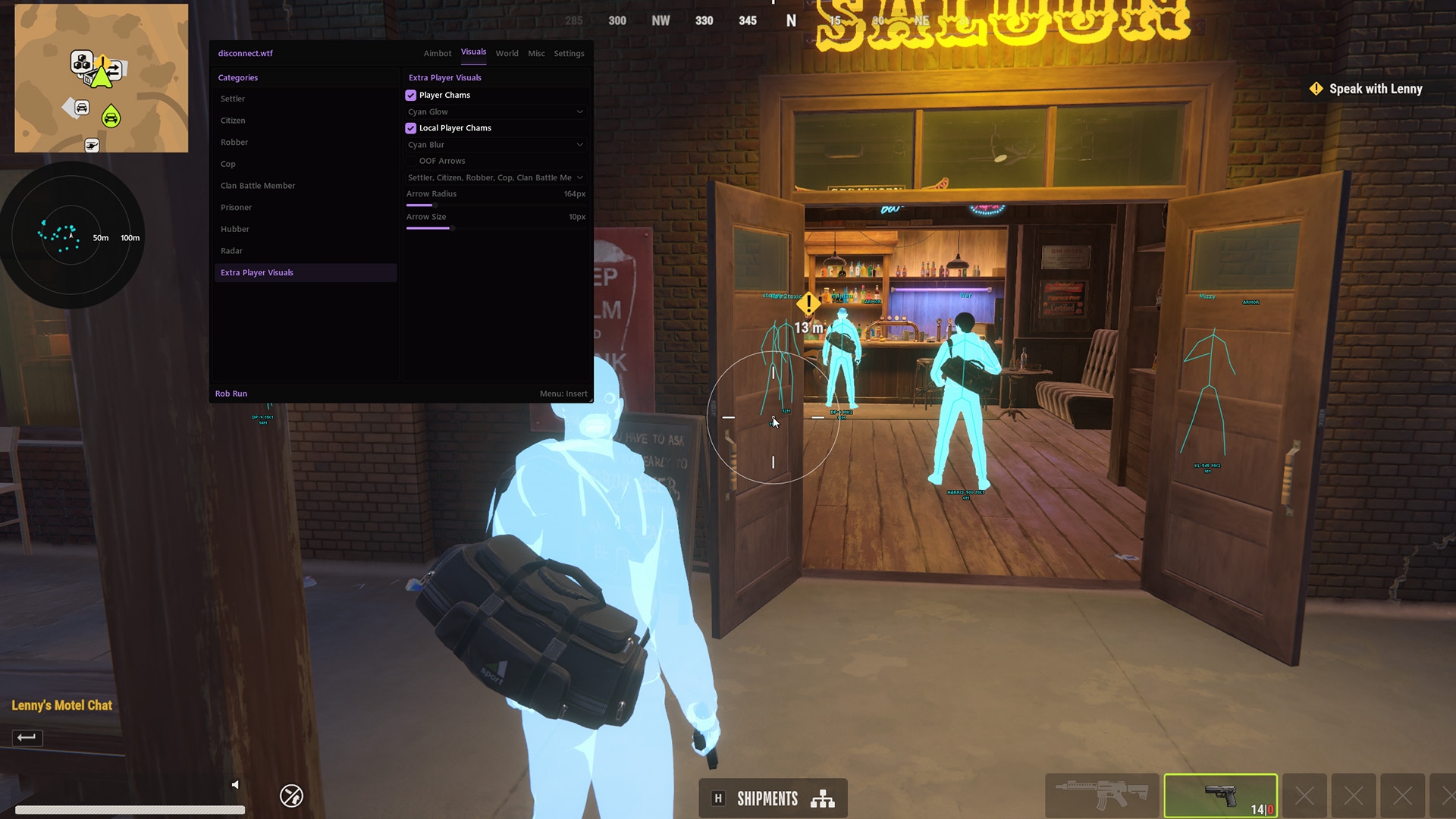
ROB RUN Aim Key, Aim Point and FOV Circle
Four features decide when the ROB RUN aimbot wakes up, where it aims and how far it looks for a target. Get these right before you touch anything that changes how it moves.
ROB RUN Aimbot Custom Keybind
You choose which key brings the aimbot in. Pick one your finger already rests near in a fight, so you're not fumbling when a cop rounds the corner. Keeping it on a key also means your aim stays your own the rest of the time, while you drive, loot and run.
Aimbot Aim Point Selection
This sets the part of the body the aimbot pulls to. Heads end fights fastest, and headshot after headshot is exactly the pattern people report. A lower point spreads your hits the way a decent player's would.
ROB RUN Aimbot Radius
The radius is the area round your crosshair where the aimbot will accept a target. Small means it only steps in on players you're already roughly facing. Large means it can whip your view across the screen to someone you never looked at, and that whip is the clip that gets you reported.
ROB RUN Aimbot FOV Circle Options
FOV Circle draws that radius on screen so you're not guessing. The product page also lists Dynamic FOV Circle and Custom FOV Circle Color, so you can pick a colour that stays visible against ROB RUN's streets without getting in the way.
Aimbot FOV is the biggest single tell in this group. Start smaller than feels useful. If it misses targets you'd genuinely have taken, widen it a touch. If it grabs people at the edge of your vision, it's too big.
Radius and aim point also work together. A tight radius on a head point still lands headshots, it just stops the long flicks. A tight radius on a lower point is the quietest pairing in the group, because the lock only ever moves a little and lands somewhere a good player would.
Smoothing, Humanization and Deadzone in ROB RUN
The radius decides whether the ROB RUN aimbot acts at all. These three decide how it moves once it does. They're the reason two players on the same aim point can look nothing alike, one like a sharp shooter and the other like a script.
ROB RUN Aimbot Smoothing
Smoothing sets how quickly the crosshair travels to the aim point. Low smoothing is a snap, near instant, the kind of flick nobody's wrist does twice in a row. Higher smoothing turns it into a glide that takes a moment to settle. Good aim smoothing should feel a little slow while you're testing, because in a real fight you'll be moving and so will the target.
Aimbot Humanization Adds a Human Wobble
Smooth aim still gives itself away if it takes the same perfect line every time. Humanization is there to break that up and add the small wobble a real hand has. Treat it as a partner to smoothing, not a replacement. Smoothing slows the pull down and Humanization stops it looking machine drawn.
ROB RUN Aimbot Deadzone Stops the Jitter
Deadzone is the small area around the aim point where the aimbot stops correcting. Without it, the crosshair keeps making tiny adjustments even when you're already on target, which reads as jitter. A small deadzone lets your own hand finish the job, so the last bit of tracking is genuinely yours.
Target Line and Aimbot Role Filters in ROB RUN
Aimbot Target Line draws a line to whoever the aimbot has picked, and Custom Target Line Color sets its colour. It's brilliant while you're tuning, because you can see exactly which player it's choosing and when it switches. Once you trust the selection, switch it off and keep the screen clean.
Target selection is where the ROB RUN aimbot gets interesting. The menu splits players into seven roles, Settler, Citizen, Robber, Cop, Clan Battle Member, Prisoner and Hubber, and the aimbot has filters built around those roles.
- Target Role Filters choose which roles the aimbot may lock onto.
- Ignore Role takes a role out of targeting altogether.
- Ignore Team keeps it off your own side, so a gang war doesn't end with you beaming your own crime family.
Here's why that's worth getting right. If you're robbing a bank, the players coming for you are most likely cops, and an aimbot that drifts onto someone else at the wrong moment wastes the shot and draws attention you didn't need. Narrow the roles to the fight you're actually in, and change them when the fight changes.
Tune Your ROB RUN Aimbot in Six Steps
Tuning everything at once is how you end up with a lock you can't read. Work through it in this order and change one thing at a time, so you always know which feature made the difference.
-
Bind Your ROB RUN Aimbot Key
Set Custom Aim Keybind to a key you'd naturally reach in a fight. Leave everything else alone for now.
-
Pick Your Aimbot Aim Point
Choose the body part it pulls to. Go lower than the head if you care how your hits read to other players.
-
Shrink the Aimbot Radius and FOV
Turn on the FOV Circle, then bring Adjustable Aim Radius down until it only covers players you're roughly facing.
-
Dial In ROB RUN Aimbot Smoothing
Raise Aimbot Smoothing until the pull reads as a glide, not a jump. A touch slow is right.
-
Add Aimbot Humanization and Deadzone
Add Humanization so the path varies, then a small deadzone so you finish the last bit of tracking yourself.
-
Set Your ROB RUN Aimbot Targets
Use Target Role Filters, Ignore Role and Ignore Team for the fight you're in, then drop the target line once you trust it.
Play a handful of fights before changing anything else. If it feels obvious to you, it'll look worse to the player on the receiving end.
Silent Aim Is a Separate ROB RUN Mode
ROB RUN External lists Silent Aim and Silent Aim Hitchance in the same group, but they aren't extra sliders for this aimbot. Silent Aim corrects the shot instead of moving your view, so there's no crosshair travel for smoothing, Humanization or deadzone to shape.
If that's the mode you're after, read how ROB RUN Silent Aim works before you mix the two up. And if you'd rather know where everyone is before the aim key comes into it, the ROB RUN radar cheats guide covers the radar and its off screen arrows.
Blatant Aim Gets You Reported in ROB RUN
The ROB RUN aimbot is the loudest cheat you can run, because it changes the one thing every other player is watching, which is whether you hit them. Snaps, perfect tracking through a crowd and headshots on players who barely peeked all show up on the other side of the fight.
ROB RUN uses Easy Anti-Cheat (EAC), and its Steam page lists Kernel Level Anti-Cheat as well. No cheat is guaranteed to stay undetected, and that includes anything Disconnect Cheats sells. A careful config can make your play look less blatant to other players. It can't remove detection risk or account risk.
ROB RUN has been in Early Access since 4 November 2026, and Early Access games update often. After any game update, check the status page before you load in, and read whatever label Disconnect Cheats shows there as today's status rather than a promise.
ROB RUN Aimbot FAQ
Can I stop the aimbot locking onto my own crew?
Yes. Ignore Team keeps it off your own side, Ignore Role drops whole roles from targeting and Target Role Filters let you choose which roles it's allowed to lock onto.
What aimbot FOV should I start with?
There's no magic number, and the product page doesn't give one. Start with a radius that only covers players you're roughly facing and check it with the FOV Circle. Widen it only when it misses targets you'd genuinely take.
Does smoothing make the aimbot safe to use?
No. Smoothing changes how your aim looks to other players, which helps with reports. It does nothing about detection, and no config can promise your account stays clean.
Do I need Silent Aim as well as the aimbot?
No, they're separate modes. Normal Aim moves your crosshair and Silent Aim corrects the shot without moving it. Pick one and learn it properly before you experiment with the other.