ROB RUN radar guide
ROB RUN Radar Cheats and What the Radar Hack Shows You
ROB RUN radar cheats answer one question before every fight, which is where everyone is. ROB RUN External draws nearby players on a radar you can filter by role, resize and drag anywhere, then adds arrows round your crosshair for players you can't see. It doesn't aim for you. It tells you who's coming and from which side.
The Radar & Player Indicators group in ROB RUN External gives you a Player Radar with role filters, a teammate toggle, range and size controls, marker size, background and opacity, orientation lock and a draggable position. Out-of-FOV Arrows add role filters, radius, size and role colours of their own. It's positional awareness for chases and raids, and it can't make cheating risk free.
What the ROB RUN Radar Hack Puts on Screen
Player Radar is a small overhead map of the players around you, drawn by the cheat on top of the game. Each player is a marker. You see where they are relative to you at a glance, without swinging your camera round and giving away that you're looking.
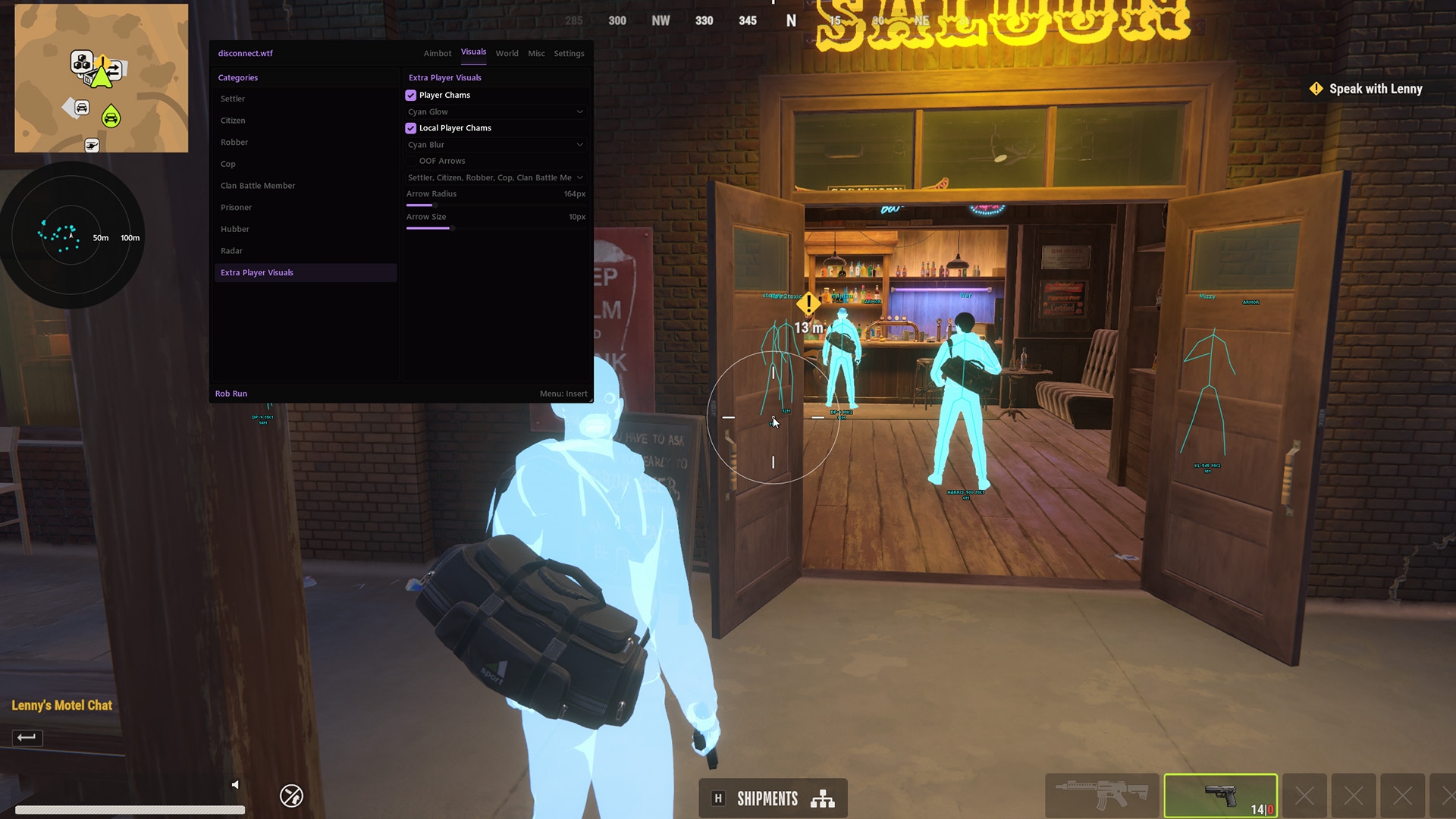
That's the ROB RUN radar hack in one picture. The rings give a quick sense of range, and the markers tell you how many players are close and which way they are. In a game where every cop and criminal is a real player, knowing that much before you commit is worth more than any headshot.
Disconnect Cheats lists 16 named radar and indicator features in ROB RUN External, and the product page notes 12 more on top. This guide sticks to the named ones. Radar is one corner of the menu, and the ROB RUN cheats page covers the rest, from loot and base ESP to the aimbot.
ROB RUN Radar Role Filters and Teammates
A radar showing everyone is noise. Radar Role Filters fix that by letting you choose which roles appear at all. ROB RUN's menu splits players into Settler, Citizen, Robber, Cop, Clan Battle Member, Prisoner and Hubber, and you'll rarely want every one of them on the radar at once.
Show Teammates is the other switch worth a thought. Running with a crime family, turn it on so your own people stand apart from everyone who isn't meant to be near you. Playing alone, leave it off and keep the radar for threats only.
Filters are where ROB RUN radar cheats earn their keep in a busy area. A street full of markers tells you nothing. The same street showing only the roles that can hurt you right now tells you exactly where to look.
Set Up the ROB RUN Radar Without Clutter
A radar you have to squint at is worse than none. Work through these in order and you'll end up with something you can read in a split second, even mid chase.
- Range. Adjustable Radar Distance sets how far out players are picked up. Too far and the radar fills with people who aren't part of your fight. Too short and someone's on you before they show.
- Size. Adjustable Radar Radius sets how big the radar is on your screen. Bigger is easier to read but covers more of the game behind it.
- Orientation. Orientation Lock controls whether the radar's orientation stays fixed. Try it both ways and keep whichever you read fastest.
- Distance. Distance Visualizer helps you judge how far away a marker is, which is the bit you need when you're deciding whether to run or hold.
- Markers. Custom Player Marker Size makes players bigger or smaller on the radar. Bump it up if the markers get lost on a high resolution screen.
- Background. Custom Radar Background and Adjustable Background Opacity decide how solid the radar looks. A lower opacity keeps the street visible behind it.
- Position. Draggable Radar Position lets you put the radar anywhere. Keep it near where your eyes already go, but clear of anything on your HUD you actually use.
You won't need to redo this every session. Set it once, then revisit the range and the role filters when the kind of fight changes, say from a quiet loot run to defending your hideout.
ROB RUN Out-of-FOV Arrows for Players Behind You
The radar is a glance away. Arrows sit right in front of you. Out-of-FOV arrows ring the centre of your screen and point towards players outside your view, so you know someone's behind you without taking your eyes off the fight in front.
Filter ROB RUN Off Screen ESP Arrows by Role
The arrows take their own role list, separate from the radar's. Keep it tight. Arrows for every role on a busy street turn into a ring of noise round your crosshair, and you'll stop reading them.
Resize ROB RUN Off Screen ESP Arrows
Adjustable Arrow Radius sets how far from the centre the arrows sit, and Adjustable Arrow Size sets how big they are. Too close and they crowd your aim. Too far and they drift out towards the edges, where you won't notice them in time.
Colour Off Screen ESP Arrows by Role
Colouring arrows by role means you know what's behind you, not just that something is. A Cop arrow and a Robber arrow usually call for different reactions, and colour gets that across faster than reading a name.
ROB RUN Radar Cheats in Chases, Raids and Gang Wars
Bank robberies, police chases, raids on rival hideouts and gang wars are what ROB RUN is built around. Each one asks something different of the radar, and they show what ROB RUN radar cheats are actually for.
ROB RUN Radar on Cops After a Job
Filter the radar and the arrows down to the Cop role once you've made off with the loot. You'll see which direction police are coming from and whether they're splitting up, and an arrow flags the moment one gets behind you.
ROB RUN Radar Before a Crime Family Raid
Bigger hideouts attract more intruders, and that's when Show Teammates earns its place. Your crew shows as teammates and everyone else is a marker to watch, while the arrows warn you when someone works round the back.
Radar Hack on the Doors During a Bank Job
A robbery keeps you busy in one spot with your attention on the job. Keep the Cop role on the radar with a sensible range and you'll see police arriving well before anyone reaches the door.
ROB RUN Radar Role Filters in a Gang War
Gang wars put a lot of players in the same place. Show Teammates keeps your family's markers apart from theirs, and the arrows flag anyone working round your flank while you hold a corner.
Radar tells you where. For who they are, what they're holding and which clan tag they wear, you want the ROB RUN ESP side of the menu. Once you know where a fight is coming from, aim is its own decision, and our ROB RUN aimbot guide covers FOV, smoothing and target roles.
What ROB RUN Radar Cheats Can't Do
A radar hack is quieter than an aimbot, because your aim never changes. That doesn't make it harmless, and it doesn't show you everything.
The radar only shows players within the distance you set, and it can't tell you what anyone plans to do next. ROB RUN uses Easy Anti-Cheat (EAC), and the radar is still part of a cheat running alongside it. No cheat is guaranteed to stay undetected, Disconnect Cheats included, and no radar config changes that. What config changes is how blatant you look.
Players notice behaviour, not overlays. Spinning to face someone behind you every single time, or always knowing which door a cop is about to come through, looks wrong to the people on the other end. React to some of what the radar shows, not all of it.
Before each session, check the live status page. ROB RUN has been in Early Access since 4 November 2026 and the developer expects that phase to last 6 to 12 months. Early Access games update often, and status can move with them. Disconnect Cheats shows the current status there, which is today's status, not a promise.
ROB RUN Radar FAQ
Can other players see my radar?
No. The radar is drawn on your own screen by the cheat, not placed in the game world. ROB RUN External is also listed as Streamproof, which means the cheat is hidden from game capture.
Do I need both the radar and the OOF arrows?
Not always. Arrows keep your eyes near the crosshair and only flag players outside your view, while the radar shows the whole area around you. Most fights go better with both running and tight role filters on each.
How far should the radar reach?
Far enough to see a threat coming and short enough that it isn't full of players who have nothing to do with you. Set Adjustable Radar Distance for the fight you're in and pull it in on busy streets.
Is a radar hack safer than an aimbot?
It's quieter, because nothing about your aim changes. It isn't safe in any real sense, though. It's still part of the same cheat and ROB RUN uses Easy Anti-Cheat (EAC). Config changes how blatant you look, not your detection or account risk.