ROB RUN Visuals Guide
ROB RUN ESP and Wallhacks for Players, Loot and Bases
ROB RUN ESP is the part of the cheat that shows you what walls hide. Every cop and criminal in ROB RUN is a real player, and the loot, cameras, garages and workbenches they fight over are spread right across the map. Good ESP marks all of it. Smart ESP only shows what you need for the job in front of you.
Disconnect Cheats' ROB RUN cheat covers players, chams, loot, world objects, cameras and alarms, plus bases and workbenches. Each group switches on and off by itself with its own colours, and most get their own render distance too. Run players and valuable loot all the time, then turn the heavier layers on only when you're lining up a robbery or a raid.
What ROB RUN ESP Covers in the Menu
ESP and wallhacks are the same thing in cheat talk. Both mean labels, boxes and colours drawn on your screen that the game would never show you, mostly through walls. ROB RUN ESP goes a long way past boxes on players, though. Eight of the 11 feature groups Disconnect Cheats lists for ROB RUN External put something on screen, and the menu splits them across a Visuals tab and a World tab.
The Visuals tab is about people. Settler, Citizen, Robber, Cop, Clan Battle Member, Prisoner and Hubber each get their own category, with a Radar page and an Extra Player Visuals page for chams and OOF arrows after them. The World tab is about everything else. Its Main side lists loot, bodybags, vehicles, alarms, cameras, cargo, containers, ATMs, doors and hide spots, and a separate Base side sits next to it.
All of it runs from an external cheat, and if you want to know what that means for your PC and your account, read what a ROB RUN external cheat is. Aim and weapon features sit on the hub page for our ROB RUN cheats. This guide sticks to the visuals and takes them group by group.
ROB RUN Player ESP Through Walls
Player ESP is the core of any ROB RUN wallhack, and it comes in layers you switch on one at a time. Skeleton ESP and Box ESP show where someone is and how they're standing. Player Names and Clan Tag ESP tell you who they are and which crime family they run with. Held Item ESP shows what's in their hands, and Distance ESP tells you whether they're a problem now or a problem in a minute.
Reload and Armour Indicators on ROB RUN Player ESP
The indicators are small, and they change fights. The Reloading Indicator flags a player who's reloading, which is exactly when you push. The In Vehicle Indicator marks anyone sitting in a vehicle, so you know who can drive off and who's on foot. The Armor Indicator shows who's wearing armour, and the Crouching and Sprinting Indicators tell you how someone's moving before you've got eyes on them.
Cop and Robber Colours in ROB RUN Wallhacks
This is what makes ROB RUN ESP its own thing. Cops and criminals are all real players, so one colour for everybody tells you nothing. Custom Role Colors paint each role differently, the options for each role give every role its own page of toggles and Ignore Teammates clears your own crew off the screen. A sensible start is a loud colour for Cop, another for Robber and quieter ones for the roles that don't matter to you that session.
ROB RUN Chams and Glow Materials
Chams recolour the player model instead of drawing lines around it. On a busy street that's quicker to read than a box, because a glowing body pops out of the background straight away. There are two layers. Player Chams colour everyone else, Local Player Chams colour your own character and Independent Material Selection means they don't have to match.
The materials include Pink, Purple Glow, White Glow, Cyan Blur, Cyan Glow, Lime Glow, Banana Glow, Orange and Red See-Through, and Custom Cham Materials takes it further. Cyan Glow on other players with Cyan Blur on yourself keeps the two easy to tell apart. Pick whatever stands out on the part of the map you play, and if you're running skeleton ESP as well, choose a cham colour that doesn't swallow the lines.
ROB RUN Loot ESP and the Minimum Value Filter
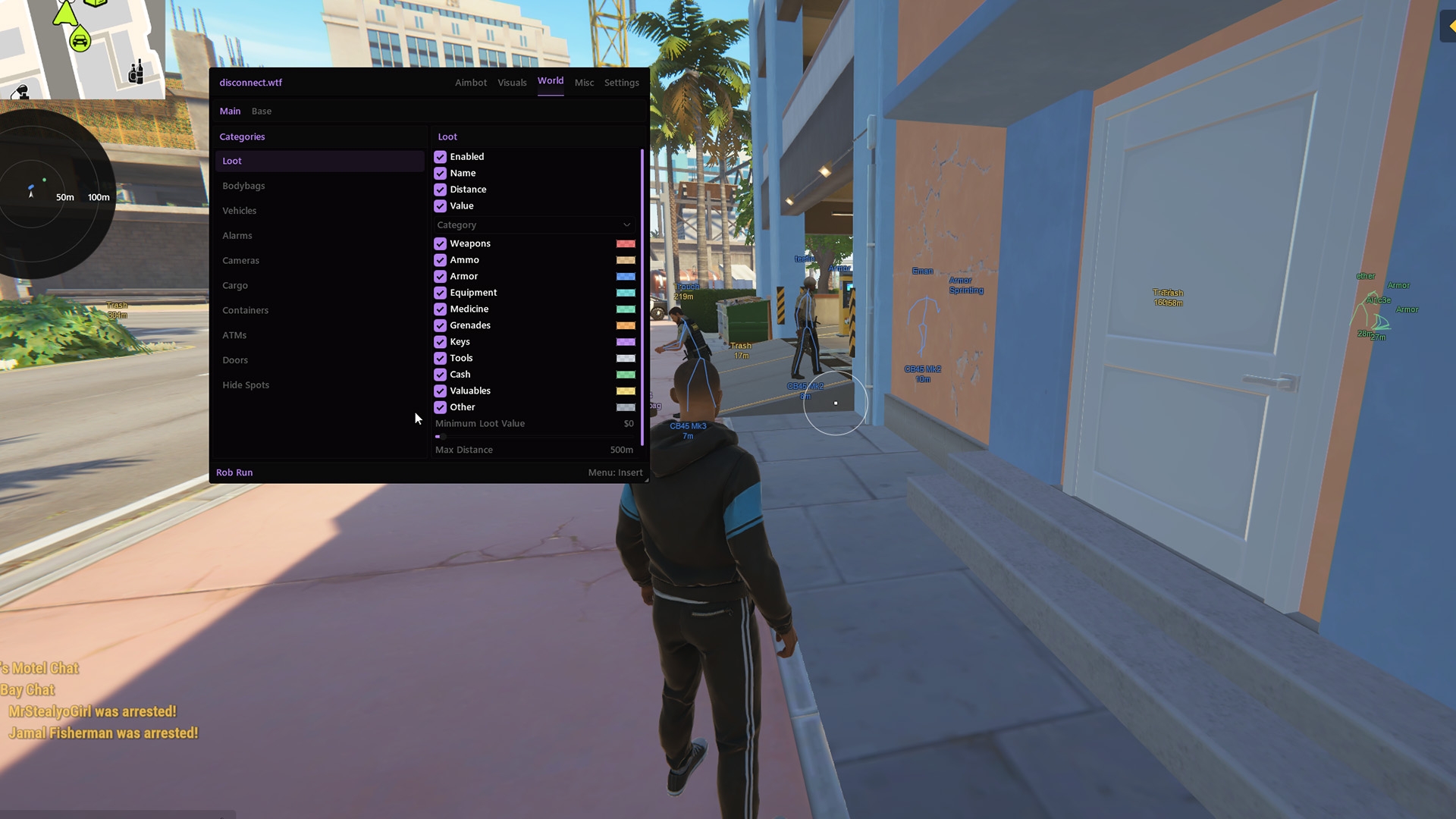
Loot ESP is where this game gets interesting, because the cheat can show what an item's worth and not just where it's lying. Switch on Name, Distance and Value and every item carries all three. Then the Minimum Value Filter does the heavy lifting. Set a floor and anything cheaper vanishes, so the only labels left are the ones worth running for.
Categories sit underneath. Weapon, Ammo, Armor, Equipment, Medicine, Grenade, Key, Cash and Valuables ESP each have a toggle and a colour, and Loot Rarity Filters give you a second way to thin things out. Colours can follow category or rarity, and the screenshot below has max distance set at 500 m. Bright colours for cash and valuables with everything else muted is an easy place to start.
ROB RUN World ESP for ATMs, Doors and Vehicles
The Main side of the World tab marks the map's objects instead of its people. Individual ESP Toggles mean you only show the categories you want, Custom Object Colors and Object Distance Display keep each one readable and an Independent Render Distance lets world labels stop short of your player labels.
ROB RUN ATM ESP
ATMs get their own category, so you're not walking street after street looking for one. Turn it on when they're part of the plan and off when they're not.
Door and Hide Spot ESP in ROB RUN
Doors show the ways in and out. Hide spots show where someone could be tucked away, and where you could tuck yourself away when the cops roll past.
ROB RUN Bodybag ESP and Despawn Timer
Bodybag ESP marks every bodybag in range, and the despawn timer shows how long each one has left. Check it before you cross open ground for a bag that's about to disappear.
ROB RUN Vehicle ESP and Owner Display
Vehicle ESP marks vehicles, and Vehicle Owner Display tells you who each one belongs to. A car parked outside a hideout means a lot more once you know whose it is.
Cargo and containers round out the Main side. Each has its own toggle, so they stay hidden until you go looking for them.
ROB RUN Camera and Alarm ESP
For a game about robbing banks and hideouts, this group pulls its weight. Camera ESP and Alarm ESP mark each one with its distance, so you know where the security is before you walk in, and it's the part of ROB RUN ESP you'll miss most when it's off.
The status indicators are the clever bit. Hacked Camera Indicators and Disabled Camera Indicators show which cameras have already been dealt with, and Hacked Alarm Indicators do the same for alarms. If a camera on your route shows as hacked, somebody got there before you, and that's worth knowing whatever side they're on.
Custom camera and alarm colours plus their own render distance stop the group cluttering your screen on the days you're not working a job.
Base ESP for ROB RUN Hideouts and Garages
Hideouts hold players' loot and vehicles, and the game's own description says bigger bases attract more intruders. Base ESP is for the intruders. Base Overview ESP marks the base, Base Owner Display and Base Clan Display tell you whose it is and which clan runs it and Base Status Display adds its status.
Then it gets granular. Building ESP marks structures. Storage ESP and Storage Contents show what's stored and where, and Cargo ESP with Cargo Contents does the same for cargo. Garage ESP and Garage Contents show what's inside each garage, while Defense ESP, Defense Status and Defense Timers mark a base's defences along with their status and timers.
That's the group that tells you whether a raid's worth it before you commit. Thin contents, move on. It has its own category colours and render distance too, and that distance is best kept short unless you're scouting a target.
ROB RUN Workbench and Production ESP
Hideouts come with workbenches, and the cheat gives them a group of their own. Workbench ESP marks each bench. Workbench Status and Workbench Contents show its state and what's on it, and Workbench Timers add the clock.
The production side is where the crime theme really shows. You get Laundering Desk ESP, Grow Table ESP, Crypto Farm ESP and Production ESP, plus Cargo Opening ESP and Cargo Exchange ESP. Individual Workbench Filters keep the ones you care about and hide the rest, with custom colours and a distance display on each.
You won't need most of this on day to day. Switch it on while you're sizing up a hideout, so you can see what a crew has running before you decide it's worth the risk.
Render Distance and Clutter in ROB RUN ESP
More ESP isn't better ESP. Run every group of ROB RUN ESP at full distance and the screen turns into a wall of labels, the useful ones get buried and you start reacting to things nobody else can see. Players, loot, world objects, cameras, bases and workbenches each have their own render distance, and that's the fix.
- Everyday play: players with skeleton or chams, names and distance, plus loot above a value floor.
- Before a robbery: add cameras, alarms, doors and hide spots, all on short render distances.
- Scouting a hideout: switch on base, storage, garage and workbench layers, then drop them once you've made the call.
- Crowded streets: pull player distance in and let the radar handle anything further out.
- Colours: a loud colour for Cop, teammates hidden and no palette where loot and players look alike.
Players who aren't on your screen at all are better handled by the radar and OOF arrows than by stretching ESP further. Our guide to ROB RUN radar cheats covers that side, from role filters to where you put the radar.
ROB RUN wallhacks don't aim for you, but they change how you move, and other players notice. Tracking someone through a wall or walking straight to a hide spot you shouldn't know about is how you get clipped and reported. ROB RUN uses Easy Anti-Cheat (EAC), the label Disconnect Cheats shows on the product page today is a current status rather than a promise and any cheat can get an account banned. Check the status page before you play and keep what you react to believable.
ROB RUN ESP FAQ
Does ROB RUN ESP show loot value or just item names?
Both, if you want them. Name, Distance and Value are separate toggles on the loot page, and the Minimum Value Filter hides anything below the value you set.
Can cops show in a different colour from robbers?
Yes. Custom Role Colors give each role in the menu its own colour, and every role has its own page of options, so Cop and Robber can look completely different.
Will the ESP show whether a camera has been hacked?
It will. Camera ESP comes with Hacked Camera Indicators and Disabled Camera Indicators, and alarms get Hacked Alarm Indicators, so you see their status as well as their position.
How do I stop ESP cluttering my screen?
Turn on only the groups you need for what you're doing, lower each group's render distance and use the value filter on loot. Base and workbench layers are best left off until you're scouting a hideout.