
Disconnect Rust Guide
Rust aimbot, Silent Aim and recoil control explained
Aim features get thrown into the same sentence far too often. Smoothing, Silent Aim, recoil and spread affect different things. If you are paying for a cheat, you should know what each control changes before a long feature list makes the decision for you.
A regular aimbot assists aim towards a target. Smoothing affects that visible aim movement. Silent Aim changes shot direction without the same visible crosshair movement. Recoil control changes weapon kick, while spread concerns shot dispersion. These are separate features, even when one menu includes them all.
What a Rust aimbot actually does
An aimbot for Rust assists aiming towards a selected target according to the supported controls. The target area, selection region and way the aim moves can all affect the result. None of those words automatically means recoil removal, and none tells you that a cheat includes every weapon feature advertised somewhere else.
Rust aimbots differ in their implementation and menu. Disconnect Rust External explicitly includes Memory Aimbot and Silent Aimbot, with hitbox choices, FOV, smoothing and further weapon options. That gives you several distinct things to understand, rather than one all-purpose switch that somehow handles every part of firing a gun.
This article explains the terminology using the current Rust External feature list. Follow the aim group first, then the weapon group, so you can tell which controls concern target selection and which concern the shot. For the wider menu, the Rust cheat guide covers visuals and movement as well.
Regular aim and Silent Aim are separate features
Rust Silent Aim refers to shot direction being adjusted without the same visible crosshair movement used by a regular aimbot. That distinction is the reason you should not explain both features with the same sentence. A smoother camera movement is still a camera movement; it does not become Silent Aim because it is less abrupt.
Smoothing belongs to regular aim
Aimbot smoothing controls how the supported regular aim assistance moves towards its target. The useful distinction is the movement over time. It is not recoil compensation, a damage multiplier or an anti-cheat feature. The direction of any numerical scale should be read from the current product instructions rather than assumed across different cheats.
Disconnect describes smoothing for the normal aimbot. It does not belong in an explanation of how Silent Aim is made smoother. Keeping that boundary clear prevents a common mistake: borrowing the name of a visible aim control to explain a feature that handles shots differently.
Silent Aim is not invisible cheating
Rust Silent Aimbot is another name used for the Silent Aim feature. The word silent concerns the relationship between shot direction and visible aiming, not a promise that the cheat cannot be detected. It does not make every shot valid, guarantee that an obstruction can be ignored or remove account risk.
If you are reading about a Rust aimbot hack, look for that separation in the feature description. A page that attaches smoothing, recoil removal and impossible accuracy to the same vague claim is not giving you enough information to know what is included.
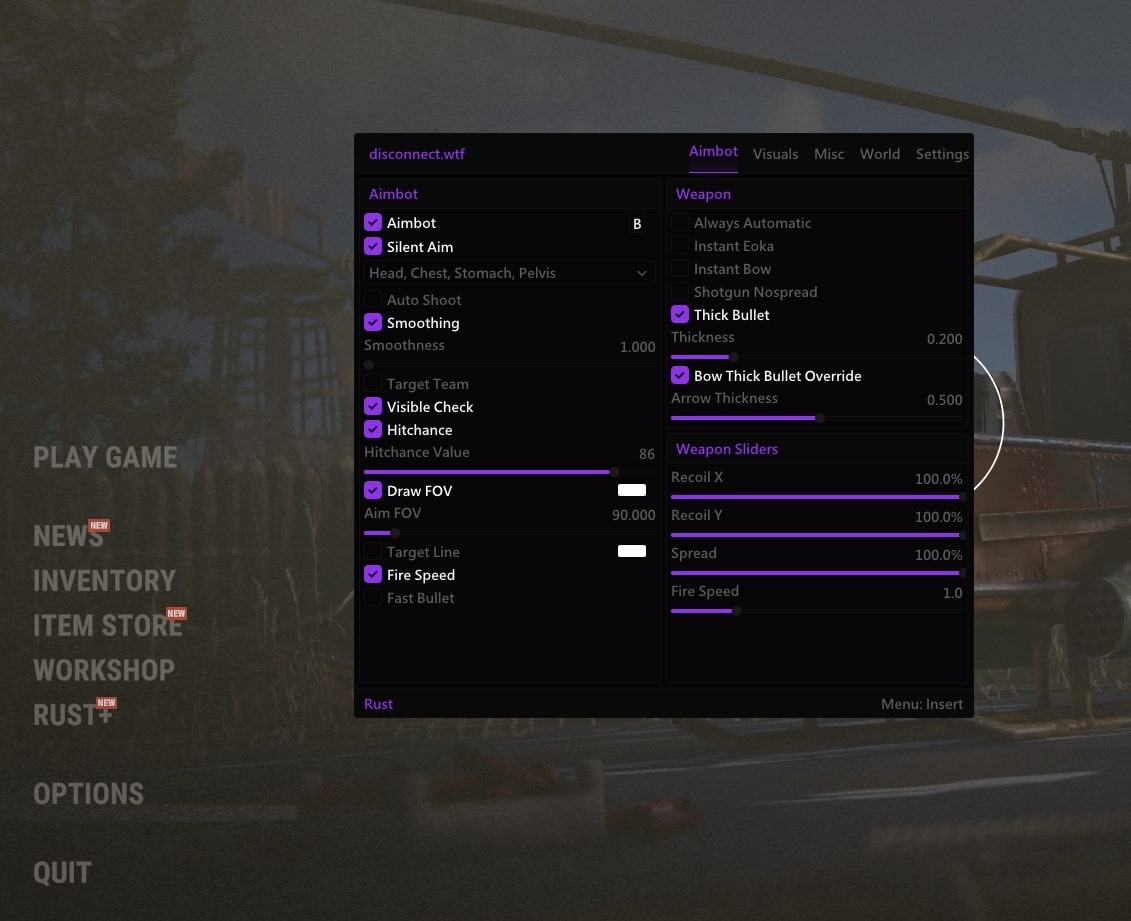
FOV, hitboxes and hit chance mean different things
Aimbot FOV defines the supported region used for target selection. A displayed FOV circle is a visual aid for that region. Drawing the circle and changing the selection region are related controls, but the circle itself does not aim, fire or improve the underlying weapon.
Target area and selection area
Hitbox selection chooses the supported body area used by the aim feature. Disconnect names head, chest, stomach and pelvis. A hitbox is an area associated with the target, while FOV concerns the selection region around your aim. Changing one does not make the other term redundant.
A target line is another visual aid, showing the supported target relationship on screen. It is useful for understanding what is selected, but it is not the same feature as Skeleton ESP, which draws the player’s bone structure. Similar looking lines can represent very different information.
A percentage is not an accuracy benchmark
Hit chance is a product control labelled as a percentage. Disconnect shows a zero to one hundred percent range. That is not a published guarantee that a chosen percentage of every shot in a live session will damage a player. Target movement, obstacles, game behaviour and the exact feature implementation still matter.
The best Rust aimbot for your intended use starts with a menu you can understand. Ask what selects the target, what moves the aim, what handles the shot and which visual aids are available. A long string of percentages without those distinctions tells you very little about the product you are considering.
Recoil control is about weapon kick
Rust recoil control concerns the movement produced by a weapon firing. Disconnect exposes Recoil Amount X and Recoil Amount Y as separate controls. The axis names distinguish horizontal and vertical components. They do not describe where the aimbot selects a target or which body area it follows.
Rust no recoil is a common name for the aim of removing or heavily reducing weapon kick. The product page here names adjustable recoil amounts, so the accurate description is that those controls are available. A label alone should not be stretched into a guarantee that every weapon behaves identically in every situation.
Recoil and spread should stay separate
Rust spread control concerns shot dispersion, which is different from the visible movement caused by recoil. A weapon can have less kick without every shot landing at an identical point. Disconnect gives Spread Amount its own entry, which is exactly why the copy should not use recoil and spread as interchangeable words.
Weapon-specific options also need their own names. Instant Eoka, instant bow and shotgun no spread are separate entries in the current menu. Their inclusion does not mean that every weapon shares one universal firing behaviour, and a general aim description should not silently absorb all of them.
Rust weapon cheats can cover several parts of shooting, including fire speed and projectile-related options. Read each confirmed entry in context. Fast Bullet is a named feature on the product page, but that name is not a published measurement of projectile speed or a promise of instant hits at any range.
Aim assistance and visual information work on different parts of a fight
Player ESP supplies information about a supported player. Aim assistance concerns where aim or shots are directed. A Rust ESP hack can include names, boxes, held items and distance without those labels doing any aiming themselves. Keeping the visual and aim layers separate makes the whole menu much easier to understand.
A Rust wallhack can reveal information through an obstruction, but that does not make the obstruction disappear. A visible marker is not proof of a clear shot. This matters when a feature description moves too quickly from seeing a player to claiming that hitting them is automatic.
Selection
FOV and target-area controls describe which supported target or body area the aim feature uses.
Weapon behaviour
Recoil, spread and weapon-specific entries concern aspects of firing. Their names should remain separate from target selection.
Cheats for Rust often include both groups in one subscription. That is convenient, but it can make a product sound more mysterious than it is. Start with the named feature you want to understand and follow its own controls, instead of treating the entire menu as one promise of better accuracy.
The same discipline helps when reading screenshots. A menu with a skeleton toggle, FOV circle and recoil slider shows three kinds of control. It does not prove how those controls performed together, and it certainly does not establish a long-term safety record.
External does not mean visual features only
External Rust cheats run in a separate process from the game. That describes where the cheat operates, not a rule that it can only display information. Disconnect’s external product includes Memory Aimbot, Silent Aimbot and weapon controls, so calling it a read-only overlay would be inaccurate.
A Rust external cheat also should not be described as a DMA setup simply because it is external. DMA hardware is a different arrangement. If a product does not name a hardware requirement, do not infer one from the external label. Use the actual compatibility and access information attached to that product.
Our external and internal explanation covers the implementation distinction in more depth. Use it to understand the process arrangement, then check the individual product page for the menu included with your subscription.
When choosing Rust game cheats, separate compatibility from detection status too. Windows support tells you about the stated operating environment. A stream-proof claim concerns capture behaviour. Neither is evidence that the game’s anti-cheat approves the cheat or that an account cannot be banned.
What to check before you pay for aim features
Start with the exact feature names on the current page. Confirm whether regular aim and Silent Aim are both included, which hitboxes are supported, and whether recoil and spread have separate entries. Then check compatibility and subscription duration. This avoids paying for a feature you assumed was present because another game’s menu included it.
Rust cheat providers should make those answers easy to find. You should not need to infer a feature from an old montage or a vague description of “advanced aim”. The product page is where the current menu belongs, and a support answer should clarify any requirement that remains unclear before purchase.
Undetected Rust cheats are not permanently safe cheats. Undetected is a status claim at a point in time. Rust uses Easy Anti-Cheat, and the live status notice can change after an update. A less blatant config does not remove technical detection or guarantee that nobody reports what they see.
Cheating in Rust carries account risk whether you enable one feature or twenty. If the current notice says compatibility is being checked, treat that as relevant information. The useful buying decision is based on confirmed features, current support and a clear understanding of risk, not the loudest accuracy claim.
Frequently asked questions
Does smoothing apply to Silent Aim?
No. In this product’s terminology, smoothing applies to regular aimbot movement. Silent Aim is a separate feature that adjusts shot direction without the same visible crosshair movement. Describing it as smoother regular aim would mix up two different behaviours.
Is recoil control the same as an aimbot?
No. Recoil control concerns weapon kick, while an aimbot assists aim towards a target. Spread is another separate aspect of shooting. Disconnect Rust External names individual recoil-axis controls and a separate spread control in its weapon menu.
Does a larger FOV increase weapon range?
No. Aimbot FOV concerns the target-selection region. It does not increase the weapon’s range or make an obstructed shot clear. The FOV circle is a visual aid, and drawing it is not itself an aiming feature.
Can an external cheat include Silent Aim?
Yes. Disconnect Rust External explicitly includes Silent Aimbot. External describes a separate process arrangement; it does not mean that only visual features are possible, that DMA hardware is required or that the cheat is undetectable.