
Disconnect Rust Guide
Rust ESP explained: Player ESP, World ESP and radar
A screen full of boxes is easy to sell. Reading those boxes while you cross a monument, carry farm home or watch a roof is the part that matters. Here is what the visual features actually show, and where each one earns its space.
Player ESP adds information about players. World ESP marks supported objects such as ore and crates. Radar puts player positions into a separate view. A wallhack is a broader name for seeing information through obstructions, so check the actual menu before assuming every visual feature is included.
What is ESP in Rust?
ESP stands for extrasensory perception. In this context it means a cheat displaying information that the game would not normally show you in that form, such as a player box, distance label or marker for an object behind cover. The name describes the information on your screen, not one fixed set of features that every seller includes.
The useful Rust ESP meaning is straightforward: extra visual information about supported entities. That can help you recognise a nearby player, locate a resource or understand where several players sit around you. It does not mean every marker is an enemy, every object is lootable or every player can be hit from your position.
If you want ESP for Rust, start with the information you need during an actual session. Someone carrying a full inventory back to base has different priorities from someone looking for a minicopter. More labels only help when you can tell them apart without stopping to read the entire screen.
This guide uses the confirmed menu for Disconnect Rust External. Its player visuals, World ESP and radar have separate controls. You can read the wider Rust cheat guide for the aim, weapon and movement features outside this article.
Player ESP: identify the person before the fight
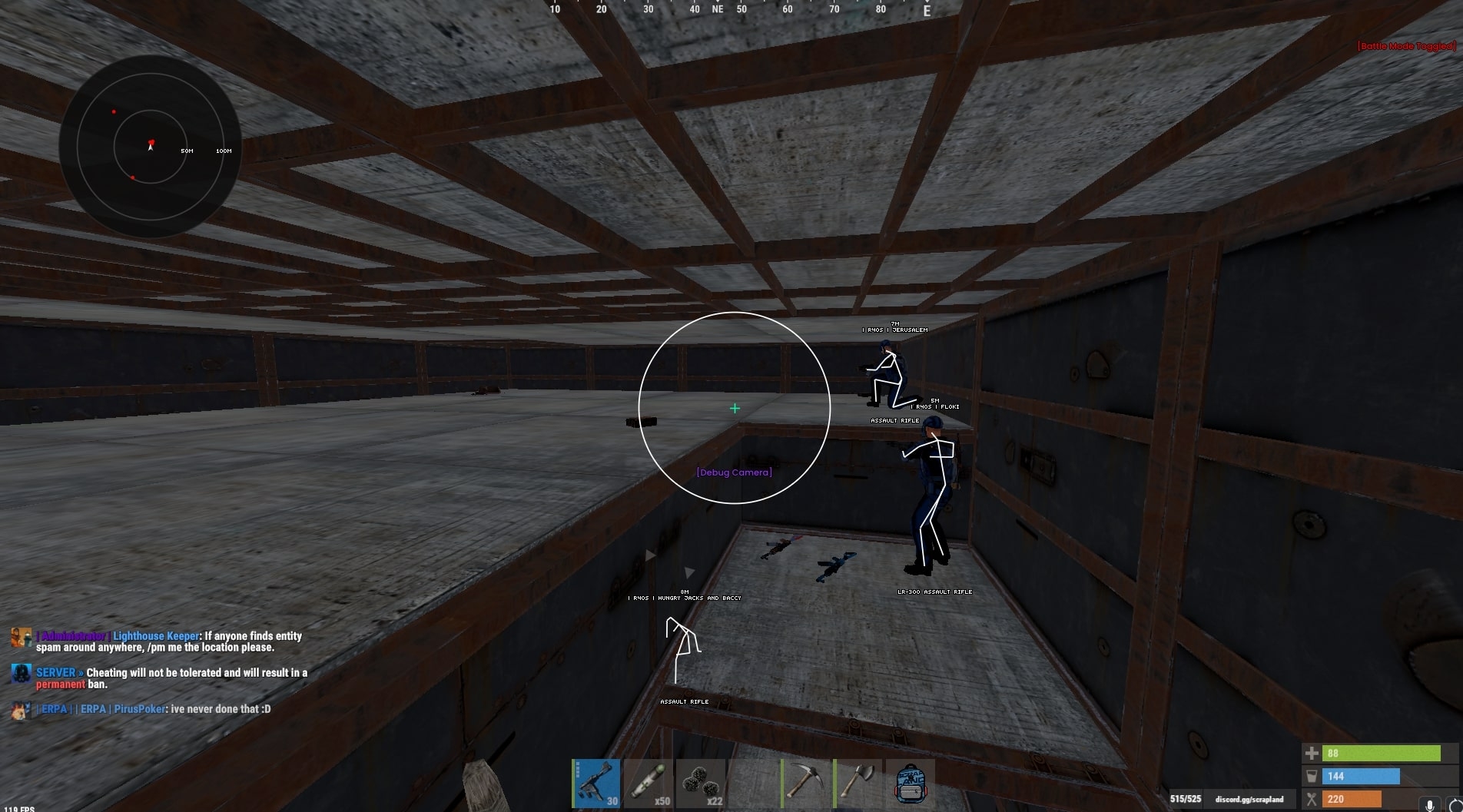
A Rust ESP cheat can show a lot more than a rectangle. Disconnect supports player names, held items, distance, skeletons and team IDs, alongside full or corner boxes. Those fields answer different questions. A box helps locate someone, a held item tells you what is currently in their hands, and distance gives you context for how close they are.
Names, boxes and skeletons
Name ESP gives a label you can recognise again. Box ESP outlines the player on screen, while Skeleton ESP draws the supported bone structure. A skeleton can make posture easier to read, but it also adds more lines. If several people stand together, stacking a full box, skeleton and long name on each one can make the group harder to follow.
Choose a visual hierarchy. The marker that locates a person should be obvious, with smaller supporting information around it. Colour and font choices should stay consistent across your config, otherwise you are learning a different visual language every time you switch from a roof defence to a farm run.
Held items, sleepers and wounded players
Held Item ESP describes the item being held, not a complete inventory inspection. Separate controls cover teammates, sleepers, wounded players and dead players. That distinction matters around a base, where a sleeper marker can sit close to an active opponent without representing the same immediate threat.
For a Rust external ESP config, these filters are as useful as the boxes themselves. Decide which player states deserve attention and keep their colours recognisable. A wounded label tells you about the displayed state; it does not tell you that the surrounding area is clear or that another player cannot arrive.
World ESP: ores, crates and the route between them
Rust World ESP covers supported objects rather than just people. Disconnect includes sulfur, metal and stone ore, collectables, crates, selected deployables and vehicles. That is useful when you have a specific reason to leave base. A route for sulfur should not need every mushroom, barrel and food marker competing for attention.
Resources and collectables
Ore ESP identifies supported ore nodes, with sulfur, metal and stone separated in the menu. Collectable options include hemp and several foods. These are different object groups, so finding a sulfur node is not the same feature as finding loose collectables. Read the group names before assuming one switch covers everything on the ground.
The benefit is less guesswork about where supported objects are. The limit is just as clear: a marker does not move the resource into your inventory, clear the route or stop someone following you. You still have to reach it and bring it home. Player information and object information answer different parts of that trip.
Crates, deployables and vehicles
Crate ESP covers the supported crate types, while vehicle options include entries such as the minicopter and patrol helicopter. Deployable markers include selected workbenches and defensive objects. Read the exact item names on the product page because a long World ESP section is not a promise to identify every object Facepunch might add later.
For ESP for Rust to stay useful, the world layer needs restraint. An object across the map can be technically interesting and irrelevant to the next thirty seconds. Keep the information tied to the route you are taking, then use a separate saved config when your objective changes.
Radar, chams and wallhacks do different jobs
Rust radar gives you a separate view of player positions. Disconnect includes render distance, radius, player size, transparency and a distance visualiser. These controls affect what the radar shows and how easy it is to read. A larger radar panel and a longer world distance are separate choices, even though both can make the display look busier.
Radar
Useful for relative positions around you. Its separate view does not replace the detail attached to a player in the main scene.
Chams
Material effects applied to supported models. Disconnect has separate player, NPC, hand and weapon entries, so the affected model matters.
A Rust wallhack is a broad description, commonly used for visuals that expose information through walls or other obstructions. An overlay box and a highlighted model can both be described that way, but they do not have identical controls. Rust wallhacks should be judged by what you can actually see in the menu and screenshots.
Rust ESP hacks often combine several of these visual methods. The important question is whether you want position markers, model highlighting or a separate positional view. Calling everything a wallhack hides those distinctions and makes it harder to understand what your subscription contains.
Through-wall information does not turn a wall into an open shot. Visibility, collision and the information displayed by a cheat are different things. Seeing a marker behind a building tells you where the marker is, not that the building has stopped blocking you.
Keep the screen readable when several things happen
The hardest screen to read is often the one with everything enabled. Consider a monument entrance with several player markers, an NPC label, crates and a vehicle nearby. If every label has equal size and brightness, the next threat gets buried in the same pile as an object you never intended to collect.
Distance has a purpose
Render distance limits how far away supported information is drawn. It does not increase the underlying range of a weapon or guarantee that every distant entity is available to the cheat. Separate player and NPC distances let you give those groups different emphasis without treating a scientist and a player as interchangeable.
A useful Rust ESP hack should let you recognise what a marker means quickly. Font size, outline, colour and box style all contribute to that. Tiny text can look tidy in a still image and become unreadable during movement. Huge text can be clear on one player and cover half the scene when six people gather.
Saved configs should match a reason to play
A farm config might prioritise ore and nearby player information, while a base defence config has little reason to fill the scene with collectables. Save distinct configs when you have a real reason to switch. Renaming the same crowded display three times does not make it easier to read.
These are readability decisions, not claims about avoiding detection. A subtle display can still be part of a detectable cheat. The same applies to a small radar, a low distance limit or a config that leaves aim features disabled.
ESP only access and product claims
Rust ESP only describes an interest in visual information without aim assistance. It does not automatically identify a separate product. A full cheat may let you leave its aim features off, while a dedicated visual subscription could have a different menu entirely. Check which of those you are actually buying.
If a page advertises a Rust ESP only cheat, look for an explicit description of the included access. Disconnect Rust External is a broader cheat with aim, weapon and other features alongside visuals. Using only its visual options does not change the product into a separately verified read-only implementation.
External Rust cheats run separately from the game process, but external does not mean DMA hardware or an automatic safety advantage. A Rust external cheat can still include features that affect aiming and weapons. The implementation label and the enabled feature list need to be read separately.
Before choosing between Rust ESP cheats, check current compatibility, the live status notice, supported visual groups and the subscription period. Screenshots help explain the interface, but an old screenshot cannot confirm that a product is ready after the latest game update.
Rust uses Easy Anti-Cheat. Read the anti-cheat guide if you want the fuller explanation, and use the live status page before launching. An undetected label is a current status claim, never a guarantee that your account cannot be banned.
Frequently asked questions
What is Rust ESP?
It is a cheat feature that displays extra information about supported players or objects, such as boxes, names, distances and resource markers. The exact information depends on the product. ESP describes the visual feature, not a guarantee that every object or player state is supported.
Are Rust wall hacks and radar the same thing?
No. Wall hacks commonly describe information visible through obstructions in the main scene. Radar presents player positions in a separate view. They can appear in the same cheat, but their display controls and the information you read from them are different.
Does World ESP include everything on the map?
No. It covers the object types supported by the product. Disconnect names ore, collectables, crates, selected deployables and vehicles in its menu. Check the current feature list for the specific object you want rather than assuming every object is included.
Does using visual features alone remove ban risk?
No. Leaving aim features disabled does not make a cheat approved or undetectable. Visual features can still carry account risk. Check the live status notice and remember that a current undetected status can change.