Disconnect Wardogs Guide
How does a Wardogs aimbot work?
A Wardogs aimbot moves your aim towards a selected player. FOV limits where it can select a target, the target bone chooses the body point, and smoothing changes how gradually the aim moves. Understanding those differences explains far more than calling every feature better accuracy.
Disconnect Wardogs External includes head, chest and pelvis selection, prediction, Visible Check, Lock Target, smoothing, deadzone and maximum distance. Its aimbot also has an FOV circle and target line. Silent Aim is not confirmed for this product.
Start with the player and the body point
Three opponents can be on your screen without all three being suitable targets. An aimbot needs to select a player, choose a point on that player and move your aim towards it. Those are separate parts of the same action, which is why the menu gives you more than a single on or off choice.
Head, chest and pelvis are the target bones named for Disconnect Wardogs External. A head selection directs the aimbot towards the head. Chest and pelvis select different points on the body. Changing that choice does not change the weapon's damage or turn a blocked target into an exposed one.
Think about a player partly behind cover. Seeing their head and shoulders does not mean their pelvis is exposed. The body point matters because aiming towards the right player is only one part of placing a shot. The chosen point, the obstruction and the player's movement still belong to the same situation.
The broader Wardogs cheats guide explains where aimbot fits alongside Player ESP and radar. Here, the focus is the aiming itself, from selecting a target to understanding why the crosshair moves the way it does.
Aimbot FOV limits the target-selection area
Aimbot FOV describes the area around your aim within which a player can be considered for selection. A narrower area restricts selection to players closer to the centre. A wider area allows candidates farther from it, which can make the distinction between the player you are watching and another nearby player more noticeable.
The FOV circle draws a reference for that area. It does not create a wall around enemies or tell you that every player inside it will be selected. Maximum distance, visibility and other selection behaviour can still matter. The circle helps you understand the region, while the aimbot decides which eligible target to follow.
Selection around the crosshair
Aimbot FOV concerns the target's position relative to your aim. An enemy near the screen edge can be outside that region even when the enemy is close to you in the game.
Distance across the battlefield
Maximum distance limits how far away a target can be. A distant enemy can sit near your crosshair and still fall beyond that separate limit.
Dynamic FOV is also named in the Wardogs menu. The public description does not explain its exact calculation, so there is no universal conversion to give you between its value, weapon zoom and the size of the circle. Treat a shared numerical config cautiously when that relationship has not been established.
Smoothing changes how the aim moves
Smoothing makes the movement towards a target more gradual. With less smoothing, the movement can appear more abrupt. With more smoothing, the transition takes a gentler path over time. It changes the visible movement of an ordinary aimbot, rather than choosing a different body point or extending the target-selection area.
That difference is easiest to understand when a target moves sideways. The selected point keeps changing position as the player runs, and the crosshair has to follow those changes. A gradual response can trail that movement more visibly. An abrupt response can make direction changes stand out. Neither behaviour is a guarantee that a shot will connect.
There is no evidence here for a single Wardogs smoothing percentage that suits every player. A value copied from a different cheat can use a different scale, and a number that looks comfortable in one clip may look quite different in another. Learn the direction of the adjustment before treating someone else's percentage as a recommendation.
Smoothing also does not remove account risk. A less abrupt crosshair movement describes what the movement looks like, not what an anti-cheat can detect. Keep that distinction clear when somebody describes a config as looking natural.
Prediction deals with a moving target
Prediction estimates where a moving target will be when the shot reaches it. That is a different job from making crosshair movement gradual. One concerns the point being aimed towards, while the other concerns how the aim moves towards that point.
A player travelling steadily in one direction gives a prediction feature a more consistent movement to work from than a player who abruptly stops or changes direction. The estimate can become less useful when that movement changes. This is why prediction should not be described as a promise that every moving target will be hit.
Disconnect confirms prediction in its Wardogs aimbot menu, but does not publish the underlying calculation. There is no verified weapon-by-weapon prediction chart to reproduce here. The useful fact is that prediction and target-bone selection work on different parts of aiming, and neither should be mistaken for recoil removal.
When you see a shot miss, avoid assuming that the body-point choice alone explains it. Target motion, cover and the time between aiming and impact can all change what happens. A single clip rarely establishes which part of that chain caused the miss.
Visible Check and Lock Target have separate jobs
Visible Check applies the cheat's visibility test to target selection. That makes it relevant when a player moves behind an obstruction or only part of the body remains exposed. A Player ESP box can still identify a player without proving that the selected aiming point has a clear line of sight.
Lock Target concerns retaining the selected player. It is useful to distinguish that from the initial search for a target, especially when several players cross close together on screen. The public menu confirms the feature, but does not document every condition that releases a lock or causes a new selection.
Deadzone is named separately. In general aimbot terminology, it describes a region near the intended aim point where correction is limited or stops. The Wardogs page does not give its units or precise behaviour. Do not assume that a deadzone value from another game translates directly to this menu.
Those controls deserve separate explanations because changing one does not automatically fix the others. A larger FOV cannot make an obstruction disappear. A different bone cannot explain how long a lock persists. Keeping each function distinct makes an unexpected result easier to describe.
The FOV circle, target line and zoom
The target line and FOV circle draw references on your screen. They help you see what the aimbot is considering or following, but a line itself does not move your aim. Disconnect includes separate colours for these two drawings, so they can remain readable beside the player boxes and skeletons.
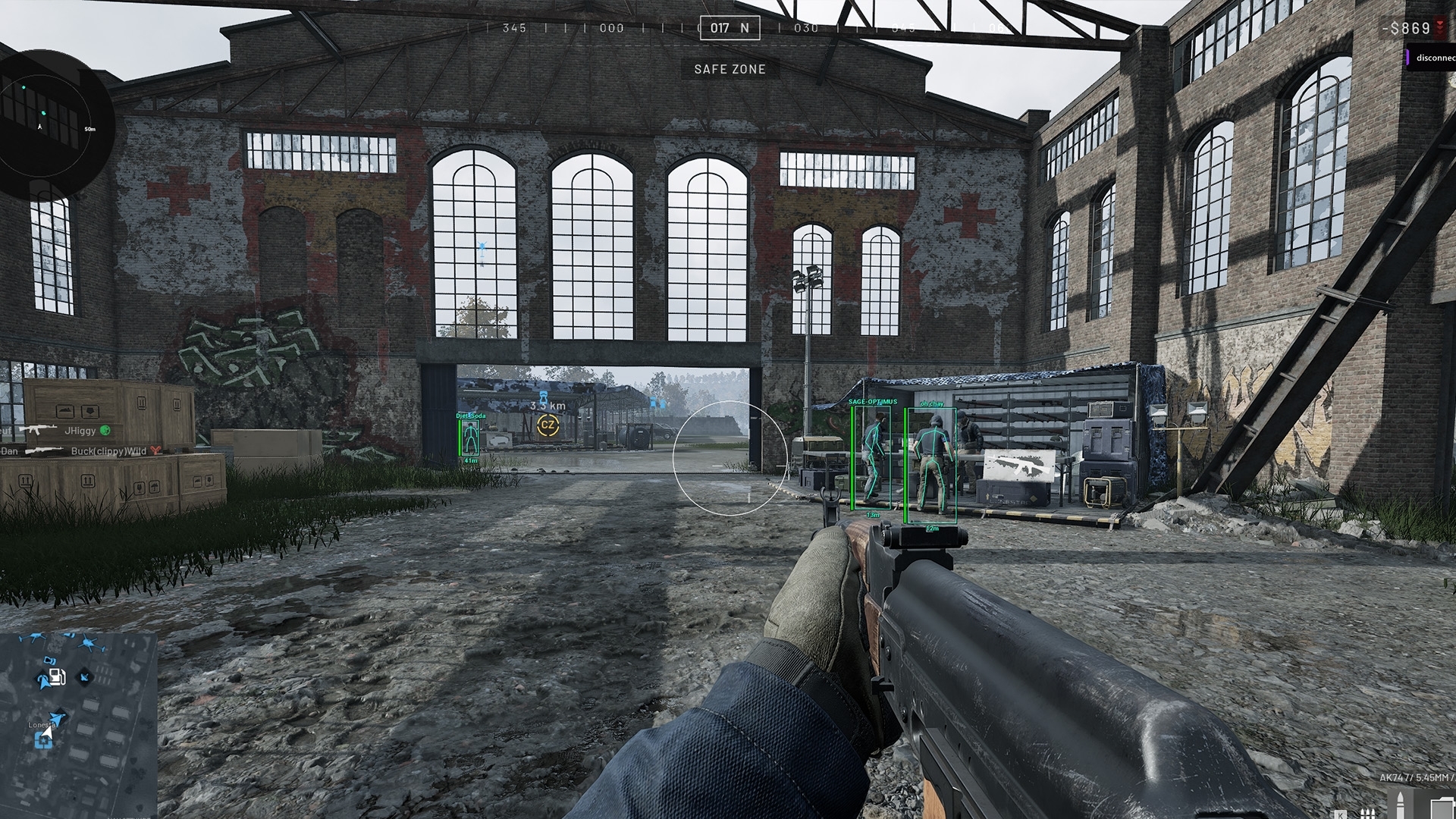
Custom zoom FOV belongs to the zoom feature. It changes the camera view used for zoom, rather than being another name for the aimbot's selection region. The product names a zoom keybind as well. That distinction matters whenever two menu sections both use the abbreviation FOV.
Radar has its own distance controls, too. A radar dot, an ESP box and an aimbot target reference can all concern the same player while serving different purposes. The dot shows a position in a separate panel, the box outlines the player in the scene, and the target reference relates to aiming.
What Disconnect actually includes
The Disconnect Wardogs External product documents the aimbot features discussed above. It also includes Player ESP, radar, zoom and saved configs. Those are separate feature groups, so you can understand the aiming without assuming every drawing on the screen belongs to it.
Silent Aim is not confirmed in this Wardogs product. It is a separate mechanism involving shot-direction correction without the same visible crosshair movement. A feature available for another game should not be carried into a Wardogs description simply because the provider name is the same.
Save and load support lets you keep a config you understand. When reviewing an existing config, describe the actual change: a different target bone, a narrower FOV or more gradual movement. That is much clearer than calling the whole config stronger. Check the current Wardogs status before use, because an explanation of aiming behaviour does not establish current availability.
Frequently asked questions
Does Wardogs External include Silent Aim?
Silent Aim is not confirmed in the current Disconnect Wardogs External feature list. The product documents an aimbot with target-bone selection, prediction and visible crosshair movement controls.
What does aimbot smoothing change?
Smoothing changes how gradually an ordinary aimbot moves towards its selected target. More smoothing generally makes the movement more gradual. It does not remove recoil or account risk.
Is aimbot FOV the same as zoom FOV?
No. Aimbot FOV concerns the area used for target selection. Custom zoom FOV belongs to the camera zoom feature, which has its own keybind.
Which target bones does Disconnect support?
The documented Wardogs target-bone choices are head, chest and pelvis. Choosing a body point does not change weapon damage or guarantee that the point is exposed.