
Console and commands
Wardogs Console Commands and Cheat Codes
People search Wardogs console commands expecting a dev console, an FOV command or a code for free cash. Bulkhead hasn't published any of them. Here's what does exist, what Season 3 changed for config file tweaks and where the things you're really after live.
There are no published Wardogs console commands and no cheat codes. The developer's pinned FAQ, its update notes since Early Access began and its security policy document no player console at all. The only commands Bulkhead mentions are RCON commands for people running community servers. Since Season 3, tweaking graphics outside the in-game menu can get you banned. If what you want is to see players and land shots, that's cheat territory, with the risk that comes with it.
No Wardogs Dev Console and No Cheat Codes
Start with what Bulkhead has actually published. The developer's pinned WARDOGS FAQ on Steam covers the game mode, where it's coming out, playtests and system requirements. The update notes since the 10 September Early Access launch cover maps, vehicles, progression, bug fixes and server changes. The security and enforcement policy covers what gets you banned. None of them documents a Wardogs dev console, a command list or anything you type to change the game.
So the plain answer is that Wardogs console commands don't exist for players. No noclip, no god mode, no spawn commands and no Wardogs cheat codes for money or XP. The Wardogs exploits page covers what Bulkhead has said about XP and cash glitches instead.
If you find a command list online, ask where it came from. Commands lifted from another game, or written for a server admin panel, do nothing in your client. Anything that only works after you edit the game's files is tampering under Bulkhead's policy, whatever the video calls it.
That fits the game. Wardogs is an online shooter for up to 100 players, with cash and XP that carry over between matches, and Bulkhead's policy lists modifying the game's files, executable or memory as a bannable offence. A player console that changed values would cut straight across both.
Part of the search is a mix up, too. Some people typing Wardogs console mean PlayStation or Xbox. The FAQ says the game is launching on consoles in 2028, and for now it's a PC game on Steam with limited controller support.
Wardogs RCON Commands Are for Server Admins, Not Cheats
Look for Wardogs console commands in Bulkhead's notes and the only Wardogs commands you'll find belong to community server admins. The game has a server browser, and many servers are rented from hosting partners and run by their owners. Those owners manage them through RCON, a remote console for the server rather than for your game client.
The 0.1.2 update on 30 September shows the kind of thing RCON does. It let admins restrict who can reach RCON, capped RCON message and broadcast lengths, trimmed the detail RCON sends back and stopped config responses exposing server internals. It also added a daily scheduled restart.
None of that reaches a player. Bulkhead's policy says an admin can kick or ban you from their own server for any reason, and that those bans stop at that server. RCON gives the admin control of their server, not of your aim, your view or your balance.
You do see the results of server side moderation in game. Since the Season 1 changelog, cheater bans are announced in the server when match termination is turned off, and the kicked from server message only appears if you were actually banned. That's the server talking to you, not a console you can talk back to.
Wardogs Config File and CFG Tweaks After Season 3
Searches for a Wardogs config file or a Wardogs cfg tend to be after one thing: a graphics trick that clears grass or smoke so players stand out. Bulkhead closed that door in Season 3.
The Season 3 update notes are specific. Using NVIDIA Inspector or any other third party software to remove smoke, remove grass, modify geometry, alter LOD bias or change textures is now bannable. If one of those options is set, the game blocks you at launch with a warning popup asking you to close it and change them, and forcing your way past that warning counts as bannable too.
The .ini files get the same treatment. Wardogs only shows its lowest "potato" shadow option to PCs it detects as truly minimum spec, and from Season 3 the game resets that option at boot if it's been edited in the .ini files. Spoofing your system specs to keep it is a bannable offence from Season 3 onwards.
Changing graphics through the in-game menu is still fine. Bulkhead even moved Global Illumination so it only appears on the Overkill preset. The line it draws is editing outside that menu to gain an advantage, and it has told players plainly where that line sits.
Wardogs FOV and Crosshair Without a Console
Two smaller searches sit next to this one, the Wardogs FOV and the Wardogs crosshair. Neither has a published command.
On the crosshair, Bulkhead's notes describe an adaptive crosshair, and update 0.1.2 fixed it so it hides properly while you aim down sights. There's nothing to type that restyles it. On field of view, there are no Wardogs console commands in the notes either. The only view change Bulkhead describes is a penalty: since Season 2 the Level 4 Helmet restricts your field of view, muffles audio and fogs over when you sprint.
FOV means something different inside a cheat, and that's where a lot of the confusion starts. Wardogs External has two kinds, and neither one changes your camera.
Aimbot Customization
Wardogs Aim FOV and the FOV Circle
Adjustable Aim FOV sets the area around your crosshair where the aimbot picks a target. Dynamic FOV, a FOV Circle you can recolour and a Target Line that shows the current pick all sit in the same group.
Weapon and Camera Utilities
Wardogs Zoom FOV and Its Keybind
Zoom is separate from aiming. It has its own Adjustable Zoom FOV and a Custom Zoom Keybind, so you can punch in on a far target without touching the aimbot config.
If the aiming side is what you came for, the Wardogs aimbot guide goes through FOV, smoothing and prediction in detail. Maxed sliders and a snapping crosshair are what get you reported.
What the Wardogs Cheat Menu Does That Commands Can't
Most of what people hope Wardogs console commands will give them is what a cheat menu does: show where players are, help you land shots and let you see more of the fight. Disconnect Cheats' Wardogs External lists eight feature groups and 89 features, running as an external with its own menu over the game.
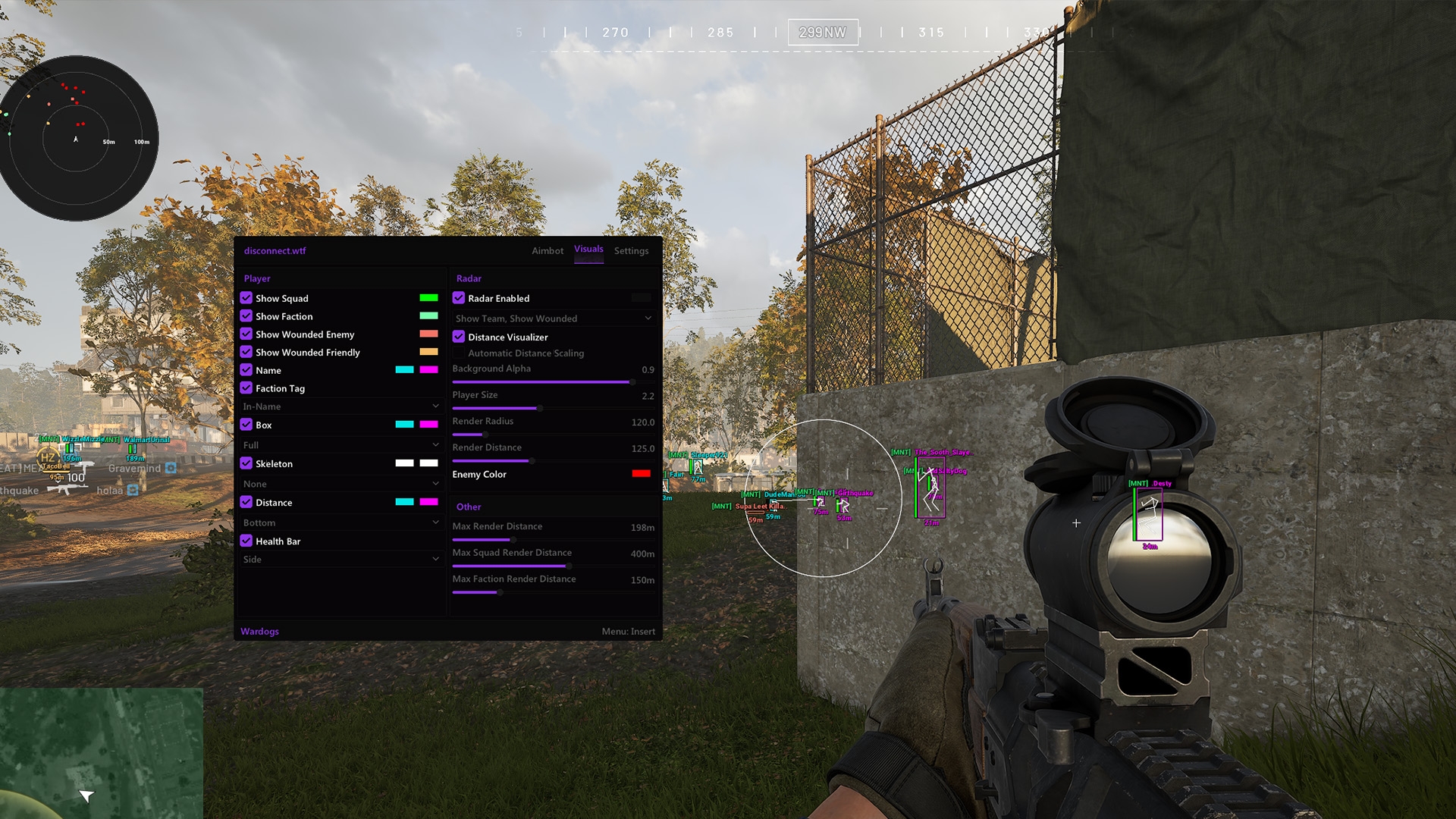
- Player ESP with names, boxes, skeletons, health bars and distance, plus separate visible and hidden colours.
- Squad ESP, Faction ESP and Enemy Loadout Cost ESP, which shows what an enemy's kit is worth.
- A Player Radar with teammate and wounded player filters, adjustable radius and its own render distance.
- Aimbot with prediction, a visible check, target lock and hitbox selection, plus a Silent Aimbot.
- Freecam with adjustable speed and its own keybind, the nearest thing to a noclip camera. The Wardogs freecam guide covers how it behaves.
Instead of a cfg file, the cheat has its own config system. Export Config to Clipboard and Import Config from Clipboard let you save and share a whole setup as text, and the Wardogs cheat configs guide shows how to do it cleanly.
The Wardogs External product page lists every feature by name, along with plans that currently run from $4.99 for a day to $129.99 for lifetime. For the bigger picture, the Wardogs cheats page from Disconnect Cheats lays out aimbot, ESP and radar side by side.
No command can get you banned if it doesn't exist. A cheat can. Bulkhead's policy names aimbots, wallhacks, ESP and radar among banned cheats, and penalties run up to permanent and hardware bans. The DisconnectCheats live status page shows Undetected for the Wardogs product today, which is today's reading and not a promise. Any cheat can get your account banned, so play it smart.
Wardogs Console Commands FAQ
Can I open a developer console in Wardogs?
Not one Bulkhead has published. Its FAQ, update notes and security policy don't document a player console, and changing the game's files or memory to force one counts as tampering under the policy.
Are there Wardogs cheat codes for money or XP?
No. There are no cheat codes, and Bulkhead resets cash and XP gained through exploits and bans players who keep abusing them.
Will editing my Wardogs .ini file get me banned?
The edit alone isn't what Bulkhead names. From Season 3 the game resets a tampered potato shadow option at boot, and working around that reset, for example by spoofing your specs, is a bannable offence. Change graphics in the in-game menu instead.
Is Wardogs coming to consoles?
Bulkhead's FAQ says Wardogs launches on consoles in 2028. For now it's a PC game in Early Access on Steam, with limited controller support.