
Disconnect Wardogs Guide
Wardogs Player ESP and radar: read squads, factions and loadout cost
Wardogs can put a lot of people in the same part of the battlefield. More labels will not help if you cannot tell your squad from the wider faction, or a wounded player from someone still fighting. The useful details are in the filters.
Disconnect Wardogs External includes Player ESP, squad and faction filters, separate wounded-player options, loadout-cost labels and radar. Use the labels for detail in the main scene and the radar for relative positions. Loadout cost is information about a player’s loadout, not a cash balance or a money-generation feature.
Why Wardogs ESP needs more than enemy boxes
Wardogs ESP adds extra information about supported players to your view. The usefulness depends on what each marker tells you. A box can locate someone, but it does not by itself explain their relationship to your squad, their faction or whether they are wounded. Those distinctions become important when several groups occupy the same area.
The official Wardogs Steam page describes a 100-player FPS with three teams fighting over a control zone. That context explains why a visual menu needs more than a single friendly colour. A close squad member and someone elsewhere in your faction do not always deserve the same amount of screen space.
Disconnect’s Wardogs External product page confirms separate squad, faction, wounded-enemy and wounded-friendly options. This guide explains those named controls and their limits. It does not claim that we ran new gameplay tests or measured the cheat’s performance in a full server.
If you are browsing Wardogs cheats for the first time, start with the information you want from the visual features. A readable display should make a few important distinctions quickly. It should not force you to study a crowded screen while the fight moves somewhere else.
Squad ESP and faction ESP answer different questions
Squad ESP concerns the players identified as your squad. Faction ESP concerns the wider faction group. Disconnect offers Show Squad and Show Faction separately, along with their own maximum render distances. That separation lets the display give close squad information a different reach from the broader group.
A familiar marker should mean the same thing every time
Keep the relationship colours consistent. If you learn one colour for your squad and another for your faction, changing them between saved configs makes recognition slower. Colour is useful when it becomes familiar enough to read immediately, not when every session starts with you remembering which shade means what.
Faction tags add a text cue as well. The menu supports placing the tag in the name or at the left side. Text can help when two colours are hard to distinguish, but a tag still needs room around other labels. Put several long fields in the same place and the extra detail becomes a pile of overlapping words.
Separate distances prevent unnecessary crowding
The maximum squad render distance and maximum faction render distance are named separately from the general maximum render distance. These are display limits, not promises that the cheat has unlimited access to every player anywhere on the map. They describe how far supported markers are allowed to appear.
For a Wardogs Player ESP view, the closest relevant group should be easy to recognise. Information about distant friendlies may be useful for context, but it should not carry the same visual weight as the person directly in front of you. More range is not automatically more useful information.
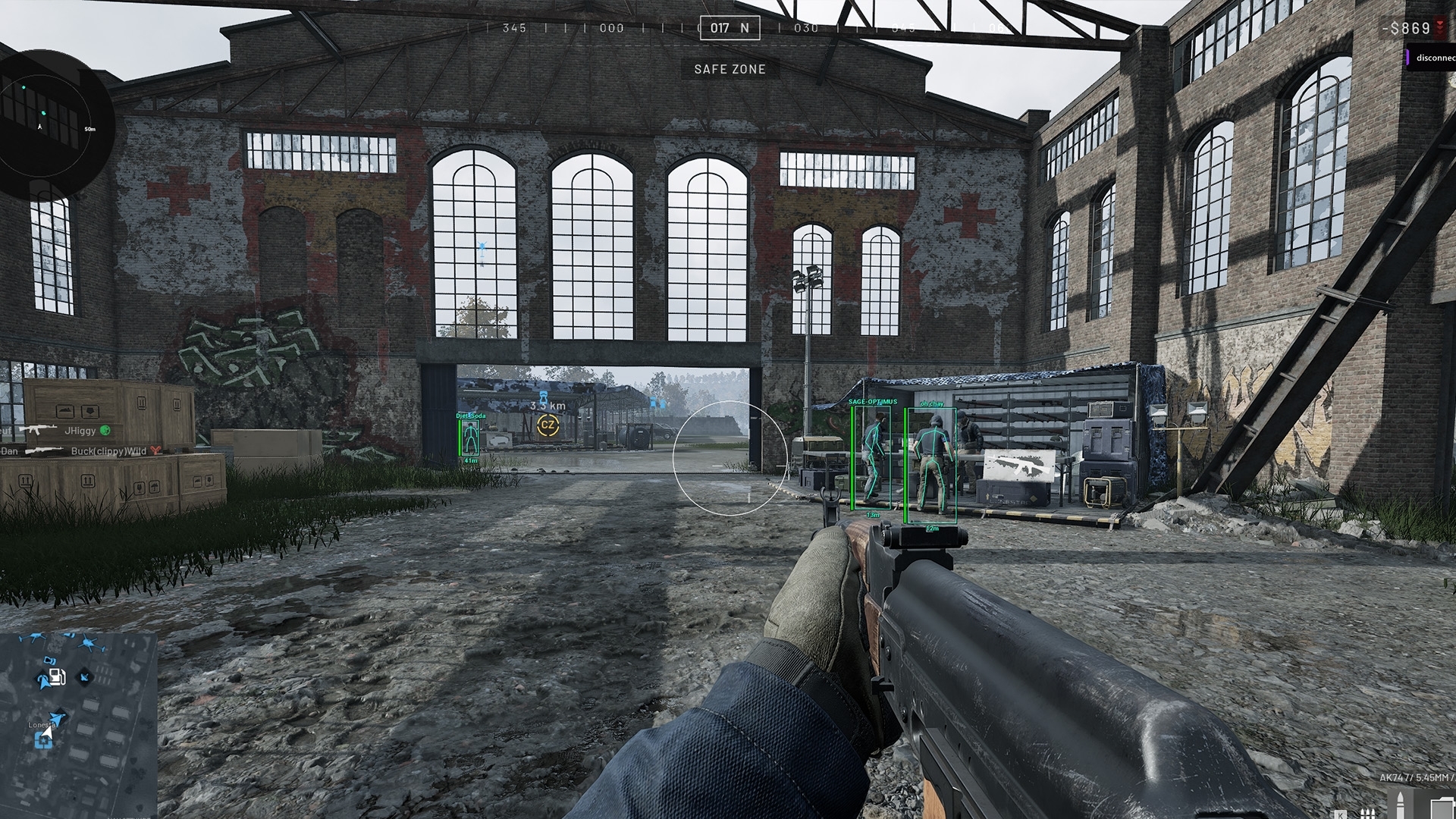
Wounded players need their own visual treatment
Disconnect includes Show Wounded Enemy and Show Wounded Friendly. Wounded ESP therefore should not be described as one undifferentiated switch. The two groups have different relationships to you, and the current menu also gives them separate colour options.
A wounded-friendly marker can help distinguish that player from an active squad member. A wounded-enemy marker describes a different state from an opponent who is still moving and firing. The marker supplies information; it does not tell you that approaching the position is safe or that nearby players have stopped being relevant.
Do not make state and relationship compete
You are reading two things at once: who the player is in relation to you and what state the product displays for them. Choose a combination of labels and colours that preserves both. If every wounded player looks identical, the relationship distinction you added elsewhere can disappear at the moment you need it.
The supported skeleton controls also name friendly and wounded targets. That is useful detail to look for on the current menu. A general claim that a cheat has Skeleton ESP does not explain which groups can be shown, or how those groups can be filtered independently.
Treat a screenshot as an illustration of the interface. It can show where the controls live and which labels are available, but it cannot prove that every player state will always be represented correctly after a game update. Current compatibility still matters.
Loadout Cost ESP is a label, not free money
Loadout Cost ESP displays the supported cost information associated with a player’s loadout. Disconnect offers a minimum loadout cost control and lets you place the label above, below or on the right side. Those are information and display controls, not a way to add cash to your account.
Cost gives context, not certainty
An expensive loadout does not prove that someone is skilled, carrying a particular amount of spendable cash or about to make a good decision. It gives you a value to read alongside other information. Do not turn a useful label into a claim about everything that player owns.
The minimum-cost control belongs to the loadout-cost display. Its inclusion does not establish that it filters every other player visual or changes target selection as well. Read it as a named control within this feature, and ask support if a specific interaction matters to your purchase.
Give the label enough room
Loadout-cost position matters because Name ESP, distance and faction tags can already occupy the same area. If the top of a box is crowded, moving one field to the side can make the whole marker easier to understand. You do not need every value in the same line to keep it close to the player.
Wardogs loadout cost works best as one readable field beside the marker. Give it a consistent colour and a position that leaves the name and distance clear. If that area becomes crowded, change the placement before making every label smaller. You should be able to read the value without losing the player underneath it.
Boxes, skeletons, health and distance
Box ESP gives you a full or corner outline. Skeleton ESP displays the supported bone structure. Health bars add a different kind of information, with side or bottom placement in Disconnect’s menu. None of these controls has the same purpose as an aimbot, even though the product contains aim features in another section.
Locate the player
Use the box or skeleton as the main visual reference. Adding both increases detail and also increases the number of lines on screen.
Read the detail
Names, health, faction tags, cost and distance provide context around that reference. Their placement should keep each field legible.
Distance ESP includes right-side, top, bottom and in-name positions. A distance label helps distinguish a nearby marker from one farther away, but it is not a promise of weapon range or a clear path. The physical scene still matters when two labels look close together in a flat view.
Visible and hidden colours are available for several player visuals. These labels concern the product’s visibility distinction. Seeing a hidden marker does not mean a wall has become penetrable, and a visible colour should not be presented as a guarantee that every shot will land.
ESP font size is easy to dismiss until several labels gather around a doorway. The right size is one you can read in motion without the text swallowing the player model. A tidy promotional image is not a substitute for a display you can understand during a busy moment.
Wardogs radar: radius and distance are different controls
Wardogs radar places supported player positions in a separate view. Disconnect confirms Show Team, Show Wounded, a distance visualiser and automatic distance scaling, alongside background transparency, player size, render radius and render distance. You can shape the radar independently of the labels in the main scene.
Panel size is not world range
Render radius concerns the size of the radar display, while render distance concerns the world distance represented. Making the panel larger does not by itself mean that it covers more of the battlefield. Player size changes the markers, and background transparency changes how strongly the panel sits over the game.
Automatic distance scaling and the distance visualiser affect how you read the positional view. Use the current product instructions for the precise behaviour of those controls. Their names should not be expanded into promises of a live map, vehicle tracking or unlimited range when the public menu does not confirm those features.
Use the main scene and radar for their own strengths
The main scene is where you read names, health and loadout-cost labels. Radar is useful for the relative arrangement of players around you. Looking only at one loses some of the value of the other, and making both excessively busy gives you two crowded places to read.
A Wardogs wallhack is a broad phrase for through-obstruction visual information. It does not tell you whether a product includes radar, model highlighting or a particular player field. Read the confirmed feature names instead of treating that single word as a complete specification.
Save a readable config and check the current product
Disconnect supports saving, loading and keeping multiple configs. That lets you preserve a visual layout you understand instead of rebuilding it every time. Name configs around their purpose, and keep the meaning of squad, faction and wounded colours consistent between them.
The product also includes zoom with a keybind and custom zoom FOV. Zoom changes the view; it should not be confused with radar distance or the aimbot’s selection region. Several controls contain the word FOV, so the section they belong to matters as much as the abbreviation itself.
Wardogs External is described with Windows 10/11 and Intel/AMD support, plus no USB required and a stream-proof claim. These are separate statements. They do not mean that the cheat has no requirements, works with every capture method or is approved by the game’s anti-cheat.
Before buying, check the current status notice and the exact requirements on the product page. A quiet-looking overlay does not remove account risk. The useful reason to choose a cleaner display is that you can read it, not that fewer boxes somehow make cheating safe.
Frequently asked questions
Does Disconnect Wardogs External include radar?
Yes. The current product menu confirms radar with team and wounded filters, a distance visualiser, automatic distance scaling, transparency, player size, render radius and render distance controls. Use the current product page for the latest supported feature list.
Does Loadout Cost ESP show a player’s cash balance?
The confirmed feature is loadout-cost information. It should not be described as a player’s spendable cash balance, a full inventory inspection or a cash-generation feature. The menu also names a minimum-cost control and several label positions.
Can squad and faction markers have different distances?
Yes. The product names maximum squad render distance and maximum faction render distance separately, alongside a general maximum render distance. These are display controls for supported markers, not a guarantee of unlimited coverage across the map.
Is Player ESP the same as an aimbot?
No. Player ESP displays information about supported players. An aimbot assists aiming. Disconnect includes both feature groups, but names, boxes, health bars and distance labels should not be described as if they aim or fire for you.