
Cheat menu guide
ROB RUN Cheat Menu and How to Set It Up
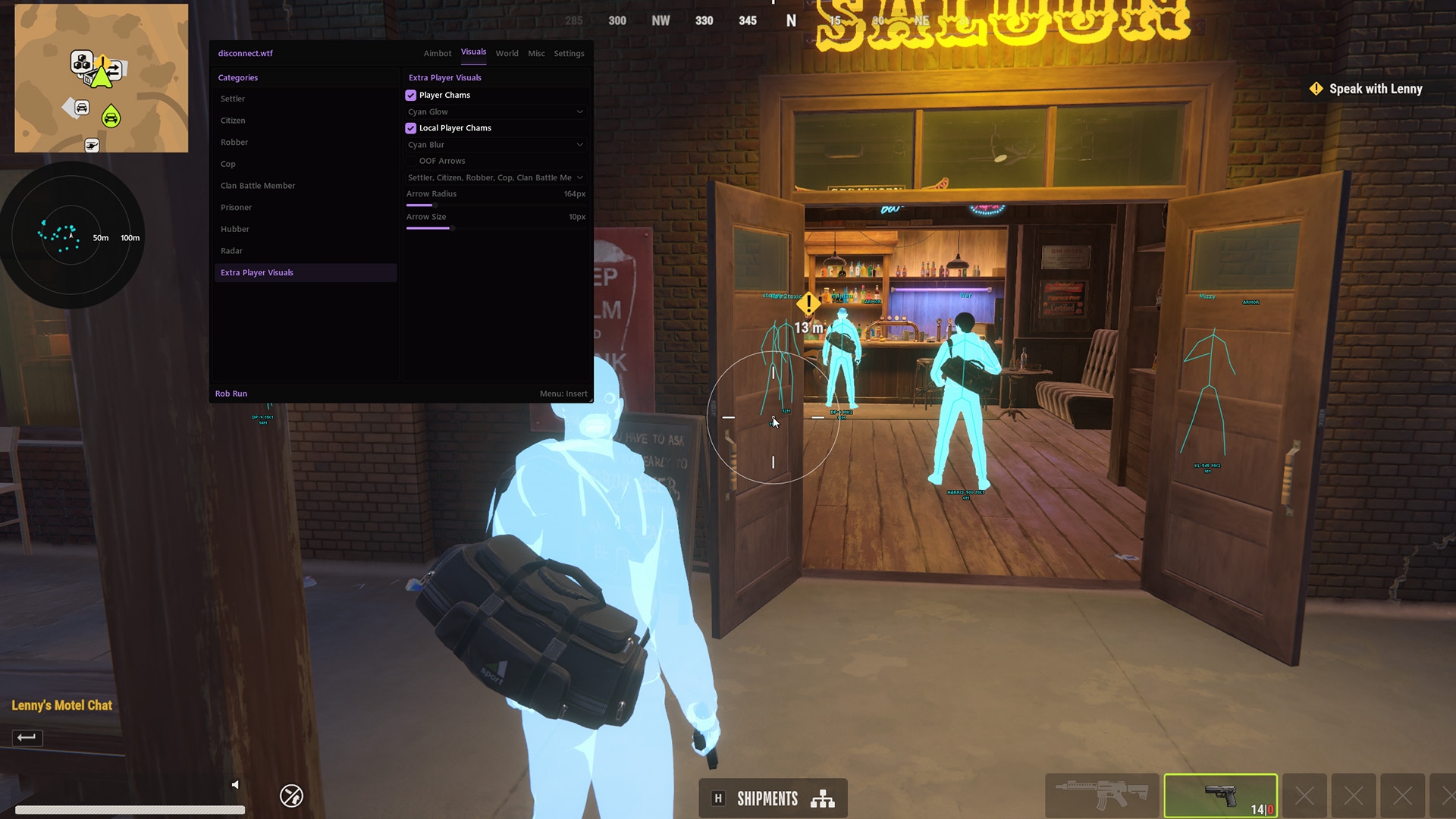
You've loaded the cheat, opened the menu and you're staring at a wall of toggles with no idea which ones matter tonight. The ROB RUN cheat menu holds 160 features in 14 groups, and a first session needs maybe a dozen of them. This guide maps every group, tells you which keys to bind first and walks you through saving a legit config and a rage config you can trust.
The ROB RUN cheat menu opens on its own Custom Menu Keybind and splits into aimbot, player visuals, radar, loot, world, base, camera and config groups. Set it up in one order: keys first, then a small aimbot radius, light player ESP and a loot value floor, then save the lot to the Legit slot. Make a louder version in the Rage slot only if you want one, and check the live status page before every session.
What Sits in the ROB RUN Cheat Menu
YouTube uploads call it a ROB RUN hack menu or a ROB RUN cheat client. Same thing, different label: the overlay you open in game to switch features on and off.
On Disconnect Cheats, the ROB RUN cheat menu is the window inside ROB RUN External, an external cheat that runs beside the game instead of inside it. Disconnect Cheats lists 160 features across 14 groups for it. That sounds like a lot until you see the split: one group aims, most of the others draw something on screen and the last few look after your keys, fonts, friends and configs.
Here's the whole map, with an honest call on what to touch in your first session.
| Group | What it covers | First session? |
|---|---|---|
| Aimbot & Targeting | Normal Aimbot, Silent Aim with Silent Aim Hitchance, Aim Bone Selection, role and team filters, smoothing, humanization, deadzone, aim radius and the FOV circle | Yes, the aim key and a small radius |
| Detailed Player Visuals | Skeleton ESP, Box ESP, names, distance, clan tags, held items and indicators for reloading, armour, crouching, sprinting and knocked players | Yes, kept light |
| Player & Vehicle Radar | Standalone, map and minimap radar with role and vehicle filters | Later |
| Off screen player arrows | Arrows for players outside your view, with role filters, role colours, size and radius | Later |
| Player & Local Chams | Player Chams, Local Player Chams and Independent Material Selection | Optional |
| Loot & Item Visuals | Loot names, distance and value, the Minimum Loot Value Filter, category and rarity filters and item category toggles | Yes, with a value floor |
| Bodybags & Despawn Timers | Bodybag ESP with names, distance and a Despawn Countdown | Later |
| Vehicle Tracking | Car, police car, van and helicopter ESP with Vehicle Owner Display | Later |
| World Objects & Security | Cargo, container, ATM, door, hide spot, camera and alarm ESP with hacked and disabled filters | On a job |
| Bases, Buildings & Storage | Base owner, clan and status, storage and base cargo contents, defences and garages | When scouting a raid |
| Workbenches & Production | Workbench ESP, Laundering Desk, Grow Table, Crypto Farm and production | When scouting a raid |
| Camera Controls & Utilities | Instant Loot Search, Freecam, FOV Changer, Zoom and Battle Mode | Bind the keys now |
| Lobby & Friends Manager | Lobby Player List, Player Search, Saved Friends List and Friend Highlighting | Once, to add your crew |
| Menu, fonts and configs | Menu key and accent colour, ESP fonts and outlines, Legit, Rage and Other config slots, clipboard import and export | Yes, before you play |
Most of the visual groups also carry their own Adjustable Render Distance or Individual Render Distances, so you can run players far and loot close without one dragging the other.
ROB RUN Keybinds for the Menu, Aimbot and Freecam
Bind keys before you touch a single slider. Five features on the Disconnect Cheats product page take a key of your choice, and getting them right early stops you fumbling for the menu in the middle of a gunfight.
- Custom Menu Keybind opens and closes the ROB RUN menu. Pick a key you won't hit by accident, because a menu popping open during a chase gets you killed.
- Custom Aim Keybind puts the aimbot on a key you choose. A side mouse button keeps it off your movement keys and means the aimbot only joins a fight when you press it.
- Custom Freecam Toggle Keybind switches Freecam on and off, and Adjustable Freecam Speed decides how quickly the camera moves once it's free.
- Custom Zoom Keybind zooms on a key, with Adjustable Zoom FOV controlling how far in it goes.
- Custom Battle Mode Keybind switches Battle Mode. The product page lists Battle Mode without describing it, so check what it changes on your own screen before you lean on it in a fight.
Write your ROB RUN keybinds down the first time you set them. After a game update or a config swap, you'll know straight away if a key isn't doing what it should.
ROB RUN Cheat Setup in Six Steps
Here's how to use ROB RUN cheats on night one, in the order that gets you from a closed menu to a config you can actually play on. Treat it as a ROB RUN cheat tutorial, not a tour of every slider.
If you haven't bought or downloaded anything yet, our guide on how to get ROB RUN hacks covers the steps that come before this one.
- Check your PC and the status. ROB RUN External currently lists Windows 10 and 11, Intel and AMD processors and no USB, BIOS or Windows features required. Then open the live status page. It shows Undetected today, which is a status and not a promise.
- Bind your keys. Menu key, aim key and the camera keys from the list above, before anything else.
- Shrink the aimbot. Choose your bone with Aim Bone Selection, keep Adjustable Aim Radius small and leave the Customizable FOV Circle on screen while you learn it. Visibility Check and Ignore Knocked Players stop it chasing someone behind a wall or already on the floor. Our ROB RUN aimbot guide goes through every value.
- Add smoothing. Aimbot Smoothing and Aimbot Humanization make the normal aimbot move like a hand instead of a snap, and Aimbot Deadzone stops it twitching once you're already on target.
- Trim player ESP. Skeleton ESP or Box ESP, Player Names and Distance ESP are plenty to start, with Custom Team and Friend Color so your crew never looks like a target. The full visual set is in our ROB RUN ESP guide.
- Set a loot floor, then save. Turn on Loot Value Display, set the Minimum Loot Value Filter so cheap items stop drawing, then use Config Save and Load to store the result in the Legit slot. ROB RUN loot ESP has its own guide if you want to go deeper.
That's the whole ROB RUN cheat setup for a first session. Everything else in the table can wait until a job, a chase or a raid gives you a reason to switch it on.
ROB RUN Legit Config and Rage Config Slots
The ROB RUN cheat menu gives you three named config slots: Legit, Rage and Other. The product page doesn't say they come filled in, so treat them as empty slots with useful names. What goes in each is your call, and keeping them apart is the whole point.
Legit slot
What Goes in a ROB RUN Legit Config
Normal Aimbot on its key with a small radius, smoothing, humanization and a deadzone. Player ESP kept to skeletons, names and distance, and loot above a value floor. A ROB RUN legit config is the one you load most nights, so set it up first and change it least.
Rage slot
What Goes in a ROB RUN Rage Config
Silent Aim with a higher Silent Aim Hitchance, Keep Target on, a wider radius and every visual group you like. A ROB RUN rage config wins fights fast and gets you reported just as fast. Load it on purpose, never by accident, because a rage config is the fastest way to put the account at risk.
Other slot
A Job Config in the Other ROB RUN Slot
Use it for robberies: camera, alarm, door and hide spot ESP on short render distances, with aim left exactly as it is in your legit slot. Or park a clean copy of your legit setup there before you start experimenting.
Whichever slot is loaded, a ROB RUN cheat config changes what the cheat does, not the ban rules. Kefir's permanent ban doesn't care which slot you had open.
Clipboard Config Export and Import in ROB RUN
Sort your crew out first. In the Lobby & Friends Manager, Add and Remove Friends keeps a Saved Friends List, Friend Highlighting marks those players in game and Online and Offline Status shows who's on tonight.
Then share the config. Clipboard Config Export copies your current config so you can paste it to a mate, and Clipboard Config Import loads one they send back. It's the quickest way to get a whole crew on the same colours, so roles and teammates read the same on everyone's screen.
Read an imported config before you play on it. Open the aim group and check the radius, Keep Target and Silent Aim Hitchance, then check the render distances on every visual group. Someone else's idea of legit can be your idea of blatant, and the ban lands on your account, not theirs.
Save your own work to a slot before you import anything. That way a bad paste costs you nothing but a reload.
ROB RUN ESP Fonts, Text Outlines and Menu Accent
The display options are easy to skip, and they decide how readable your ESP is on a busy street. Separate Top, Bottom, and General ESP Fonts give top labels, bottom labels and everything else their own font, chosen from Tahoma, Verdana, and Small Fonts. Small Fonts keeps labels compact when a crowd stacks up, while Tahoma and Verdana read more easily at a distance.
Text Outlines and Text Drop Shadows stop labels vanishing against bright walls and open sky. Custom Menu Accent Color changes the menu's highlight colour, and Resizable Menu lets you shrink the window so it covers less of the game while you adjust things live.
The product page also lists Streamproof, with the cheat hidden from game capture. If you record or stream, read our page on the ROB RUN streamproof cheat first, because hiding the overlay from capture doesn't hide the way you play.
What the ROB RUN Cheat Menu Can't Do for Your Account
No toggle switches off ban risk. ROB RUN runs Easy Anti-Cheat, and Kefir's help centre says using cheats results in a permanent ban. The live status page shows Undetected today, which is a current status and not a promise, and any cheat can get your account banned.
What the ROB RUN cheat menu does give you is control over what draws and how the aimbot moves. None of it is protection, and no config in any slot will save an account once a ban lands.
For how bans work in this game, including what Kefir hasn't said about hardware bans, read our ROB RUN HWID ban guide. For every feature group on one page, start from our ROB RUN cheats page.