
How to Spot a Rust Crosshair Overlay in a Clip
A Rust crosshair overlay draws a reticle over the picture. A fixed centre dot can stay in exactly the same place while the weapon, the HUD and everything behind it move. A dot in a clip is poor evidence of an aimbot.
Rust has its own crosshair. Disconnect Cheats also lists Custom Crosshair for Rust External. The same clip can contain the game's reticle, a separately drawn dot and a much larger aim circle, each with a different job.
The Crosshair Rust Already Has
Facepunch introduced a built-in crosshair in The Combat Update. It later revisited the design in Meta Shift. A PC clip with a centre mark could therefore be showing the game exactly as supplied. Start with the date of the footage before deciding what drew the reticle.
A Rust crosshair overlay can put a fixed reference over that changing picture. The dot is tied to a position on the screen. It has no knowledge of the name, health or distance of the player who walks past it.
The phrase “Rust custom crosshair” can refer to the appearance of a reticle, regardless of where the drawing comes from. A different colour or shape is the least useful part of a screenshot for identifying its source. Both can be imitated in an edit.
The Custom Crosshair in Rust External
Disconnect Cheats lists a Rust crosshair overlay under the name Custom Crosshair in Movement & Utility on the Rust External page. The published feature name establishes that a crosshair is included. It doesn't promise that every reticle you've seen on a Rust stream is available in the menu.
If a streamer calls their dot a Rust crosshair overlay, look at what else they're showing. A menu capture that names the feature is stronger evidence than a circle pasted onto a thumbnail. If you need a particular shape, ask about that shape. The product page doesn't document every visual option.
On the Rust cheats page from Disconnect Cheats, combat and player visuals have their own feature groups. A Rust crosshair overlay doesn't identify a sleeper on the ground or put a name above an enemy. Those details have their own group.
Player ESP labels move with a character as they run across the screen. A reticle stays in the same place while the character runs past it.
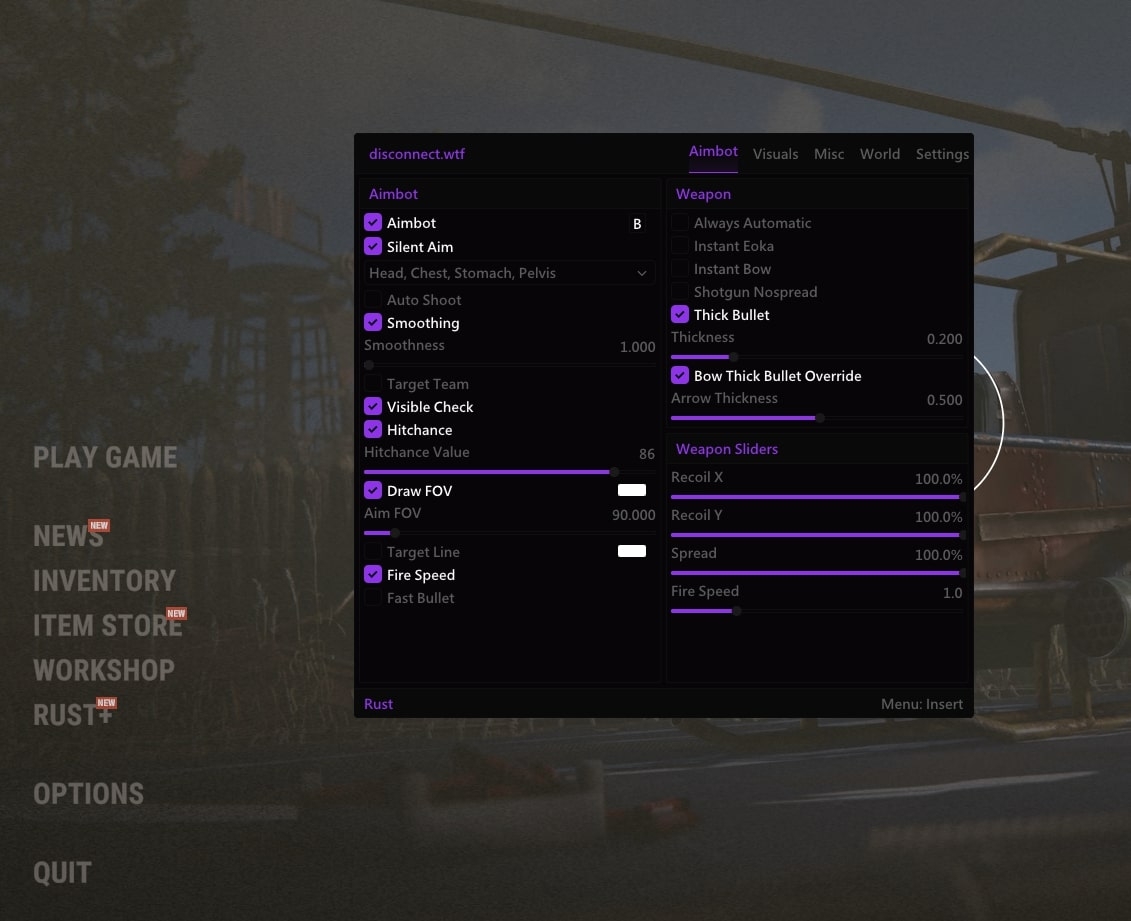
A Crosshair Dot and an Aim Circle
The Rust crosshair overlay occupies the centre. An aimbot FOV circle marks the area around it. A recording can show a white dot inside a much larger ring, which makes the difference easy to see even without the menu open.
Rust External also lists a target line. That's a separate drawing which may extend away from the centre towards a player. If the dot stays put while a line changes direction, the dot hasn't locked onto anything.
A Rust crosshair overlay doesn't tell you whether weapon spread changed. A reference point and the path the game gives a shot are two separate things. A still image of a reticle on a head doesn't show where a fired round landed.
How a Reticle Looks in Rust Footage
Footage of a Rust crosshair overlay can be cropped until the HUD and the corners of the screen disappear. If the editor hasn't kept the original centre, the dot can look slightly off even when it was centred during play. Check the aspect ratio before taking measurements from a repost.
A monitor crosshair can be drawn by the display itself. An ordinary capture of the game might leave that mark out while a camera filming the screen picks it up. The missing dot tells you something about how the clip was recorded, not whether the original player had a centre mark.
The Rust aimbot guide covers the aim features in Disconnect Cheats. If your whole reason for opening it was a Rust crosshair overlay in the middle of a clip, the separate crosshair entry is the closer match.
Which Rust Feature Is in the Clip?
You can usually narrow a Rust crosshair overlay question down to one of three drawings. A dot fixed in the centre is a reticle. A ring enclosing an area is consistent with an aim circle. A line that ends on a character is consistent with a targeting display. One frame can contain all three. For the same question in ROB RUN, see what changes when the camera FOV widens.
For Rust hacks carrying the Disconnect name, check which release the footage names. A feature listed for External is a claim about External. It doesn't identify another seller's overlay, and it doesn't tell you how a third-party server treats software running alongside the game.