
Rust config guide
Rust Legit Cheats With ESP Only and Smooth Aim
A cheat that wins every fight in the most obvious way possible is also the easiest one for other players to report. Rust legit cheats go the other way. You keep the information, keep your aim looking like your own and leave the features that change fight outcomes switched off. Here's how to put that config together from features DisconnectCheats actually lists, and where it stops protecting you.
Lean on Player ESP, radar and Enemy Proximity Alerts, add an aimbot with Aim Smoothing and a small FOV, use recoil control at part strength, and leave Silent Aim, Fast Bullets and No Shotgun Spread off. That lowers what people can see. It does nothing about EAC.
Who you're actually hiding from
Legit doesn't mean safe and it doesn't mean undetected. It describes how your play looks to people. In Rust those people are the player you just killed, your own teammates, anyone watching your stream or clips and the admin who opens a report with your name on it.
Each of them judges what they can see: where your crosshair went, how quickly a fight ended and whether your shots behaved the way that weapon normally does. A legit config keeps all of that inside what a good player could plausibly do on a good day.
What none of them can see is the information on your screen, as long as you don't act on it in ways that give it away. That's why Rust legit cheats start with information and only then add a little aim help.
There's one watcher this doesn't change. A quieter config doesn't stop EAC on Rust detecting the cheat software, so everything here is about people, not anti-cheat. More on that at the end.
The quiet config, one layer at a time
Think of it as four layers. The first three go on. The fourth is the list of features you deliberately leave alone, because they're the ones that turn a quiet config into an obvious one.
Information
Know where people are
Rust External: Player ESP, Radar, Enemy Proximity Alerts.
Rust Internal: Player ESP, Player Radar, Enemy Proximity Alerts.
Aim
Help only near your crosshair
Rust External: Aimbot, Aim Smoothing, Adjustable Aim FOV, FOV Circle.
Rust Internal: the same four, plus Dynamic FOV.
Recoil
Take some of the kick out
Rust External: Recoil Control (X/Y).
Rust Internal: Recoil Control with Horizontal and Vertical Recoil Adjustment.
Leave off
Anything that changes the result
Rust External: Silent Aim, Fast Bullets, Shotgun No Spread.
Rust Internal: Silent Aim, Fast Bullets, No Shotgun Spread.
Rust Internal also lists Legit & Rage Config Presets. They're a sensible place to begin, but the product page doesn't say what the legit preset switches on, so check every feature in it before you trust it. Rust External lists a Config System for saving your own. If you're still choosing a product, our best Rust cheats page puts Rust External and Rust Internal side by side.
Information features carry the whole config
ESP is the quietest advantage in Rust because nobody else sees it. Player ESP on both Disconnect Cheats products covers names, distance, held items and status flags, with skeleton and chams on top. The Rust chams guide covers picking colours you can recognise at a glance. Knowing what someone is carrying changes whether you take the fight at all, and from the outside that decision just looks like good judgement.
Radar does the same job at a glance. Rust External lists a radar with a distance visualiser and adjustable size and transparency. Rust Internal lists Player Radar with orientation lock and auto scale. A small, fairly transparent radar in one corner gives you the picture without covering the fight. The Rust radar guide goes further into size, distance and filters.
Enemy Proximity Alerts are on both products and are about as low profile as a feature gets. The product pages don't describe how the alert looks, but the name tells you the job: you're warned that someone is close, and what you do about it is still your call.
Some players stop there and run Rust ESP only, with the aimbot switched off entirely. It's the quietest config of all, although the account risk from running a cheat stays exactly where it was.
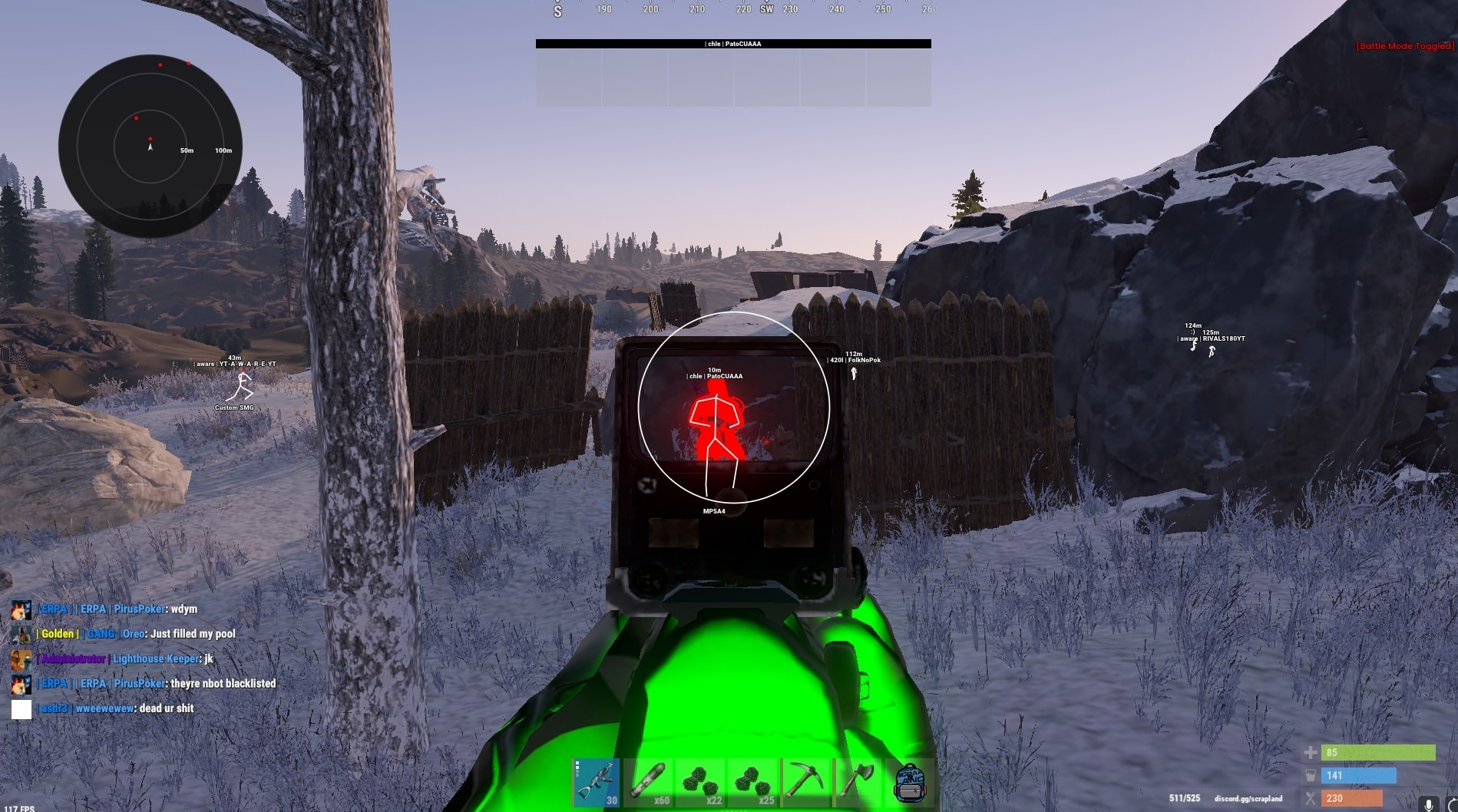
The catch is how you use it. Tracking a player through a wall with your crosshair, or turning straight to face someone you couldn't have heard, gives the ESP away as clearly as any aim feature would. Act on it the way you'd act on footsteps and map knowledge. The Rust ESP guide goes through the player and world filters in more depth.
Aim help that stays behind your own aim
The aimbot is where most legit configs fall apart. A wide FOV with no smoothing finds players you never looked at and snaps onto them, and that movement is exactly what gets clipped and reported.
Keep Adjustable Aim FOV small and turn on Aim Smoothing, so the crosshair eases onto a player you've already lined up. Leave the FOV Circle on while you tune it, so you can see where it will and won't engage. That combination is what most people mean by Rust soft aim, and that guide covers why it's slower and where it falls short.
Hitbox choice matters too. Both products list Custom Hitbox Selection, and an aimbot that finds the head every time stands out over a session in a way that body shots don't.
Partial recoil, not a laser
Recoil control earns its place in Rust legit cheats, but pushed all the way it can leave a spray that barely moves. Anyone watching a clip back can see a weapon that should climb holding perfectly still.
Both products split recoil by direction, which helps. Take some of the kick out and leave some in, so your spray still behaves like the weapon, only a tidier version of it. If the weapon pulls more one way than the other, adjust that axis on its own and leave the second axis where it was.
The Rust no recoil explainer covers what each axis does. For a quiet config, the useful rule is simply that less is more convincing than none.
Three features that give a config away
Some features are invisible to everyone but you. These three aren't, because they change what happens to the player on the other end.
On both products
Silent Aim
It corrects shots without the same visible crosshair movement. That's the problem. Hits that don't match where you were pointing are something a spectator or an admin reviewing a report can notice. The Rust Silent Aim explainer covers the mechanics.
On both products
Fast Bullets
Rust bullets take time to travel and drop over distance, and good players lead their shots to allow for it. Shots that land at range without that delay can look wrong even to someone who can't explain why.
Named differently on each
No Shotgun Spread
Shotgun No Spread on Rust External, No Shotgun Spread on Rust Internal. A shotgun that hits like a rifle at distances where pellets normally scatter is one of the clearest tells in the game.
Those three sit at the heart of a different style of play. If maximum advantage is what you want and you accept what comes with it, our page on Rust rage cheats lays out that config and what it puts at risk.
Streamproof for anyone who records
If your gameplay ends up on a stream, a YouTube upload or a clip in a Discord channel, the overlay matters as much as your aim. DisconnectCheats lists Rust External as Streamproof, which the product page describes as hiding the cheat from game capture. The Rust Internal page doesn't list Streamproof, so for anyone who records, that's a clear point in favour of the Rust External cheat.
Two cautions. Try your own recording method and watch a saved file back before you rely on it. And remember what Streamproof covers: it keeps the overlay out of your viewers' sight. It says nothing about EAC.
What a quiet config can't protect you from
Rust legit cheats lower the odds of being noticed. They don't remove any of these.
- Reports. Players report what looks wrong to them, and a single fight that goes unusually well can be enough. A quiet config means fewer of those moments, not none.
- Server admins. Community servers set their own rules and have their own admins. An admin who watches you after a report doesn't need EAC to ban you from that server.
- EAC on Rust. Facepunch's support page says an EAC ban is a game ban on your Steam account, permanent unless overturned on review, and that it can land hours or days after the activity behind it. A quiet config changes none of that, and our Rust anti-cheat guide explains how EAC bans differ from launch errors.
Check the live Rust cheat status before every session, and play on an account you could afford to lose. That holds for every config, quiet or not.
Questions about playing legit
Can server admins tell I'm using legit cheats?
They can if your play gives it away. Admins work from what they see in a fight and what players report. A smoothed aimbot, a small FOV and careful use of ESP make that harder, but no config makes it impossible.
Is a legit config less likely to be detected by EAC?
Not by itself. A legit config changes how your play looks to people. It doesn't stop EAC on Rust detecting the cheat, so it doesn't lower the account risk that comes with running one.
Should Silent Aim ever be part of a legit config?
It works against the idea. Silent Aim produces hits that don't match where your crosshair was pointing, which a spectator or admin can pick up on. Keep it for a config where you've already accepted that risk.
Which Disconnect Rust product suits legit play?
Both list everything a legit config needs. Rust External adds Streamproof for anyone who records. Rust Internal adds Dynamic FOV, Player Radar with orientation lock and Legit & Rage Config Presets as a starting point.