
Disconnect Rust Guide
How Does Rust Silent Aim Work?
Your crosshair moving towards a player and a shot being corrected towards a target are different behaviours. Rust silent aim concerns the second. This guide explains that distinction, the target controls worth understanding and the limits that still apply. Disconnect's public gallery provides examples of the feature labels, without making every displayed value a recommendation for your own config.
Silent aim concerns shot correction without the same visible crosshair movement as conventional aiming assistance. Target selection and weapon controls still have distinct roles, and a feature label is not a guarantee that every shot will hit.
Separate shot correction from visible aim movement
Rust silent aim describes shot correction without the same visible crosshair movement associated with conventional aim assistance. That is the feature's defining distinction. It doesn't mean that every shot must hit, that your original aim no longer matters or that the game ignores every obstruction. Keep the definition narrow enough to explain what the cheat is doing rather than assigning every combat feature to one name.
A Rust aimbot can instead move the aim towards a selected player. Within Rust cheats, this difference matters when you are trying to understand a gameplay clip, because a quiet-looking crosshair doesn't establish which options were active. The camera alone cannot prove the full config. Look for the actual feature labels and the explanation attached to the current product before drawing conclusions from the movement you see.
The target selection still matters with Rust silent aim. A correction feature needs a relevant target rather than a vague promise to improve every shot. The surrounding menu can influence which player and part of the player are considered. Read those controls as a group of separate decisions, instead of assuming that enabling one option supplies a universal answer to every aiming problem.
The main rust cheats page places aim features beside recoil controls, visual information and the different product types. That overview is useful here because two controls can affect the same shot while doing different jobs. Once you separate target choice, aim movement and weapon behaviour, the label in a short gameplay video becomes much less ambiguous.
Understand the target area before judging a shot
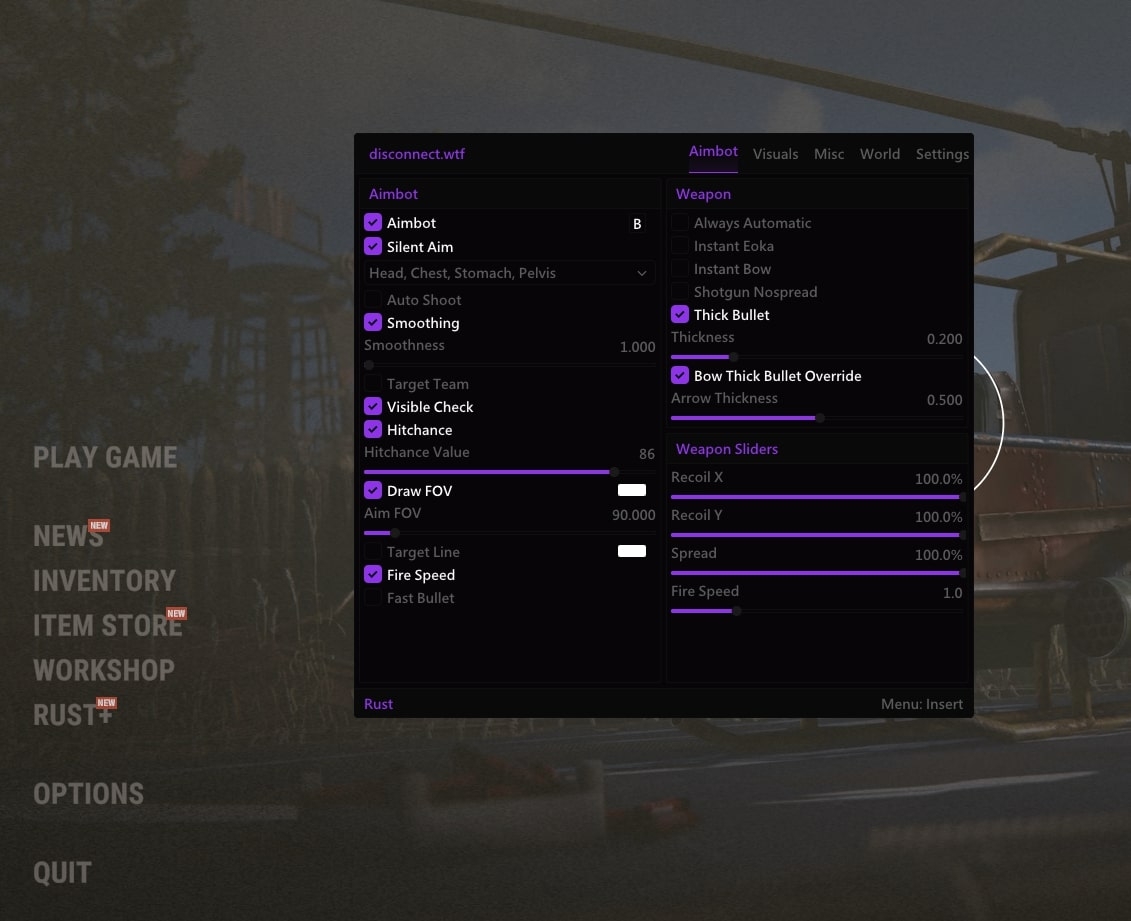
Rust cheats can expose a field of view control that defines a target area for the relevant aiming feature. A drawn circle is a visual reference for that area, not a promise about every person inside it. Its purpose is to help explain where selection is considered. It should not be read as an invisible extension of the weapon or a guarantee that the next shot will land.
With Rust silent aim, a hitbox choice concerns the part of the selected player that the feature is meant to consider. Head, chest and other options should be read as target choices rather than a ranked list that guarantees better results. The appropriate interpretation comes from the product's current behaviour, so don't invent a universal preset from the names alone or from a single screenshot.
The Rust aimbot guide already covers the broader aim features. For this narrower subject, keep your attention on what selects the target and what corrects the shot. If a visible circle appears, it can help you understand the selection area. It cannot, on its own, prove which correction option was enabled or how a particular miss happened during the encounter.
A hit chance value is another control, rather than an independently measured accuracy percentage. Rust silent aim should not be sold as matching that number across every weapon, distance and situation. An interface value describes an input to the feature. It is not a published test result, and a single clip cannot establish the statistical accuracy of the cheat over a whole session.
Keep weapon behaviour in its own category
Rust silent aim does not turn recoil adjustment into target selection. Recoil concerns weapon movement produced during firing, while correction concerns the shot's intended target behaviour. When the two appear in the same menu, the distinction becomes more useful rather than less important. You can identify the purpose of each control without assuming that one switch explains the full result of a burst.
Rust cheats may also expose weapon spread options. Spread and recoil aren't two spellings of the same feature, and neither label should be used as a shortcut for every reason a shot misses. If you change several unrelated controls together, the result is harder to interpret. Understanding the category of a control is more useful than copying a number because it appeared in an impressive recording.
A Rust aimbot may offer smoothing for its visible movement. That description belongs to conventional aim movement, not to the correction behaviour discussed here. A nearby slider in a shared aiming menu doesn't establish that every option affects every other one. Read the actual feature relationship before attributing a visible change to a control that governs a different part of the cheat.
Check Rust silent aim separately from auto shoot. Selecting or correcting towards a player and automatically triggering a shot are different actions. A product can present several controls next to one another while leaving each as a distinct feature. When you describe the behaviour you want, name that behaviour directly so the question can be answered without guessing what the rest of your config contains.
Use player information to understand the context
Rust cheats can make it easier to interpret the available target by displaying supporting player information. A distance value gives one kind of context, while the person’s movement gives another. Those details don't prove that correction will succeed. They help you understand which player the display concerns and avoid treating every highlighted person as an identical target in an identical situation.
Rust ESP adds information to the scene rather than changing the meaning of aiming controls. Held items describe what is displayed in a player's hands, not a full inventory. If that detail helps distinguish one person from another, it can be useful alongside the aim display. It remains visual context, rather than evidence that the correction feature chose the same player you first noticed.
Visibility checks should be interpreted from the current product's own description. Rust silent aim is not permission to infer wall penetration from a marker behind a surface. A visible outline, an on-screen direction indicator and a corrected shot are different observations. Keep those observations separate when asking what happened, particularly where the public image doesn't show all the relevant controls or the full sequence of movement.
Rust ESP also has data limits. Facepunch describes server-side culling for players fully hidden by terrain and rocks, which can withhold the information needed by some cheat features. That makes an important distinction between missing player data and a visual preference. Changing the appearance of a marker cannot supply a position that the game client never received in the first place.
Read the Disconnect gallery as an example
The public Rust External gallery shows Rust silent aim beside other aiming and weapon controls. It is useful evidence that the label appears in the pictured menu. It isn't evidence that every control has remained unchanged, that every current option is available or that the values shown are a suitable starting point for every reader and every session.
Rust cheats can differ between External and Internal products even where the broad feature names overlap. Don't transfer a menu position, a label or an available option from one product to the other without checking. A specific question about the current product is easier to answer than a request to reproduce a whole screenshot taken from another version with different controls and a different layout.
Treat a target line as a displayed reference rather than a complete explanation of shot behaviour. Rust ESP can show several other lines and outlines at the same time, making a busy clip difficult to interpret. Follow the relevant label and the current product description instead of deciding that every visible line belongs to the same aiming function or proves a particular result.
Rust silent aim is not proof of capture compatibility either. What an overlay looks like in a recording and how a correction feature behaves are separate questions. If recording matters to you, check the current product notes for the capture method you use. Don't infer universal recording behaviour, permanent invisibility or any kind of account protection from the word silent in an aim feature's name.
Make a product decision from current facts
Rust cheats should be judged against a clear description of the features you actually want. A short list of requirements gives you something specific to check on the product page. If a detail is unclear, ask about that exact behaviour. Product names and an old menu image aren't enough to establish the current relationship between every aiming, weapon and visual option shown together in a gallery. See the existing aimbot article for the broader subject.
A Rust aimbot and a correction feature can both appear in the wider discussion, but the purchasing question remains practical. Confirm the supported system, current feature availability and product notice for the cheat you are considering. Keep those facts separate from duration and price. Paying for a longer subscription does not establish that an undocumented behaviour is included or will remain unchanged after later updates.
Read the live status page before use. Rust ESP and aim features remain subject to game and product changes, while EAC and other enforcement can still lead to account penalties. Restrained presentation is not permanent protection. A current status label describes the provider's present information, rather than a guarantee about what can happen to an account in the future.
The useful way to understand Rust silent aim is to keep its purpose precise. It concerns shot correction, while target controls, visible aim movement, weapon behaviour and visual context each need their own explanation. Once those roles are clear, you can ask a meaningful product question and recognise when a clip or menu image leaves an important part of that question unanswered.
Your questions answered
How is silent aim different from a conventional aimbot?
Silent aim concerns shot correction without the same visible crosshair movement. A conventional aimbot can instead move the aim towards a selected player. The exact controls depend on the current product, so keep the distinction between selecting a target, moving the aim and correcting a shot clear when reading a feature description.
Does a high hit chance value guarantee the same accuracy?
No. An interface percentage is a feature input rather than a published accuracy test. It does not prove an identical result across every weapon, distance or encounter. Judge the documented behaviour and the circumstances of the shot rather than presenting the value shown in a screenshot as an independently measured outcome.
Does the word silent mean the cheat is safe to use?
No. The name describes an aim behaviour, not permanent protection from detection or account penalties. It also does not establish recording compatibility. Product notices, capture behaviour and account risk are separate questions, and a feature name should not be used to claim a guarantee about any of them.
Is recoil adjustment part of silent aim?
Recoil adjustment concerns weapon movement during firing, while silent aim concerns shot correction. They can appear in the same wider menu without becoming one feature. Keep each control’s purpose clear so a change to the weapon behaviour is not mistaken for a change to how a target is selected or a shot is corrected.