
Disconnect Rust Guide
How Rust No Recoil Helps You Control Your Spray
Your first shot is on the player, then the weapon starts moving as you hold the burst. Rust no recoil settings address that movement, helping you reduce the correction needed while firing. Disconnect Rust External provides separate horizontal and vertical recoil controls, with weapon spread handled by another setting.
That separation matters when you are trying to understand a missed burst. The weapon can move, the shots can spread and the player can change direction at the same time. With Rust no recoil, start by watching the weapon movement during the burst, then keep the player's movement in view as a separate part of the encounter.
Keep the burst closer to where you aimed
Weapon recoil moves the direction you are holding as you continue a burst. Rust recoil control addresses that movement during firing, changing how much correction you have to make while keeping track of the player in front of you. That leaves target movement as a clearer part of the encounter to follow.
Rust no recoil settings let you work on that firing movement directly. Less movement to compensate for can leave you with a clearer job: keeping the burst directed at the player as they cross your view. The name does not guarantee perfectly motionless firing with every weapon, so judge the adjustment by the behaviour you actually observe.
At close range, a short burst may end before much movement becomes obvious. Across a longer sightline, the same movement can carry your aim away from a smaller target. Rust recoil reduction is relevant to both, but the reason you notice it can differ. Keep the player and the burst in view when deciding what needs changing.
When a player runs across an opening, Rust no recoil lets you focus more of your correction on following that movement. You still need to begin on the target and continue tracking them, but you are addressing the weapon movement that can otherwise pull the burst away as the encounter develops.
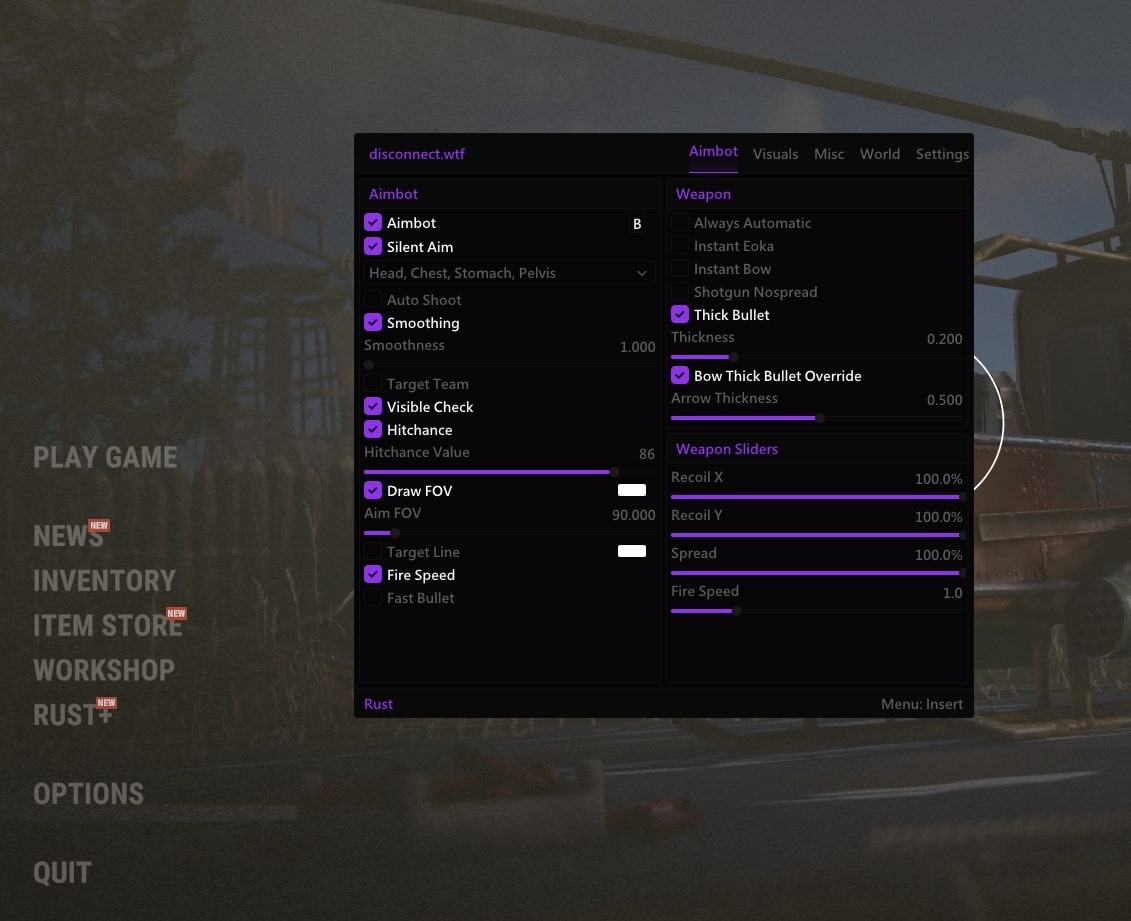
Adjust horizontal and vertical recoil separately
Disconnect's weapon features include Override Recoil, Recoil Amount X and Recoil Amount Y. The X and Y controls separate horizontal recoil from vertical recoil. That gives you a way to work on sideways movement and upward or downward movement individually instead of treating every movement during a burst as identical.
When using Rust no recoil settings, notice which direction is taking the weapon away from the player. If vertical movement is the obvious problem, changing both axes at once makes the result harder to interpret. Keep the question narrow enough that you can tell what the adjustment has changed.
Rust recoil settings should also be read by their actual labels. The public product describes the X and Y amounts, and the menu image shows separate recoil sliders. It does not establish a universal slider direction or an ideal percentage for every session. Copying a pictured number without that context can leave you expecting the wrong result.
A useful Rust no recoil setup is one you understand. Keep the rest of the shooting settings consistent while you look at recoil, then decide whether the movement you noticed still needs attention. Changing spread, aim selection and both recoil axes together gives you less information about any one adjustment.
Understand why shots can still spread
Rust weapon spread concerns variation in shot direction around the point you are aiming at. Recoil concerns the movement caused by firing. You can notice both during the same burst, but a stable view does not by itself mean that every shot follows exactly the same path.
Rust no recoil therefore belongs beside, rather than in place of, the Spread Amount control. If you reduce the movement you are compensating for and shots still disperse, the remaining question is not automatically another recoil adjustment. Keep track of which behaviour you are trying to change before moving a second slider.
Rust no spread concerns tighter shot dispersion around the aimed direction. Disconnect exposes spread adjustment separately from recoil, which is why the menu shows both. Work on the recoil first when weapon movement is what interrupts the burst, then consider spread when you want to understand the remaining dispersion.
With Rust no recoil, it is tempting to judge everything by whether the sight looks still. Look at the whole encounter instead. A moving opponent, an obstructed shot and spread can each explain why a burst did not do what you expected, even when the weapon movement itself has become easier to manage.
Keep recoil adjustment separate from aimbot
Rust aimbot deals with aiming towards a selected target. Its hitbox choices, FOV and movement controls answer questions about which player or part of a player the feature is using. Rust spray control concerns what happens while you continue firing. Those jobs meet during a fight, but they should not be confused.
Rust no recoil can reduce one source of movement while the aim feature has its own settings. If you are trying to understand why the selected target changes, recoil is the wrong place to start. If the selected player stays the same but the burst moves away as you fire, recoil becomes a more relevant question.
Aimbot smoothing belongs to ordinary aim movement. It is not the recoil slider, and it should not be described as a control for silent aim. The existing Rust aimbot guide covers the aiming features so you can keep those decisions separate from weapon adjustment.
Think of Rust no recoil as the part of the setup that helps you keep firing movement manageable after you have found the player. In a longer exchange, that can make it easier to follow the same opponent between bursts instead of repeatedly correcting a weapon that has climbed away from their position.
Built-in recoil controls and standalone scripts
A Rust recoil script generally refers to scripted input intended to compensate for a firing pattern. A recoil macro is also an input sequence, rather than the name of Disconnect's built-in X and Y controls. If you arrived here looking for a script download, the feature covered in this article is the weapon adjustment inside Rust External.
The Rust no recoil controls described here sit with the cheat's weapon features. You do not need to rename them as a script or copy a macro profile to understand which settings are being discussed. Start with the product and control labels in front of you, because instructions for a separate input script can describe a different setup.
Adding another recoil adjustment from elsewhere can also make the result harder to interpret. If you change multiple sources of compensation, you lose a clear picture of which one caused the movement you see. Keep the configuration understandable rather than stacking unrelated settings because each uses the word recoil.
Keeping recoil adjustment in an understandable config also makes it easier to return to familiar shooting behaviour. You can retain the player visuals you like and revisit the weapon controls when needed, with the X and Y adjustments in the same menu as the rest of your Rust External settings.
Use the weapon settings for the job they do
For Rust no recoil, start with the movement that interrupts your burst, then keep horizontal recoil, vertical recoil and spread as separate decisions. You will have a clearer understanding of the setup when each change answers one question and leaves the other features familiar.
Disconnect's Rust cheats guide covers the wider aim and visual features. See Rust External for the Override Recoil, X/Y and spread controls discussed here.
Frequently asked questions
Does recoil adjustment guarantee every shot will hit?
No. It concerns weapon movement during firing. Target movement, your initial aim, cover and spread remain relevant to where the shots go.
Which controls adjust horizontal and vertical recoil?
Rust External names Recoil Amount X and Recoil Amount Y alongside Override Recoil. The menu screenshot shows Recoil X and Recoil Y as separate sliders.
Is a recoil setting the same as a script download?
No. This article covers built-in weapon controls in Disconnect Rust External. It does not provide a standalone recoil script or a macro profile.