
Disconnect Rust Guide
Read Nearby Player Positions with Rust Radar
Someone can move outside the centre of your screen while still being relevant to the area around you. Rust radar puts available player positions into a separate panel, giving you a different reference from the outlines drawn over the main scene. This guide explains how to read that panel, distinguish range from presentation and combine it with useful player information.
Radar places available player positions in a separate panel. Read its scale and markers as positional information, then use the main scene for identity, height and physical access. Panel size does not by itself establish a greater information range.
Understand the view inside the panel
Rust radar is a positional display, not a second complete view of the game world. The dots or markers represent available information in a separate frame. Read them as an aid to understanding where players are relative to the display's reference, rather than assuming the panel explains every wall, floor or route between you and the person being marked.
Rust ESP relates information directly to the scene in front of you. A separate panel can remain useful when a person moves away from the centre of that scene, but it gives a different kind of reference. Knowing which display answers which question helps you avoid reading a small marker as if it contained the same detail as a full on-screen player outline.
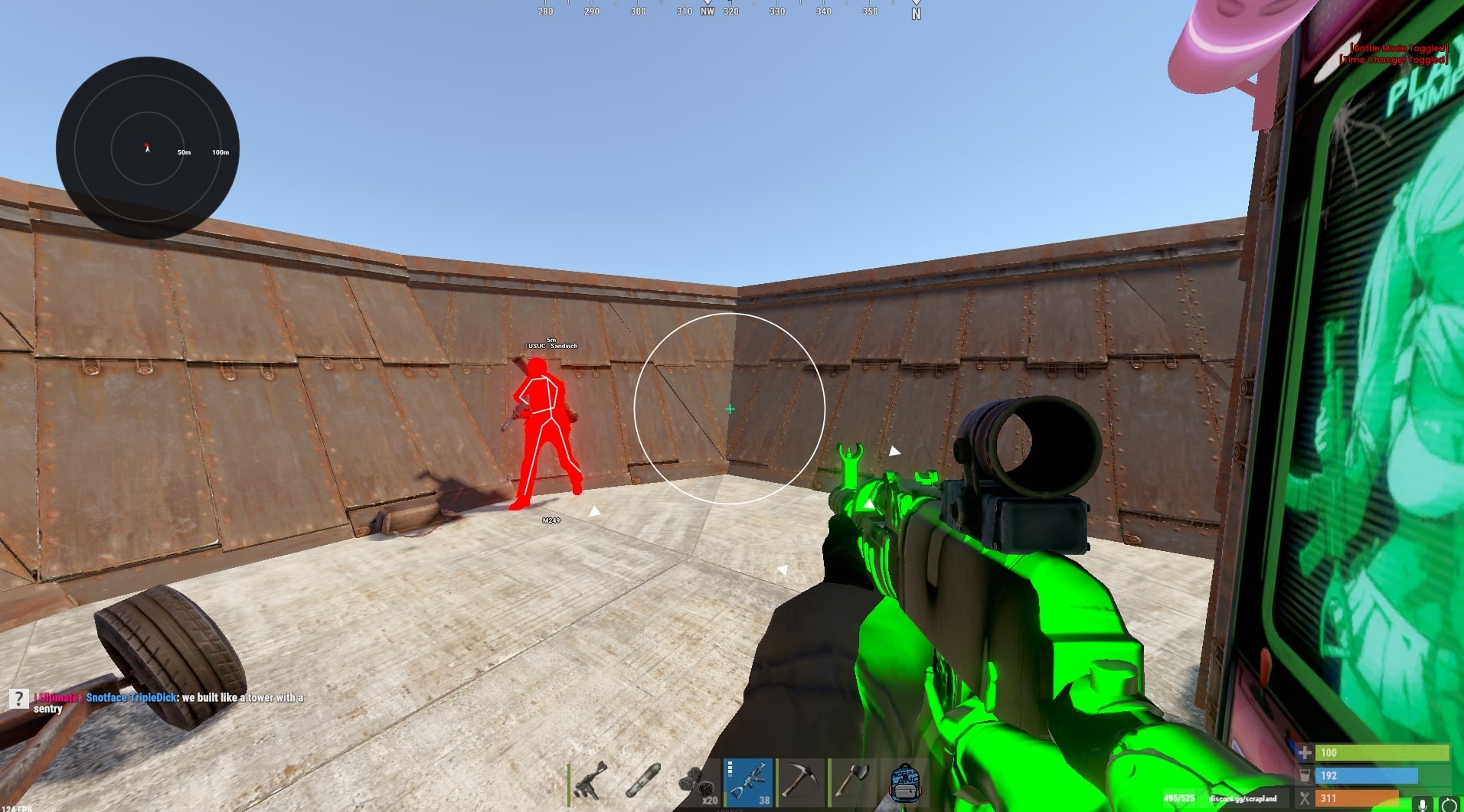
Rust radar can include distance rings that make the spacing easier to interpret. The gallery shows labelled rings rather than a featureless collection of dots. Use those references to understand the scale you are looking at, while remembering that a number visible in one screenshot isn't a universal recommendation. The current product and your own readable display determine which presentation is useful.
The main rust cheats page explains how positional and scene-based visuals fit into the wider feature set. A radar marker isn't a target selection command or a promise about a shot. Keeping those functions separate lets you read the panel for position, then use the actual scene and relevant player details to understand what the marker means.
Distinguish what is shown from how large it looks
Rust cheats can expose separate range and presentation controls. A panel can be made larger on screen without that change proving it receives information from farther away. That distinction is important when two controls use similar-looking sliders. Read the current label and its purpose before deciding that a bigger visual result means a larger area of the game world is being represented.
Rust radar needs a radius you can interpret at a glance. If the displayed area covers too much, nearby markers can become tightly grouped around the centre. If it covers too little, useful positional context may be absent from the panel. The important point is understanding the scale you have chosen, rather than treating the largest number in an example image as the correct value.
Rust ESP also has its own display distance considerations. Don't assume that the range chosen for one visual layer automatically applies to every other layer. A difference between the panel and the main scene may come from their respective controls, filters or available data. Identify which display you are reading before changing an unrelated option because the two do not show exactly the same thing.
Rust radar markers need enough separation to remain readable when several people are nearby. Player size changes the visual weight of a marker where the product offers that option. A larger dot can be easier to notice in isolation while making a group harder to distinguish. Judge it alongside neighbouring markers rather than deciding from a panel containing only one person.
Follow movement without confusing it with a route
Rust radar can help you notice that a position is changing, but the panel doesn't establish a clear path towards that person. A marker moving around a building still leaves the building between you. Use the positional information to understand the change, then judge the entrances, height differences and surfaces visible in the actual game. The shorter line on a small display isn't necessarily a walkable route.
Rust cheats should leave the screen centre readable while you glance at supporting information. If the panel obscures the place where you need to recognise a player, one useful feature can undermine another. The right placement is practical rather than decorative. Keep the panel visible enough to consult without making it the only part of the screen that holds your attention.
Rust ESP can add a name label to the player you find in the scene. That is useful because a small positional marker and a recognisable person provide different levels of detail. Use the information together when it clarifies the situation, instead of assuming that every dot tells you the identity, equipment and exact current behaviour of the person it represents.
A Rust radar display also needs to be read over time. A remembered marker is not the same as a position you are observing now. People can move while you look elsewhere, so don't turn one glance into a permanent picture of the area. The useful habit is to relate current information to the scene rather than continue acting on where you first noticed somebody.
Use player context without overcrowding the display
Team colours can make Rust cheats easier to read if your current product offers them. A consistent distinction reduces the need to interpret each marker from scratch when several people share a small area. Confirm the options for the actual product rather than borrowing another menu's labels. A colour only helps when you understand what it represents and keep that meaning consistent.
Rust radar should not treat every displayed entity as the same kind of threat. Filters for player states can separate information that matters now from markers you only occasionally need. The exact controls depend on the product. Decide which states belong in the panel you are using, and keep a different purpose from turning it into an undifferentiated record of everything nearby.
Rust ESP distance labels can help when you return from the panel to the main scene. They give context to a person you can now recognise on screen. A separate direction reference does not make that information redundant. The two displays are useful together when each supplies something you can understand without loading every available field onto the same small part of the picture.
Read a Rust radar beside held items as complementary information, rather than assuming the panel contains a complete equipment report. An item label in the main scene concerns what the player is holding. It isn't a remote inventory view. Keep that boundary clear when interpreting a screenshot, particularly where text, skeletons and positional markers are all visible together.
Make one change for one clear reason
Rust radar is easier to assess when you know which aspect you are trying to improve. Perhaps nearby markers are crowded, the scale is difficult to judge or the panel is covering another useful part of the scene. Those are different presentation problems. Identify the problem first so you can tell whether a change addressed it, rather than replacing the whole config without understanding the result.
Rust cheats can be made harder to read by changing several visual groups together. If the panel, labels and outlines all change at once, you lose a clear reference for the improvement you wanted. Keep the purpose narrow and retain a saved config you understand where the product supports it. That is a way to assess presentation, rather than a claim that one config is universally correct.
With Rust cheats, a panel position should support the way you read the rest of the screen. The corner used in an official gallery image is an example, not a requirement. Consider which existing interface elements and player information you need to see. A clean-looking placement in one picture can still obstruct something important in a different scene or on a different display size.
A similar panel is not evidence of identical behaviour across External and Internal products. Even when both galleries show a circular display, the current controls may differ. Read the relevant product page and ask about the particular option you need. Matching appearance alone is not proof of matching range, filtering, implementation or feature availability between two separately sold cheats.
Check data limits and current product information
The Rust External gallery gives you a real example of the panel beside the main game scene. Use it to understand the type of display being discussed. An example image cannot establish the refresh behaviour, every filter or current availability of every option. Those details need current product information rather than an assumption drawn from the size or colour of a visible marker. For the related visual concepts, read the broader player visuals article.
Rust radar remains dependent on player information supplied to the client. Facepunch explains that server-side player culling can stop networking people fully hidden by terrain and rocks. That panel cannot reveal data it never receives. Keep that limitation separate from the panel's appearance, because changing its scale isn't evidence that previously unavailable player information has become available again.
Rust cheats carry account risk whether the panel is large, small or rarely consulted. Check the live status page and the relevant product notice before use. Current compatibility information cannot guarantee protection from technical detection, player reports or later enforcement. Readability is a reason to organise the display, rather than a promise that a restrained presentation removes those risks.
The useful result is a display you can interpret without losing the main scene. Know the scale, keep markers distinct and use the panel for the position question it answers. Then return to the actual player and surroundings for the detail it doesn't provide. That separation keeps a small supporting display from being mistaken for a complete account of what is happening around you.
Your questions answered
Does a larger radar panel show players farther away?
Making a panel larger on screen is a presentation change, rather than proof of a greater information range. The relevant controls depend on the product. Read the current labels and distinguish the space occupied by the panel from the area of the game world its available information is intended to represent.
Can the panel replace player ESP in the main scene?
The two displays answer different questions. A panel gives a separate positional reference, while scene-based visuals can help identify the person and relate them to what is in front of you. Use the information together where it is helpful, rather than assuming a small marker includes every detail shown by another visual layer.
Does a nearby marker mean there is a direct route to the player?
No. A marker does not remove buildings, height changes or other physical obstacles. Use it to understand the displayed position, then judge the actual route in the game scene. A short apparent distance in a small panel is not proof that the person can be reached directly from where you are standing.
Are radar controls identical on both Disconnect Rust products?
A similar-looking circular display does not establish identical controls or availability. External and Internal products need their own current checks. Read the relevant product page and ask about the option that matters to you, rather than assuming a gallery image proves the same range and filters on a separately sold cheat.