
Disconnect Rust Guide
What Are Rust Chams?
An outline can locate a player while still leaving their body difficult to distinguish from the scene. Rust chams change the appearance of supported models so their shape is easier to recognise. This guide focuses on readable player highlights, the difference between player and first-person effects, and the supporting information that makes the display useful without burying the game beneath colour.
Chams change the appearance of supported models to make them easier to recognise. Player highlights, hand effects and held-item effects have different purposes, while names, range values and other labels provide separate supporting information.
Give the player model a clear visual role
Rust chams are a model highlight rather than a complete explanation of everything happening around a player. The coloured shape can make a person stand out against a busy background. Its main value is recognition, especially when the ordinary appearance is hard to distinguish at a glance. Treat that colour as a visual aid attached to the available model, rather than a separate source of information about the whole area.
Rust ESP can place text and drawn shapes around the same person. Those additions don't have to compete with the coloured model for attention. If the highlight already locates the player clearly, the remaining information should answer another useful question. A display becomes easier to read when each part has a job, rather than several bright layers all repeating the same location in slightly different ways.
With Rust chams, colour contrast matters more than simply choosing the brightest option. A shade that stands out against dark metal may be less obvious against snow or a similarly coloured effect. Consider the backgrounds you actually need to read. The aim is to recognise the model consistently, rather than make one promotional screenshot as saturated as possible while the surrounding game becomes difficult to follow.
The main rust cheats page explains where coloured models sit among the wider visual features. That relationship is useful because a strong highlight doesn't replace names, range information or an understanding of the scene. You can keep the model prominent while deciding separately which supporting fields deserve space. The feature is most useful when it improves recognition without making every other display element equally loud.
Keep player highlights separate from first-person effects
Rust cheats can show a coloured opponent and a coloured weapon in the same image. That doesn't make the two effects identical. The opponent's appearance concerns another model in the scene, while a first-person effect concerns what you see in front of the camera. Distinguishing those purposes helps you read a feature list without assuming that every mention of chams describes information about an enemy.
Rust chams on a player can help you follow a moving shape when the ordinary clothing blends into the background. The effect should still leave the person's outline understandable. If several colours and other markers overlap, stop judging the appearance of a single model and look at the whole group. The important test is whether you can recognise separate people without having to decode every bright surface.
The Internal gallery includes hand chams as a separately labelled option. Rust ESP elsewhere in that same menu describes player information, so don't transfer the purpose of one group to another. A first-person appearance change isn't evidence that additional opponents have been located. Use the label attached to the specific feature you are checking, particularly where a gallery places several visual effects together in one picture.
Held item chams are another separate label shown in that gallery. Rust chams should therefore be described precisely enough to distinguish a player highlight from the appearance of an item in your own view. The fact that both can use colour doesn't establish the same target, information or controls. That distinction is useful when you are asking about a feature before selecting a product.
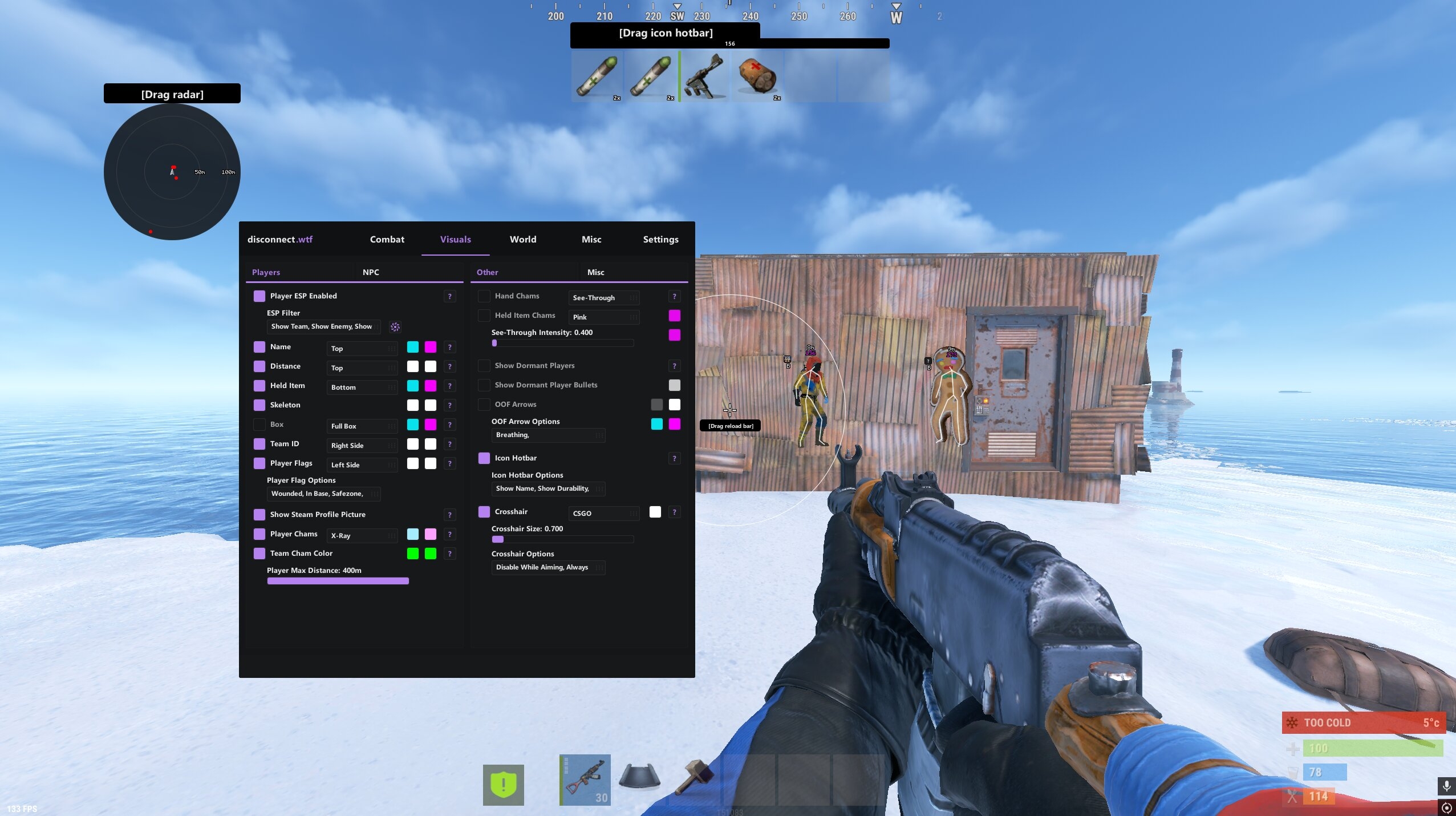
Choose colour and material for recognition
Rust chams can use an appearance selected through the current product's own controls. A material choice affects presentation, so assess the result in the context of the model and background. It shouldn't be treated as a ranking for safety or a promise about new information. A different surface effect can change how easy something is to see without changing what the client knows about its position.
Rust cheats may let you give teammates a different presentation from other players. The Internal gallery shows a team cham colour label, which provides a concrete example of that separation. Keep the meaning of each colour consistent. If the same shade represents several different things in one config, the display asks you to stop and interpret it instead of recognising the distinction immediately.
Rust ESP text can supply the detail that a surface colour cannot. A name label helps you recognise the same person after they move, whereas a coloured body can make the model easier to locate. Use both only where both help. The text should stay readable when the highlighted shape crosses a background, rather than disappearing into the same shade or competing with an equally bright border.
Rust chams should also leave posture readable. The body shape can matter more than a large block of saturated colour when the person is partly obscured by another model. Consider whether the presentation helps you recognise the figure, not simply whether it makes the figure impossible to miss. A highlight that overwhelms all the smaller visual cues may reduce the information you can take from the scene.
Add supporting fields that answer a different question
Distance labels give Rust cheats a useful second layer of context. A bright figure close to you and another far away can look equally urgent if colour is the only information you read. A clear range value helps separate those situations. Keep it legible enough to glance at without making it as visually dominant as the model you are trying to locate in the first place.
Pair Rust chams with a held item label when the displayed item helps explain which person you are looking at. That label concerns what is shown in the player's hands, rather than a remote view of every inventory slot. Its value is specific context. It should not become an excuse to describe a feature the current product page or gallery never actually demonstrates.
Rust ESP can add a skeleton outline where that feature is supported. It may help you recognise the figure's posture, but it also puts more lines over the same person. If the coloured body is already clear, ask whether the extra shape adds anything useful. Two ways of locating the same model are not automatically more readable than one strong, understandable presentation.
Filters for different player states can help Rust chams remain meaningful around a busy base. A sleeper, a wounded person and an active player should not become indistinguishable simply because their positions overlap. The precise filter names depend on the product. Decide which states need your attention now, rather than assuming the most useful config is always the one displaying the largest number of entities.
Judge readability across the whole screen
Rust chams do not need to dominate every part of the scene to remain useful. Look at the information density around a group of players, including names, ranges and any other markers you choose to display. If every layer is equally prominent, the eye has no clear starting point. A deliberate hierarchy lets you locate the person first and read the additional detail only when it matters.
Rust cheats can put a radar panel beside the model display. That panel supplies a separate positional view, so it shouldn't cover the area where you are trying to recognise the highlighted figure. Think about the screen as one composition rather than a collection of unrelated options. A feature can be readable by itself while still being badly placed beside another part of the same config.
With Rust cheats, a useful visual hierarchy also leaves room for the game itself. The doorway, floor edge and other geometry still matter even when a coloured model is obvious. Avoid treating the overlay as a replacement for those details. What you can see clearly and what you can physically do from your position remain different questions, and the surrounding scene is part of answering the second one.
A coloured model still depends on information the game client has received. Facepunch's server-side player culling can withhold players fully hidden by terrain and rocks. A different colour or surface effect cannot remove that data limit. Keep missing information separate from a presentation problem, because changing the visual appearance is not evidence that the underlying player position has become available again.
Use the current product rather than a borrowed config
The current Rust Internal page has its own gallery, including a Player Chams label and a pictured X-Ray selection. That is product-specific evidence about the image. It should not be used to claim that every other Disconnect product has the same controls, that the selection is a universal preset or that a screenshot confirms uninterrupted operation of every feature shown. For the related visual concepts, read the existing player visuals guide.
Rust chams on External and Internal products need their own checks. If you are interested in the External product, read its current page and ask about the relevant feature there. A shared name does not establish identical menus or identical availability. Precise product questions are more useful than a request to reproduce the entire appearance of a picture from a different cheat.
Rust cheats remain subject to account penalties even when the visual display is restrained. The live status page and current notices provide the provider's latest information, rather than permanent protection. A quiet-looking config doesn't remove technical detection or other enforcement. Make that distinction once, then judge the presentation for what it actually changes, the information visible on your own screen.
Choose a presentation that helps you recognise the model without losing the surrounding scene. Keep player effects, first-person effects and supporting labels separate in your thinking. That gives each part of the display a clear purpose and makes it easier to spot an option that is adding colour without adding clarity. A config you understand is more useful than a look copied without knowing which feature produced it.
Your questions answered
What do Rust chams change on screen?
They change the appearance of supported models so the shape can be easier to recognise against the scene. That is a presentation function rather than a complete account of the surrounding area. The exact effect depends on the current product, and a coloured model does not replace range, identity or state information.
Are player chams and hand chams interchangeable?
No. A player highlight concerns a supported model in the scene, while a hand effect concerns part of your own first-person view. Similar colour choices do not make them the same feature. Read the label for the effect you want and confirm which product currently offers the relevant controls.
Should every visual element use the brightest colour?
Brightness alone does not create clarity. A highlighted body, text and several additional outlines can compete for attention when they are equally prominent. Use a consistent hierarchy where the product permits it, keeping the model recognisable while leaving supporting information and the surrounding game readable at the same time.
Can chams reveal a model that the client never receives?
No presentation choice can manufacture unavailable player information. Facepunch describes server-side player culling that can withhold people fully hidden by terrain and rocks. Keep that data limit separate from colour and material choices, which concern how available models are presented rather than changing what the client has received.