
Disconnect Rust Guide
Why Players Use a Rust Wallhack to Find Enemies
A player outline can tell you where someone is, but it takes the right supporting information to understand what you are looking at. A Rust wallhack brings available player positions into view around cover. This guide explains how to read those markers, reduce clutter and recognise the limits of the information, using Disconnect's published Rust features and gallery examples.
A wallhack makes available player positions easier to follow around cover. Read the outline with distance and player state information, while keeping physical obstacles and unavailable client data separate from what the display can show.
Start with the position the marker actually shows
A Rust wallhack is useful when the person you need to follow is difficult to pick out against a structure or background. The outline gives you a reference for their displayed position. Read that reference alongside the scene, because locating someone behind an obstruction does not establish that you have a clear route or shot towards them. The marker answers a location question first.
Rust ESP can attach several fields to that position. Box outlines help you locate the player, while other fields describe who is there or what they are doing. You don't need every option to answer a simple question. Start with a recognisable outline and add information that changes your understanding, rather than filling every available space around the character.
The value of a Rust wallhack changes with distance labels. A nearby marker deserves a different reading from one on a distant roof, even if both use the same colour. Check the number before reacting to the size of the outline. Screen position alone is a poor way to judge proximity when buildings, elevation and perspective are involved in what you are seeing.
The wider rust cheats page places this feature beside aiming, radar and weapon options. That context matters because a visual marker doesn't choose a target or alter a bullet by itself. You can understand the location information independently before deciding which other features, if any, belong in the same config. Keep the job of each feature clear.
Identify the player before reacting to the outline
Rust cheats can display a lot of player information, but not every field has equal value in every situation. A crowded group may need a name label so you can recognise the same person after they move. At another moment the distance alone is enough. The useful question is which detail resolves the uncertainty you actually have about the marked player.
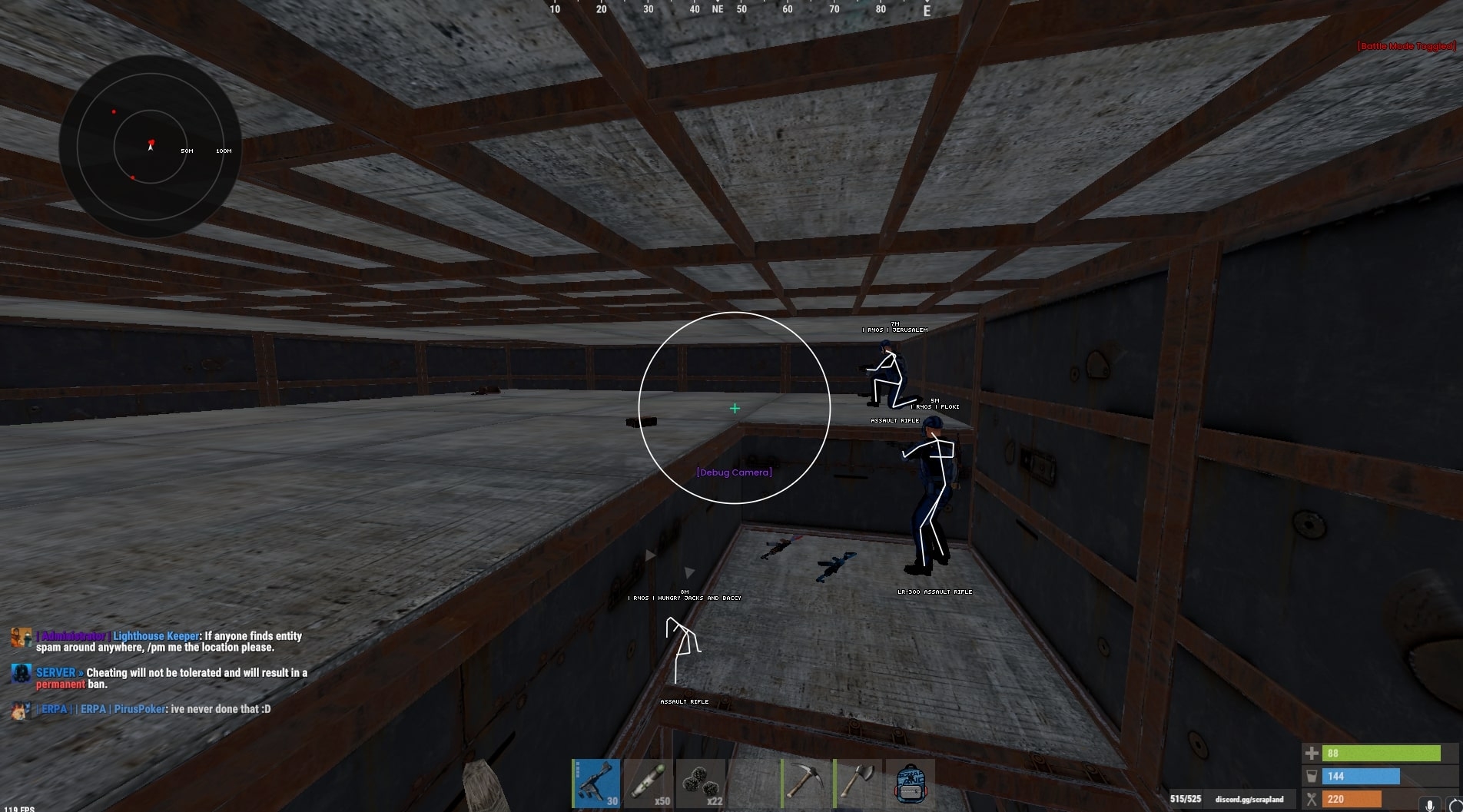
Use a Rust wallhack with held items as supporting context. An item label describes what the available display says a person is holding, rather than opening their entire inventory for inspection. It can help you distinguish two nearby markers, but it shouldn't become a claim about everything they own. The existing gallery shows labels alongside player outlines rather than a complete inventory window.
Rust ESP also separates different player states. A sleeper filter concerns someone who is not currently behaving like the moving opponent beside them. Keep that distinction readable when several markers overlap around a base. Giving every state identical emphasis makes the display harder to interpret, even when each individual label is technically visible and correctly placed on screen.
A Rust wallhack can use a wounded state to distinguish a player from someone still moving normally. Read the state as information about that person, not a statement that the surroundings are safe. Another marker, an unseen approach or a change in movement can matter more than the first outline you noticed. One displayed detail should not stand in for the whole situation.
Read cover and height without inventing an open path
A Rust wallhack can make a player on another level easier to locate, but a marker's position is not an instruction to walk directly towards it. The floor between you still exists. Use the location to understand which part of a structure needs attention, then judge the actual entrances and movement space visible in front of you. Those are separate decisions.
Rust ESP skeletons add posture information where the product supports them. A crouched figure and a standing figure may be easier to distinguish when the body outline is readable. That extra shape can be useful at a doorway, but it also adds lines. Check whether the detail helps you recognise the person or simply makes an already busy group of markers denser.
Rust cheats remain dependent on what the game client receives. Facepunch describes server-side player culling that stops networking players fully obscured by terrain and rocks. A missing marker can therefore reflect unavailable information, rather than a colour that needs changing. This is a data limit, and a different visual presentation cannot manufacture a player position that was never supplied to the client.
Treat a Rust wallhack as information rather than wall penetration. A coloured figure behind a surface doesn't prove that a projectile can travel through it. Likewise, a marker above a doorway can belong to another floor. Keep the physical geometry in view instead of following the overlay as if it removed every obstruction between your current position and the displayed player.
Keep a crowded display readable
Teammate colours can make Rust cheats easier to read when several players cross the same small area. A consistent distinction lets you recognise a familiar marker without rereading every name. The precise options differ between products, so use the controls actually offered by your cheat. A screenshot from another product is not a reason to assume the same fields or behaviour exist in yours.
Full boxes give a Rust wallhack a strong rectangular boundary around each marked player. They can be easy to spot against a complicated background, but several complete outlines may cover details you still need to see. Judge the result as a group rather than assessing one character in isolation. The useful outline is the one you can recognise while keeping the scene readable.
Corner boxes give a Rust wallhack another presentation where supported. Leaving the middle of each edge open can reduce the amount of linework around a player. That is a readability choice, rather than an upgrade to the underlying information. If the position data is unavailable, changing the boundary style won't bring it back or extend what the server is sending.
With Rust cheats, more decoration can reduce clarity. A restrained colour choice may separate the main player outline from the supporting text without turning both into equally bright shapes. Look at the whole screen, including the part behind the labels. An overlay should remain understandable when people overlap, rather than working only in a clean promotional picture with one stationary character.
Understand what a screenshot can and cannot prove
A Rust wallhack screenshot is a useful example of player identification, but it is a moment captured from one product and version. It can show which labels were visible in that scene. It cannot establish the behaviour of every current feature, prove permanent compatibility or tell you how the display will look against every background. Keep the picture's role specific.
Rust cheats may place a name label above one marker and another detail below it. That arrangement helps you separate identity from location when the text remains readable. Don't assume that a large font is automatically clearer. Long names, several overlapping players and a small display can change the result, so judge the hierarchy of information rather than one field on its own.
Rust ESP can include dead player markers as a separate state. Those markers don't carry the same meaning as an active person approaching you. If bodies remain mixed into the most prominent layer, they can distract from movement that matters now. Keep the distinction between locating an entity and interpreting its current state, especially when old and new markers share the same part of the screen.
A Rust wallhack may also be shown beside a circular radar in the gallery. Those displays answer different questions. The outline relates a player to the scene in front of you, while the separate panel offers another positional reference. One picture containing both does not make their ranges, filters or purpose identical. Read each display according to the information it actually presents.
Check the product before choosing your visual config
Start with the current Rust External product page when the pictured menu is the one you want to understand. Its gallery provides a concrete example of the visual display. Current product notes and support should resolve any uncertainty about a feature's availability, rather than an old image being treated as a permanent promise about the cheat. For the related visual concepts, read the existing visual features guide.
A Rust wallhack can include player chams as another way to distinguish a model, but coloured surfaces and drawn outlines are not interchangeable descriptions. Use the relevant feature name when checking the product. That makes a question about a model highlight easier to answer than a general request for everything seen in an unrelated gameplay clip or another provider's menu.
Rust cheats carry account risk regardless of how restrained the display looks. EAC compatibility and a current status label don't create permanent protection. Check the live status page and the current product notice before use. A quieter visual config changes what is on your screen, rather than removing technical detection, reports or the possibility of a penalty.
Choose a Rust wallhack for the information you can explain clearly to yourself. An outline locates the available player, supporting fields add context and the scene still determines what is physically possible. If a field doesn't help with those tasks, it doesn't need to dominate the display. The result should be understandable without relying on the appearance of someone else's entire config.
Your questions answered
Does a Rust wallhack let you shoot through every wall?
No. A visual outline concerns the available player position, while projectile behaviour is a different question. A marker behind a surface does not establish a clear shot through that surface. Keep the surrounding geometry and the current product’s documented features separate from the fact that an outline is visible.
Why can a player marker disappear behind terrain?
The game client may stop receiving the required player information. Facepunch describes server-side culling for players fully obscured by terrain and rocks. A visual option cannot display information that was never supplied, so a missing marker is not automatically evidence that changing its colour would resolve the problem.
Are boxes and chams the same visual feature?
They are different presentations. Boxes draw a boundary around a player, while chams affect the appearance of a supported model. A product can offer both, but that does not make their controls identical. Check the relevant feature name on the current product rather than treating every bright outline as the same effect.
Which details should I read alongside a player outline?
Use the details that answer a real question about the person being displayed. Distance gives range context, names can help distinguish nearby players and state information can separate active people from sleepers or bodies. Keep only the supporting information you can read clearly when several markers share the same area.