
Disconnect Wardogs Guide
Why Your Wardogs ESP Is Not Showing Players
If your Wardogs ESP is not showing players, check for a hidden player group, a distance limit or text that is difficult to see. Start with which players are missing. Disconnect separates squad, faction and wounded-player controls, so an incomplete display does not automatically mean that the entire ESP has stopped working.
Check the relevant player-group filter, then its render distance and colours. Review the active config if the problem began after an import. If all ESP remains absent, check current product status and access instructions before changing unrelated game or system controls.
Describe which players are missing from ESP
Wardogs ESP not working is a broad symptom. Note whether enemy players, squad members, faction members or wounded players are missing. Also note whether names, boxes and skeletons are all absent or only one part of the display is affected.
That distinction gives you a starting point. If enemy boxes appear but squad members do not, the problem is more specific than the entire overlay failing. Check the player group before changing every ESP control.
See the Wardogs cheats guide for the full aimbot, ESP and radar feature overview.
Check Show Squad and Show Faction separately
Show Squad and Show Faction apply to different friendly groups. A member of the wider faction is not necessarily in your own squad. Enabling one group should not be assumed to enable the other.
Read both active choices after importing a config or changing how you want friendlies displayed. A file created by someone who hides friendly players can produce a screen that looks incomplete to you while matching their intended choices.
Review wounded-enemy and wounded-friendly filters
Show Wounded Enemy and Show Wounded Friendly are separate controls. If players disappear from the ESP when wounded, inspect the relevant wounded-player choice instead of assuming that the distance limit changed.
Keep relationship and state separate while checking the result. Friendly or enemy describes the player’s relationship to you; wounded describes their state. Review the control that matches both parts of the missing-player symptom.
Check the render distance for the correct group
Maximum Player Render Distance, Maximum Squad Render Distance and Maximum Faction Render Distance provide separate limits. A squad member at one range may qualify while another player at the same range does not, depending on the active controls.
These are ESP draw distances, not aimbot range. Do not change maximum aim distance to fix a missing player box. Likewise, a radar display has its own range and does not establish the range configured for the main Player ESP.
Check boxes, skeletons and text individually
Box ESP, Skeleton ESP, Name ESP and Distance ESP can provide different parts of the display. The Health Bar is another element. If a player’s box appears without their name, inspect the name display rather than treating the visible box as evidence that every detail is enabled.
ESP Font Size affects text readability. Check whether text is too small, crowded or placed over another element. An element can be drawn but difficult to read, which is a different problem from a player being excluded by a group filter.
Review colours and radar filters
Visible / Hidden ESP Colors distinguish supported visibility states. Check that the selected colours remain readable against the scene. Similar colours can make a change in visibility difficult to notice without the player actually disappearing.
Radar filters are separate from the main ESP controls. If a player appears on radar but not in the scene, inspect the relevant Player ESP group and distance. If the reverse happens, check the radar’s player filters and range instead.
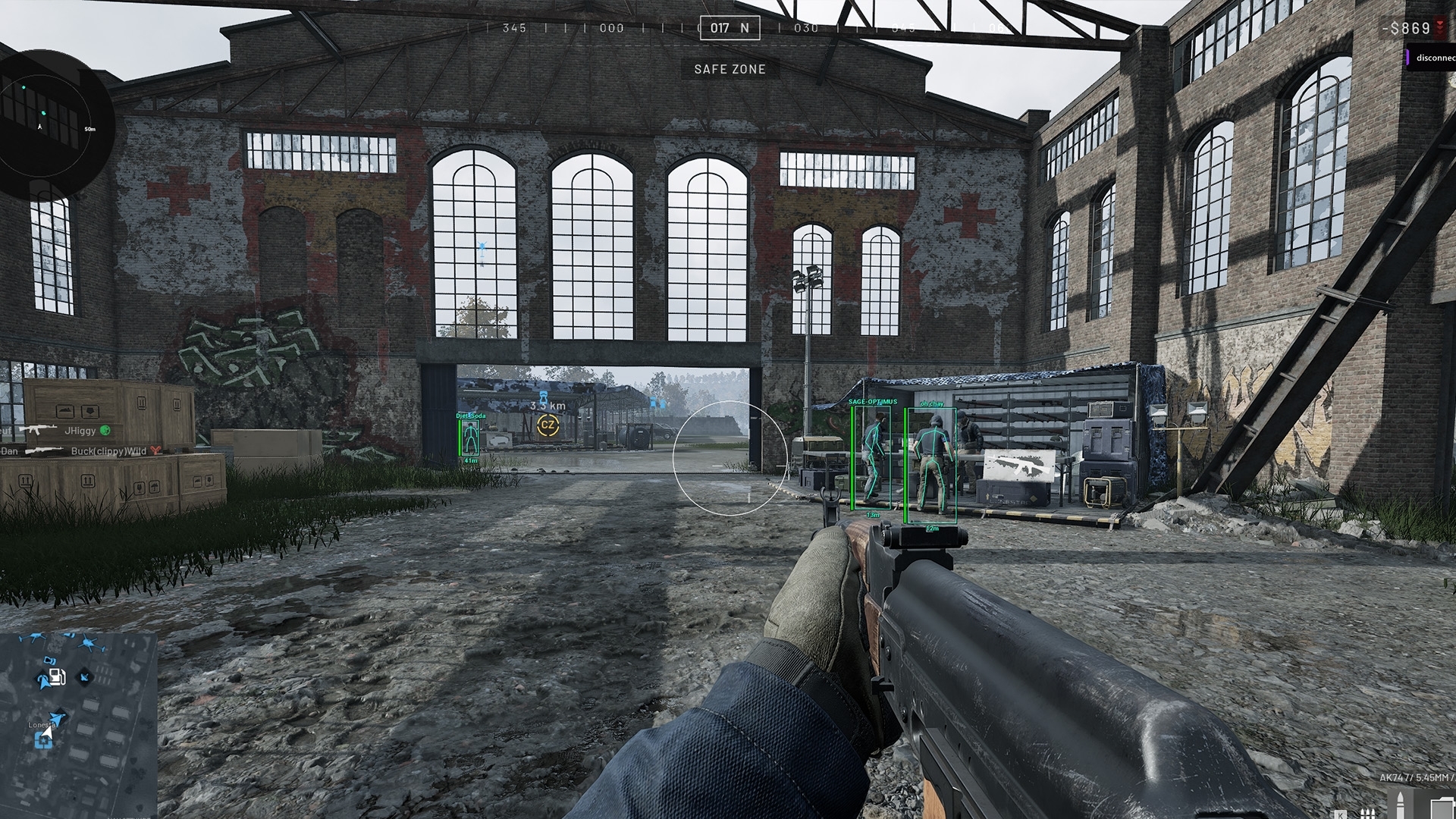
Check the imported config before changing everything
Use Export Config to keep the current values before another round of changes. If the symptom began after Import Config, review what changed in player groups, distances, colours and text. Restore your earlier reference if available, then test one change at a time.
If every ESP element remains absent, check live product status and the current access instructions. Send support the affected groups, distance conditions and whether the menu or radar still appears. Our main Wardogs cheats page explains the complete product; the existing ESP guide explains the individual features.
Questions about missing Wardogs ESP
Why is my Wardogs ESP not showing players from my faction?
Show Squad and Show Faction are separate controls. Check the wider faction choice and its render distance.
Why does a player disappear after being wounded?
Review Show Wounded Enemy or Show Wounded Friendly for that player’s relationship to you.
Does radar range also control Player ESP distance?
No. Radar and the main Player ESP have separate distance and filtering controls.
What should I check after importing a config?
Review player groups, wounded-player filters, render distances, colours and text choices before assuming the ESP has failed.
More Wardogs guides
How to Save and Share Wardogs Cheat Configs
How to Check Wardogs ESP in OBS Recordings
Wardogs External product and access periods · Current Wardogs cheat status