
Disconnect Wardogs Guide
Find Hidden Enemies with a Wardogs Wallhack
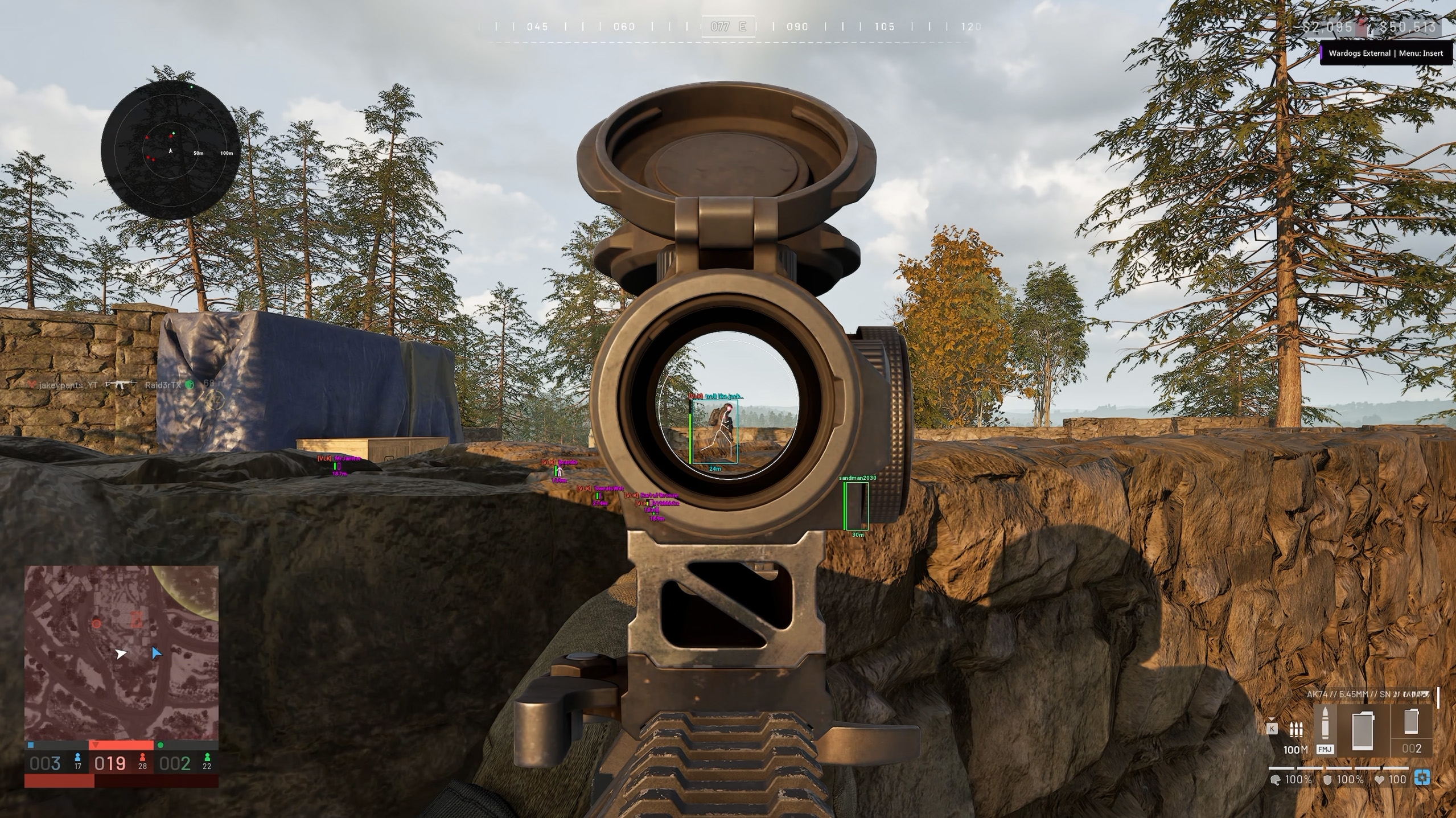
An enemy moves behind a wall and disappears just as your squad reaches the next opening. A Wardogs wallhack helps you keep track of that position with player ESP, so you are not searching the whole scene when they move again. Disconnect Wardogs External adds boxes, skeletons and player information, with separate controls for squad members, faction players and wounded players.
That extra context makes a Wardogs wallhack more useful in a crowded fight. Knowing there is a person behind cover is a start, but knowing whether the marker belongs to an enemy, a friendly player or someone already wounded makes it much easier to decide what deserves your attention.
Follow the enemy after they leave view
A Wardogs wallhack uses player markers to keep a supported position readable when the character is hidden by cover. You can follow movement behind an obstruction and watch the opening that matters, rather than wait for the player to become obvious in the main view again.
Wardogs player ESP adds information to that position. A box helps you find the player quickly, a skeleton can make posture easier to read and a distance label gives context for how far away they are. Those details work together when several people occupy roughly the same part of your view.
The value of a Wardogs wallhack is the earlier positional information. It does not make a wall transparent to bullets or establish that you have a clear shot. Keep the real cover in view and use the marker to understand where the enemy is moving around it.
Make visible and hidden enemies easy to recognise
Wardogs box ESP provides full and corner outlines. A full box is straightforward to pick out against a busy background, while a corner outline leaves more of the scene open. Choose the style you can follow without letting the marker cover the edge of the wall or the doorway beside the player.
A Wardogs wallhack also benefits from consistent visible and hidden colours. When the display distinguishes those states, the colour helps you recognise a change without reading every label again. Keep the meaning consistent across the player fields you use, instead of giving similar colours unrelated jobs.
Wardogs skeleton ESP can add body position to the outline, particularly when the player crouches or stands near cover. The extra lines should remain useful at the distances you care about. If several skeletons merge into one cluster, a simpler box and distance label may be easier to read until you are closer.
With a Wardogs wallhack, a hidden marker is still only part of the scene. A colour change does not tell you that every part of the player is exposed, and a visible box should not replace looking at the actual target. Use the display to find them, then keep following the encounter itself.
Keep your squad distinct from the wider faction
Wardogs squad ESP and Wardogs faction ESP have separate controls. That matters when your own squad is close but friendly players from the wider faction are spread across the area. If every friendly marker looks identical, you have to spend more attention working out who is beside you and who is much further away.
Use the Wardogs wallhack display to give each group a clear meaning. Show Squad and Show Faction let you decide whether both groups belong in the view. Squad and faction colours help keep the markers recognisable when friendly and enemy players cross the same sightline.
Faction tags add another identifying field. They are useful when a colour alone leaves you unsure which group a player belongs to, but they still need space around the name or outline. Keep the label readable without turning a nearby group into several overlapping lines of text.
Separate squad render distance and faction render distance controls help you manage how much friendly information reaches the screen. A Wardogs wallhack does not become clearer simply because every distant friendly player remains visible. Keep the range appropriate to the people you need to follow around your current fight.
Recognise wounded enemies and friendlies
Wardogs wounded enemy ESP is useful after an exchange when one player is down but others may still be moving. Show Wounded Enemy lets that state remain part of the display. The marker gives context to the group, helping you avoid treating every position as an active enemy who is about to move through cover.
A Wardogs wallhack can also show wounded friendly players separately. Wardogs wounded friendly ESP keeps that information distinct from wounded enemies, which matters when both states appear around the same piece of cover. The display is easier to read when the colour tells you which state and side you are looking at.
Health bar ESP adds another piece of player information alongside the outline. It can help you read the marked player's condition, but it should remain legible without becoming the largest object on screen. Think about where the bar sits when the player is close and when several markers overlap.
Keep wounded player colours consistent with the rest of your Wardogs wallhack setup. If a saved config changes the meaning of a familiar colour, you have to relearn the view at the moment you need it. A small set of recognisable choices is easier to follow during a busy encounter.
Use names and distance to follow the same player
Wardogs name ESP helps when two enemies cross behind the same obstruction. The name gives you something to recognise when their positions separate again, rather than assuming the nearest box still belongs to the player you first noticed. It is particularly useful when several outlines briefly sit on top of one another.
Wardogs distance ESP helps you judge which marker is near the opening and which is further beyond it. A Wardogs wallhack can place both in a similar direction on screen, but the distance labels give them different context. Watch whether that number is closing while the player moves, rather than relying on the outline's screen position alone.
The player render distance controls affect how much of that information you see. A longer range can provide more context in open terrain, while a dense local fight may be easier to read with fewer distant markers. The goal is to keep nearby movement clear enough to follow without stopping to untangle the display.
Wardogs ESP settings also include loadout cost information. That is covered in the broader Wardogs ESP guide. For following a hidden enemy, prioritise position, group and player state before adding another field that competes with the outline.
Bring the marker back to the fight
The Wardogs wallhack display is most useful when you connect it with the cover in front of you. Notice which opening the enemy is moving towards, whether another player remains nearby and whether friendly markers are crossing the same area. Keep enough of the game visible to understand those changes as they happen.
Disconnect's Wardogs cheats combine those player visuals with the wider aiming and radar features. See Wardogs External for the cheat used throughout this guide.
Frequently asked questions
Can you show squad members separately from faction players?
Yes. Show Squad and Show Faction are separate controls, with separate maximum render distances for those groups. That lets you keep their markers distinct.
Does a hidden player marker mean you can shoot through the cover?
No. It gives you information about the player's position. The wall or other obstruction can still block the shot.
Can wounded enemies and wounded friendlies use different markers?
Yes. Wardogs External provides separate wounded enemy and wounded friendly controls and colours. Keep their meaning consistent with the rest of your display.